

AI Vlog Generator. A character you describe talks to the camera.
Say who is vlogging and what happens, and Treza writes the selfie shot and one spoken line, renders it on Veo 3.1 Fast with a generated voice, and burns in captions. You get an 8-second vertical vlog clip.
Everything on this page was made on Treza.
Shot like a real vlog
The character holds the camera at arm's length: a handheld selfie on a slightly wide lens with a little natural shake, face and shoulders in the frame, looking into the lens, the location visible behind.
One line, said out loud
The writer gives the character one short line in a casual vlogger voice, and Veo 3.1 Fast generates the voice with the picture. Put your own line in quotes and it is used.
Captions burned in
The finished clip is transcribed and the words are set over the picture a few at a time, so the vlog reads with the sound off.
Creatures, animals, and original characters
A creature is described by species, fur, size, and natural features; a person by age, clothes, and manner. Name a real person or a character from a show and the writer swaps in an original of the same kind.
In the language you write in
Write the idea in your language and the line is written in it. Listen to the take before you post, since pronunciation varies by language.
Each step is its own node
The written shot, the clip, the transcript, and the captions sit on the canvas as separate steps. Rerun the clip for a new take, or restyle the captions without rendering again.
Made on this platform
Real output, credited under every frame.

Architectural
A dolly through a sunlit room.
Seedance 2.5

Product
A macro turn under a sweeping light.
Kling 3.0 Pro

A channel cut
Written, voiced, captioned, and published on a schedule.
Seedance 2.5
From idea to finished video
- Step 01
Say who is vlogging
Open the Character Vlog template and describe the character, where they are, and what today's entry is about.
- Step 02
Pick a version
Standard is 8 seconds on Veo 3.1 Fast and the budget version is 4 seconds on Veo 3.1 Lite. Both are spoken and captioned, and the price is shown first.
- Step 03
Run it
The shot is written, rendered with its voice, transcribed, and captioned in one run. The finished vlog comes back in the chat.
- Step 04
Make the next entry
Describe the character the same way and change what happens. Join entries in the timeline editor when you want a longer vlog.
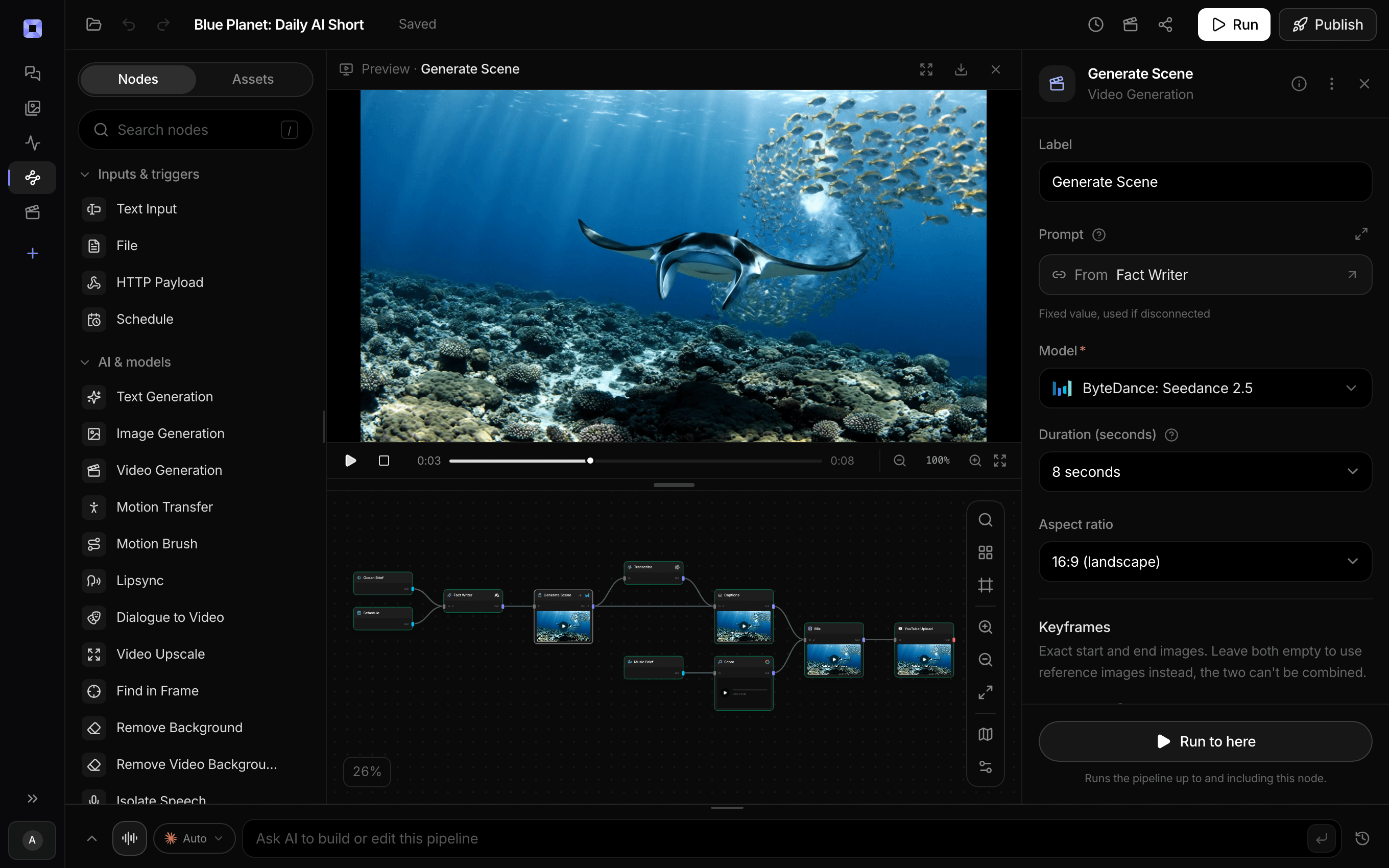
Ask for the pipeline in the composer, or send it from Claude over MCP.
What people build with it
Creature vlogs
Bigfoot in the pines, a yeti at a ski resort, a lake monster surfacing to complain about the tour boats. The format AI vlogs are best known for.
A day in an animal's life
A raccoon reporting on last night's bins, a capybara on its morning swim. One entry a day is one sentence a day.
Characters from another time
A medieval knight vlogging before a tournament, a lighthouse keeper in a storm. An original character in a real era, talking like it is today.
Your mascot's daily update
Describe your own mascot in words and give it something to say. For a mascot that has to look the same in every episode, use the Animated Series template, which draws from one saved character sheet.
A vlog series for Shorts
Day 1, Day 2, Day 3. The same character description with a new event each time is a series a channel can post daily.
Openers for a longer video
Start a longer edit with eight seconds of a character talking straight to the viewer, then cut to the rest.

AI vlog generator, answered
What is an AI vlog generator?
An AI vlog generator makes a selfie-style clip of a character talking to the camera from a text description, with the voice generated along with the picture. On Treza, the Character Vlog template writes the shot and one spoken line, renders it on Veo 3.1 Fast, and burns in captions, as an 8-second vertical clip.
Does the character look the same in every vlog?
Close, not identical. Each clip is generated from your description, so use the same words for the character every time. When the cast has to match from episode to episode, the Animated Series template draws every scene from one saved character sheet. See the series maker
Is the voice the same every time?
No. The voice is generated with each clip, so it can change between runs. Treza does not clone voices. Describing the delivery, such as a deep, slow, sleepy voice, keeps takes closer together.
Can I make a vlog of a real person or a movie character?
No. If the idea names a real person, or a character from a film, show, game, or brand, the writer does not use the name or the likeness and writes an original character of the same kind instead.
How long can the vlog be?
Each run is one clip of 8 seconds, or 4 on the budget version. A longer vlog is several entries joined in the timeline editor.
Can I change or remove the captions?
Yes, on the canvas. The Captions node has its own style, position, and size settings, and the clip node before it holds the same video with no captions.
How much does it cost to make an AI vlog with Treza?
Treza runs on prepaid credits with no subscription. Each generation is charged at the model's own rate from your balance, and a failed generation costs nothing. A typical video generation settles around $1.06, and credit packs start at $5 and never expire.
Can I call this as an API instead of using the canvas?
Yes. Every pipeline can be published as a versioned HTTP endpoint. Call the typed /invoke endpoint with JSON in and JSON out, or point any OpenAI SDK at the OpenAI-compatible endpoint. Swap a model on a node later and the API your product calls does not change.
Do I need to know how to edit video?
No. Start from a template, change the topic, and run it. If you do want frame-level control, the timeline editor is there with multi-track video and audio, per-clip trims, fades, and volume, but nothing about the automated path requires opening it.
Related tools
Bigfoot vlog generator
Bigfoot and cryptid selfie vlogs, one spoken, captioned entry per run
AI talking animal video generator
A described animal speaking one line to the camera, voiced and captioned
AI skit generator
Recurring character skits, short comedy scenes, and dialogue Shorts
AI video caption generator
Word-timed captions burned into every video
See every tool, compare the models, read what an AI video pipeline is, or earn 30% sharing these tools.
Your first video is one prompt away.
Generate your first video, image, or draft today. Prepaid credits, no subscription.