

Generate videos from Claude
Claude Video Generator. Add video to Claude with one MCP connector.
Claude cannot render video on its own. Connect Treza's MCP server and it can: ask for a video in plain words, or for a run of one of your pipelines, and Claude prepares the render, shows you the price, starts it once you accept, and hands back the finished video's link.
Everything on this page was made on Treza.
One hosted MCP server, every assistant
Treza runs a hosted Model Context Protocol server at trezalabs.com/api/mcp. Add it to claude.ai as a custom connector, or to Claude Code with one command, and Claude gains tools for your actual account: your pipelines, your runs, your library. The same server is a ChatGPT plugin and a Gemini CLI extension, and works in Cursor, Codex, and Cline.
Sign in, do not paste keys
The connector authenticates with OAuth. Claude sends you to Treza to sign in and approve access, and no API key ever touches the chat. Prefer keys for scripts? A scoped key in an Authorization header works too.
Tools for the whole loop, not just the render
Claude can read the node vocabulary, build a pipeline from nothing, publish it, price a run before starting it, check the credit balance, start the run, and report the output URLs. It can also join clips you already have over a voiceover and a music bed it composes from a description, and post a finished video to YouTube or TikTok once you approve it. Renders run in the background on Treza's workers, so the chat is never stuck waiting on one. Authoring and running are separate scopes, so a connection can be allowed to trigger work without being allowed to change it.
See the video in the chat
In claude.ai, results show up as panels in the conversation. The finished video plays right there, a run's price arrives with a Start render button, your library opens as a grid to pick clips from, and a post waits for you to press Post before it goes to your channel.
An agent can pay for its own runs
Runs draw a prepaid balance. An agent working on an API key can refill it without asking anyone: get_credit_balance returns an x402 endpoint, the agent pays it in USDC on Base or Solana, and the credits land immediately. No card, no dashboard, no human awake at 3am.
Scoped to exactly your account
Every tool call is checked against the signed-in account. Claude can only see and run pipelines you own, and API keys carry explicit pipelines:read, pipelines:run, and pipelines:write permissions you grant at creation.
The same pipelines you built on the canvas
Nothing new to configure per prompt. Whatever you wired on the node editor, Veo or Seedance shots, narration, captions, publishing, is what Claude triggers. Fix the pipeline once and every chat-started run inherits it.
Asked for in chat, made on the platform
Over MCP, Claude drafts the pipeline, runs it, and hands the file back. This is the kind of thing that comes back.

A brand spot
One sentence of brief, one 16:9 master back.
Veo 3.1

A mood piece
The model picked for the shot, not by you.
Veo 3.1 Fast

A captioned short
Asked for vertical, got vertical with captions burned in.
Captioned AI Short
From idea to finished video
- Step 01
Create your account
Sign in to Treza. That is the only setup step that needs a person, and it doubles as the sign-in that approves the connector in step 03. Building a pipeline first is optional now, because Claude can author one for you.
- Step 02
Add the connector
In claude.ai, open Settings, Connectors, Add custom connector, and enter trezalabs.com/api/mcp. In Claude Code, run claude mcp add with the same URL.
- Step 03
Approve access
Claude redirects you to Treza to sign in and approve the connection. Approve once and the connector stays linked to your account.
- Step 04
Ask for a video
Say what you want: build me a daily short about deep sea creatures, run it, or check whether last night's scheduled run succeeded. Claude picks the tools, builds or starts the pipeline, and returns the output link.
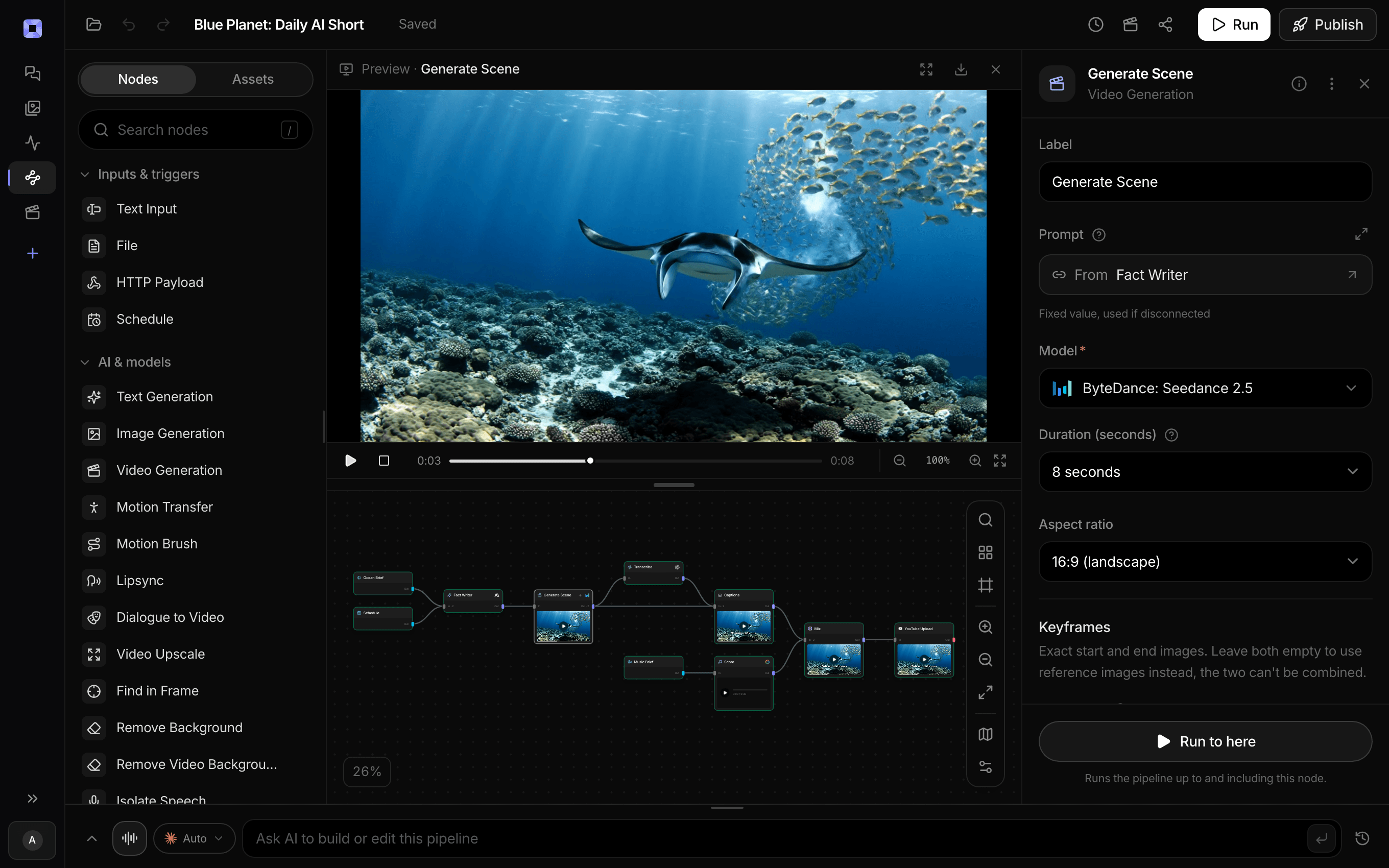
Ask for the pipeline in the composer, or send it from Claude over MCP.
What people build with it
Can Claude generate videos?
Not by itself, and that is the searchable truth. With the Treza connector, Claude orchestrates real video models like Veo and Seedance through your pipelines, which in practice makes the chat a video generator.
Run a content channel from chat
Your faceless channel already runs on a schedule. From Claude you can trigger an extra episode, check last night's run, or grab the output URL to share, without opening the dashboard.
Agents that produce media
Any MCP-capable agent, not just Claude, can call the same server. Give an agent a research step, then have it run your pipeline to turn the findings into a finished, captioned video.
Status checks in plain language
Did the 5pm run publish? What failed in last night's render? get_run returns per-node results, so Claude can answer with the failing node's actual error instead of a shrug.
Hands-off QA on outputs
Ask Claude to pull the last three runs and compare durations, statuses, and costs. The run history the dashboard shows is the same data the tools return.
Works beyond Claude too
The server speaks standard Streamable HTTP MCP. Claude Code adds it with one command, ChatGPT lists it in its plugin directory, and Gemini CLI installs it as an extension. Cursor, Codex, Cline, and other MCP clients connect with the same URL and the same sign-in, or with a scoped API key.

Your agent gets a video back, not a link to a queue.
Twenty-five tools over MCP, and pay-per-video over x402.
Generate videos from Claude, answered
Can Claude AI generate videos?
Not on its own: Claude has no built-in video model. Connect the Treza MCP server and it can. Ask Claude for a video in plain words and its make_video tool prepares the render in one step, picks a model such as Veo 3.1 Lite, and quotes the price. Once you accept, Treza renders it and Claude returns the finished video's link. Claude can also start the pipelines you built, with models like Veo 3.1, Seedance 2.5, and Seedance 2.0, and watch their progress.
What is the Treza MCP server?
It is a hosted Model Context Protocol endpoint at trezalabs.com/api/mcp. MCP is the open standard AI assistants use to call external tools. Adding the endpoint as a connector gives Claude, Claude Code, Cursor, or any MCP client a set of tools scoped to your Treza account: list_pipelines and get_pipeline to find and read work, list_node_types with create_pipeline and publish_pipeline to author it, estimate_run_cost and get_credit_balance to budget it, run_pipeline with get_run and list_runs to start it and follow it, list_assets with assemble_video and edit_asset to finish media the account already has, import_media to bring in a file you attached or linked (or a local file through create_upload_url), and list_connected_channels, connect_channel, and publish_asset to connect a YouTube or TikTok channel and post a finished video once you approve it.
How do I connect Claude to Treza?
In claude.ai open Settings, then Connectors, then Add custom connector, and enter trezalabs.com/api/mcp as the URL. Claude walks you through signing in to Treza and approving access. In Claude Code, run claude mcp add with the same URL and complete the same sign-in when prompted.
What do I have to set up myself?
Create the account, which is the same sign-in that approves the connector, and put credits on it, since runs draw a real prepaid balance. If your pipeline publishes to YouTube or TikTok, Claude gives you a link to connect the channel in your browser. Everything else, including building the pipeline itself, Claude can do through the connector.
Can an agent pay for its own runs?
Yes, if it holds a wallet. get_credit_balance returns an x402 top-up endpoint alongside the human checkout link. The agent pays that endpoint in USDC on Base or Solana, the credits post to the account immediately, and it carries on. Everything else about the run is identical, including the run history and the ledger entry. Without a wallet, a signed-in human buys credits the ordinary way.
Does Claude need my Treza API key?
No. The connector flow uses OAuth: you sign in on Treza's own page and approve the connection, and Claude receives a token scoped to your account. API keys exist as an alternative for scripts and clients that prefer a bearer header, with pipelines:read and pipelines:run permissions you grant explicitly.
What happens when Claude starts a run?
run_pipeline starts the pipeline on Treza's background workers and returns a run id immediately, because a video render takes minutes and an MCP tool call should not hang that long. Claude then polls get_run until the status leaves running, and the finished run includes per-node results and output media URLs.
Do runs started from Claude cost the same?
Yes. A run is a run: it draws from the same prepaid credit balance, shows up in the same run history, and follows the same rate and concurrency limits as runs started from the dashboard or the API. Only successful generations are charged.
How much does it cost to make a video from Claude with Treza?
Treza runs on prepaid credits with no subscription. Each generation is charged at the model's own rate from your balance, and a failed generation costs nothing. A typical video generation settles around $1.06, and credit packs start at $5 and never expire.
Can I call this as an API instead of using the canvas?
Yes. Every pipeline can be published as a versioned HTTP endpoint. Call the typed /invoke endpoint with JSON in and JSON out, or point any OpenAI SDK at the OpenAI-compatible endpoint. Swap a model on a node later and the API your product calls does not change.
Do I need to know how to edit video?
No. Start from a template, change the topic, and run it. If you do want frame-level control, the timeline editor is there with multi-track video and audio, per-clip trims, fades, and volume, but nothing about the automated path requires opening it.
Related tools
AI video generator
The full video pipeline, from prompt to published
x402 video generation API
Agents and apps that pay per video with a wallet, no API key
Faceless video generator
Faceless YouTube and TikTok channels that publish on a schedule
See every tool, compare the models, read what an AI video pipeline is, or earn 30% sharing these tools.
Your first video is one prompt away.
Generate your first video, image, or draft today. Prepaid credits, no subscription.