
AI product video generator
Product videos without a studio day
Turn a product photo and a few lines of copy into a demo video with generated scenes, narration, and captions. Rerun the same pipeline for every SKU in the catalog.
Everything on this page was made on Treza.
Start from a photo
Reference images and first-frame control let a still product shot become a moving one, so the video starts from the asset you already have rather than from a text description of it.
Direct the camera in words
The current video models understand shot language. Ask for a slow push-in, a macro detail, or a top-down reveal and the generated shot follows the direction.
Explain it while you show it
A language model writes the voiceover from your product copy, a text to speech node reads it, and captions are burned in so the value lands with the sound off.
One pipeline, every SKU
The pipeline is the reusable part. Point it at the next product and the same structure, tone, and caption style come back with new content in them.
Every placement, one build
Render 16:9 for the product page, 9:16 for Shorts and TikTok, and 1:1 for in-feed, from the same pipeline with the aspect ratio changed on the node.
Trim it properly when it matters
Hero videos usually need a human pass. The timeline editor gives you multi-track video and audio, per-clip trims, fades, and volume, exporting up to 40 clips or 15 minutes.
Product films from a written brief
Each of these is one brief, one model, one run. The name under each frame is the model that made it, not the one we like best.

Macro product
A chronograph under a sweeping key light.
Kling 3.0 Pro

Beverage
A slow-motion pour with the crema holding together.
MiniMax Hailuo 3 Max

Food
An overhead push-in with steam and a glossy sauce.
Wan 3.0
From idea to finished video
- Step 01
Bring the product in
Upload a product photo as a reference image and paste the copy you already have on the product page.
- Step 02
Let it write the shots
The language model turns your copy into a shot list, so the video has a structure rather than being one generated clip with music over it.
- Step 03
Generate, narrate, caption
Each shot renders on its own node, the voiceover is generated and mixed in, and captions are burned in after transcription.
- Step 04
Reuse it for the catalog
Save the pipeline and run it for the next product, or publish it as an endpoint and generate product videos from your own admin tool.
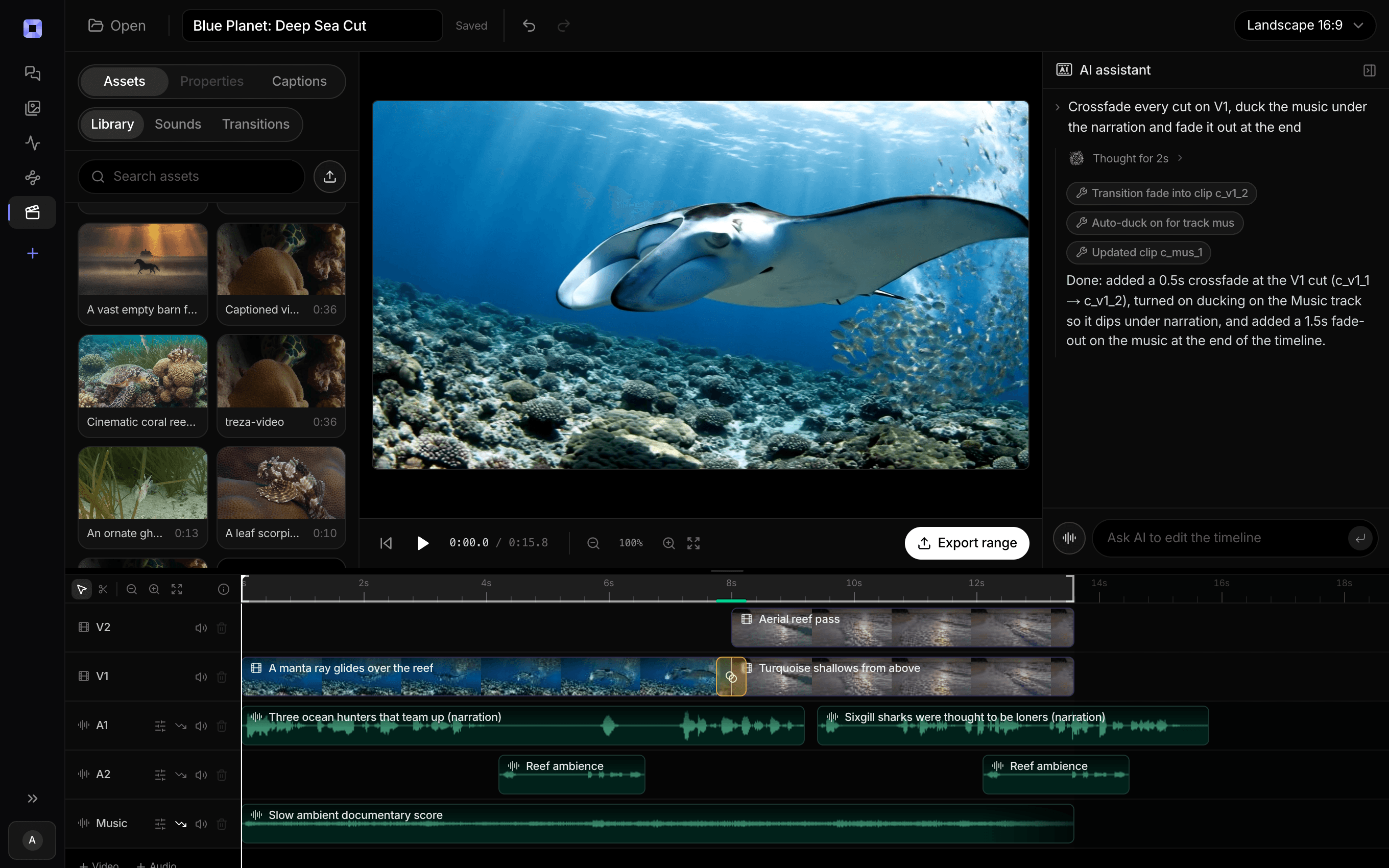
The same video, open in the built-in timeline editor.
What people build with it
Ecommerce product pages
A short demo video on the page, generated per SKU, without a photography day for each one.
Feature launch videos
Turn release notes into a narrated clip for the changelog, the launch email, and social, all from one pipeline run.
SaaS demos and walkthroughs
Combine screen recordings with generated scenes in the timeline editor and let the pipeline handle the narration and captions.
Marketplace and retail listings
Vertical video for listings that reward it, generated from the same source assets as the wide version.
Catalog refreshes at scale
New season, new copy, same pipeline. The work of getting it right happens once, and the rest is inputs.
Sales and onboarding clips
Short explainers for a deck or a help center, produced in the same house style as everything else you ship.

The reshoot costs a credit, not a studio day.
Rerun one node to change the light, the angle, or the model.
AI product video generator, answered
Can it use my real product photos?
Yes. Several video models accept reference images or a first frame, so a generated shot can be anchored to your actual product photo. For a fully accurate hero shot, the reliable pattern is combining your real footage with generated scenes in the timeline editor rather than asking a model to reproduce the product exactly.
How accurate is the product in generated footage?
Good enough for atmosphere, mood, and context shots, and not a substitute for a real photograph of the item when precision matters. Treat generated scenes as the world around the product and use your own assets for the moments where the details have to be right.
Can I generate videos for a whole catalog at once?
There is no CSV upload or bulk run inside the app today. The supported path is publishing the pipeline as an endpoint and calling it once per product from your own script or admin tool, which gives you the same result with your own catalog as the source of truth.
What aspect ratios and lengths are supported?
Aspect ratios cover 9:16, 1:1, 4:3, 16:9, and wider depending on the model. Single generated clips run up to 20 seconds, and length beyond that comes from stitching shots together, which is how a 60 second product video gets built.
Can I add music?
Yes. An Audio Generation node writes a bed from a one-line description, and the Sequence node ducks it under the voiceover automatically. You can also upload your own track into the timeline editor and mix it on an audio track with per-clip volume and fades.
How much does it cost to make ai product video generator with Treza?
Treza runs on prepaid credits with no subscription. Each generation is charged at the model's own rate from your balance, and a failed generation costs nothing. A typical video generation settles around $1.06, and credit packs start at $5 and never expire.
Can I call this as an API instead of using the canvas?
Yes. Every pipeline can be published as a versioned HTTP endpoint. Call the typed /invoke endpoint with JSON in and JSON out, or point any OpenAI SDK at the OpenAI-compatible endpoint. Swap a model on a node later and the API your product calls does not change.
Do I need to know how to edit video?
No. Start from a template, change the topic, and run it. If you do want frame-level control, the timeline editor is there with multi-track video and audio, per-clip trims, fades, and volume, but nothing about the automated path requires opening it.
Related tools
AI commercial generator
Promos and video ads for a business, from a brief and a product photo
AI image to video generator
Motion from a photo, poster, or generated key frame
AI shorts generator
Vertical short-form video for TikTok, Reels, and Shorts
See every tool, compare the models, read what an AI video pipeline is, or earn 30% sharing these tools.
Your first video is one prompt away.
Generate your first video, image, or draft today. Prepaid credits, no subscription.