


Script to video AI
Script to video AI that renders every scene you wrote
Paste a script, a screenplay, or a documentary outline and every scene comes back as a generated shot, cut in order with narration, a music bed, and captions. The whole set is priced before the first scene renders.
Everything on this page was made on Treza.
Reads the script you already have
Numbered scenes, a screenplay with INT. and EXT. headings, timestamps, or plain paragraphs. The scene breaks you wrote become the shot list, and a script without breaks is split into scenes for you.
One generated shot per scene
Each scene gets its own video prompt and its own clip, so the forest in scene two looks like a forest and the storm in scene five looks like a storm. Pick the model that suits the material: Veo 3.1, Seedance 2.5, Kling 3.0 Pro, or Wan 3.0.
Narration on its own track
Voiceover lines are read by one narrator and laid over the cut, with the footage ducked underneath. Because the voice is a separate track, it can be re-timed or re-voiced without rendering the scenes again.
Dialogue spoken on camera
A line a character says in a scene goes into that scene's prompt, and models with native audio render it spoken on screen, in the same take as the picture.
Priced before anything renders
A script is several renders, not one. Every scene in the set is priced together before the first one starts, so the cost of the whole video is on screen up front rather than discovered scene by scene.
Up to 12 scenes per cut
One cut stitches the scenes in script order, with a music bed under the narration and captions burned in from the finished audio. A longer script splits into parts, each its own cut.
Change one scene, keep the rest
When one shot misses, rerun that scene alone and recut. The other scenes, the narration, and the music stay exactly as they were.
Written first, then shot scene by scene
Each of these started as words: a script split into scenes, a shot generated for every one, and a narrator over the cut. The name under each is the model or the template that made it.

A lore episode
A written script, with a generated shot for each beat.
Seedance 2.5

A serialized story
One chapter per run, picking up where the last one stopped.
Seedance 2.5

A narrated explainer
Four scenes under one voice, captioned.
Fact of the Day
From idea to finished video
- Step 01
Paste the script
Drop it into chat as it is. Scene headings, voiceover lines, and on-screen dialogue can all stay in the format you wrote them in.
- Step 02
See the price of the whole video
Treza reads the scenes and prices the whole set together, so you know what the video costs before the first scene renders.
- Step 03
Every scene renders
Each scene renders as its own clip in the background and lands in the conversation. Rerun any one of them on its own.
- Step 04
Cut, narrate, caption
The clips are cut together in script order with the narration on top, a music bed underneath, and captions burned in. Open the cut in the timeline editor to trim it by hand.
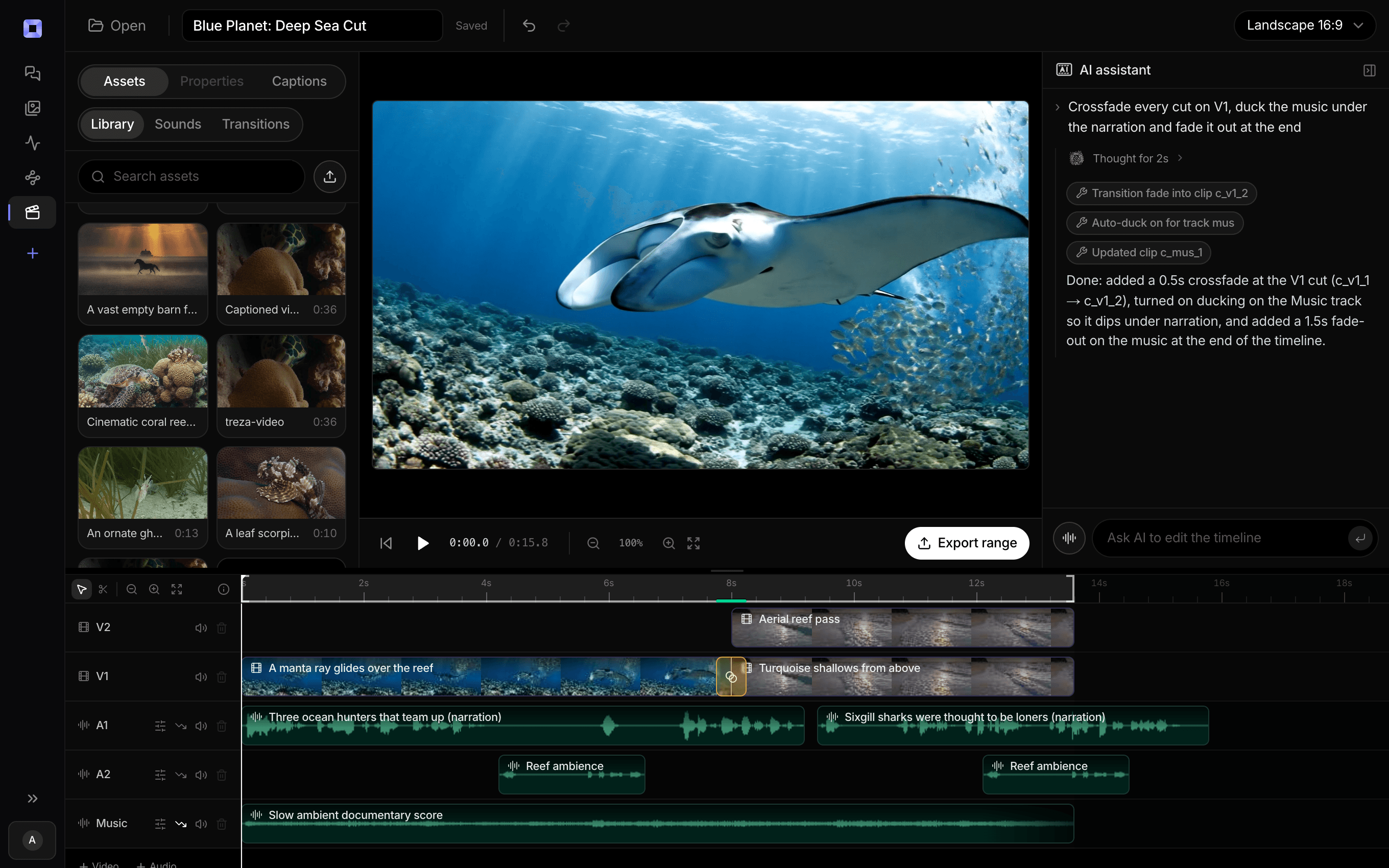
The same video, open in the built-in timeline editor.
What people build with it
Short films from a screenplay
Scene headings, action lines, and dialogue, turned into a sequence of shots you can watch straight through.
Documentary-style explainers
A narrated outline about how something works, with a generated shot for each beat and the narrator carrying the thread.
Story channels
Narrated stories with a scene for every turn, cut vertical for Shorts or wide for a longer YouTube video.
Storyboards that move
Pitch a scene list as motion before anyone books a shoot, and hand the cut to the team that will make the real thing.
Scripted ads and promos
A 30 second spot written beat by beat, each beat its own shot, with the voiceover laid on top.
Lessons and training videos
A lesson script split into steps, one shot per step, narrated and captioned for viewers watching with the sound off.

Every scene you wrote, on screen.
Narrated, scored, and captioned in script order.
Script to video AI, answered
How does script to video work on Treza?
Paste the script into chat. Each scene becomes a video prompt and renders as its own clip, the voiceover lines are generated as one narration track, and then the clips are stitched in order with the narration on top, a music bed under it, and captions burned in. The same steps can be built as a pipeline on the canvas when you want to run a new script through them every week.
What script formats does it understand?
Whatever you have. Numbered scene lists, screenplays with INT. and EXT. headings, scripts with timestamps, and plain paragraphs all work. When a script has no scene breaks, it is split into scenes at the natural turns in the story.
How long can the video be?
One cut holds up to 12 scenes. Each scene is a clip of up to 15 seconds on the default model, or up to 30 seconds on Seedance 2.5 or Wan 3.0, so a single cut runs from a Short to several minutes. A feature-length script is best made in parts, one cut per sequence.
How much does a long script cost?
Each scene is its own render, so a 12 scene video costs about what twelve clips cost, plus the narration and the music. The whole set is priced together before the first scene starts, so the number is in front of you before anything renders. Shorter scenes and a lower-cost model bring it down.
Will characters look the same from scene to scene?
They hold best when each scene starts from the same picture of the character, used as the first frame or a reference image. Details can still drift between separate renders, so describe each character the same way in every scene and rerun any shot that wanders.
Can characters speak their lines?
Yes. Put the line in the scene and a model with native audio, such as Veo 3.1 or Seedance 2.5, renders the character saying it. Narration over the top is generated separately, which keeps one voice across every scene.
Can I edit the cut afterwards?
Yes. Open it in the timeline editor to trim or move shots and adjust the music under the voice, or ask in chat for a change such as dropping the last shot, and the cut is edited rather than rendered again.
How much does it cost to make script to video ai with Treza?
Treza runs on prepaid credits with no subscription. Each generation is charged at the model's own rate from your balance, and only successful runs are charged, so a failed generation costs nothing. A typical video generation settles around $1.06, and credit packs start at $5 and never expire.
Can I call this as an API instead of using the canvas?
Yes. Every pipeline can be published as a versioned HTTP endpoint. Call the typed /invoke endpoint with JSON in and JSON out, or point any OpenAI SDK at the OpenAI-compatible endpoint. Swap a model on a node later and the API your product calls does not change.
Do I need to know how to edit video?
No. Start from a template, change the topic, and run it. If you do want frame-level control, the timeline editor is there with multi-track video and audio, per-clip trims, fades, and volume, but nothing about the automated path requires opening it.
Related tools
AI cartoon video generator
Narrated cartoon stories and animated Shorts, in Hindi or English
Faceless video generator
Faceless YouTube and TikTok channels that publish on a schedule
AI voiceover generator
Narration for faceless videos, shorts, demos, and multilingual versions
See every tool, compare the models, read what an AI video pipeline is, or earn 30% sharing these tools.

Your first video is one prompt away.
Generate your first video, image, or draft today. Prepaid credits, no subscription.