


AI shorts generator
Generate TikToks, Reels, and YouTube Shorts
Vertical video, generated end to end. Every model on Treza renders 9:16 natively, captions are burned in for muted feeds, and finished shorts post straight to YouTube and TikTok.
Everything on this page was made on Treza.
9:16 on every model
Vertical is not a crop here. Veo 3.1, Seedance 2.0, Wan 2.7, and Grok Imagine all generate 9:16 natively, and the Sequence node exports a true 1080 by 1920 portrait frame.
Sound that ships with the frames
The current video models generate audio alongside the picture, so ambience and effects arrive in sync rather than getting layered on after. Add narration on top with a text to speech node when the format calls for it.
Captions built for the feed
Word-level timestamps from Whisper drive karaoke-style caption groups, tuned by words per caption, three styles, five vertical positions, and three sizes. The bold style exists specifically for Shorts and TikTok.
Hook, beats, payoff
A short is a structure, not one clip. The language model node drafts the beats, each beat generates as its own shot, and the Sequence node cuts them together in order with the narration mixed over the top.
Post to YouTube and TikTok
Finish the pipeline with an upload node. YouTube publishes as a Short with generated title, description, and tags, and TikTok posts through the direct post API to a connected account.
Four variations per prompt
Image and video nodes take a batch size of up to four, so one run gives you several takes of the same beat to pick from instead of one and a rerun.
Shorts this made, start to finish
Vertical, narrated, captioned, and sized for the feed. These are template runs, so this is the first run rather than the result of a week of tuning.

Captioned short
Word-level captions burned in, tuned for muted autoplay.
Captioned AI Short

Top three countdown
Three beats in one cut, a shot generated per line.
Top 3 Countdown

Fact of the day
One fact, four scenes, one voice, published daily.
Fact of the Day
What the captions node does to a cut
The same six seconds of one run with the captions node off and on. Most of the feed watches with the sound off, so this is the difference between a view and a scroll.


From idea to finished video
- Step 01
Write the hook
Give the language model your topic and format. It comes back with the beats and a shot description for each one, which is the part that decides whether the short holds.
- Step 02
Generate the shots vertically
Set the video node to 9:16 and pick a model. Fast models are for iterating on structure, and the flagship models are for the version you actually post.
- Step 03
Narrate and caption
Text to speech reads the script, Whisper transcribes it back with word timings, and the captions node burns in the words so the short works on mute.
- Step 04
Post it, then repeat it
Publish to a connected YouTube channel or TikTok account. Add a schedule trigger and the same pipeline keeps posting on the cadence you set.
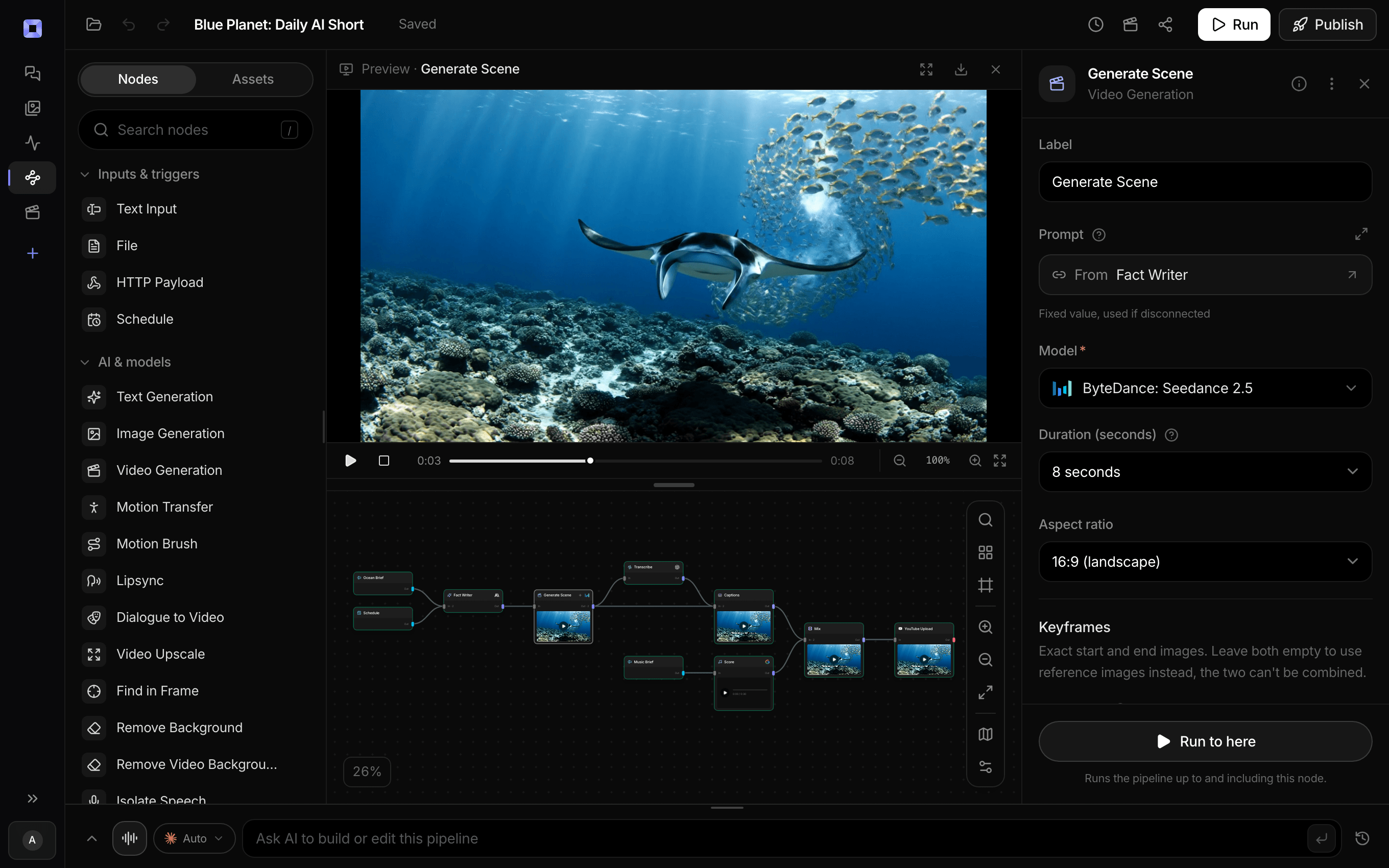
Ask for the pipeline in the composer, or send it from Claude over MCP.
What people build with it
YouTube Shorts at a daily cadence
Short-form rewards volume and punishes gaps. A scheduled pipeline keeps the cadence going through the weeks you do not have time to make anything.
TikTok content without a camera
Generated footage, generated narration, burned-in captions, direct posted to a connected account. No filming and no export dance.
Instagram Reels
Export the same 1080 by 1920 vertical file and upload it to Reels. Instagram is not yet a connected publishing destination, so this one is a download rather than an auto-post.
Repurposing a long video into clips
Drop the source into the timeline editor, cut the moments that matter, transcribe, and caption each one as a standalone vertical short.
Trend-reactive content
Publish the pipeline as an API endpoint and trigger it from wherever you spot the trend, so the short is rendering while the trend is still live.
Series content with a fixed format
Lock the structure in the system prompt once. Every run keeps the format and changes the subject, which is what makes a series feel like a series.


A short a day, without a shoot day.
Put it on a schedule and it posts while you sleep.
AI shorts generator, answered
Can Treza generate true vertical video, or does it crop?
It generates vertical natively. Every video model in the catalog supports a 9:16 aspect ratio, and the Sequence node has dedicated 1080p and 720p portrait output modes. When shots of different shapes get stitched, they are scaled and padded rather than cropped, so nothing important gets cut off the edge of the frame.
How long can a short be?
A single generated clip runs up to 20 seconds depending on the model. Stitching is how you get to a full short: the ready-made templates build 30 second shorts from four beats and 60 second shorts from eight, and one Sequence node handles up to 12 shots. YouTube accepts Shorts up to three minutes, which is well within reach.
Are the captions automatic?
Yes, inside a pipeline. Wire the transcribe node into the captions node and it runs unattended on every future run. Whisper returns word-level timestamps, so captions can appear a few words at a time in sync with the narration rather than as static blocks.
Which platforms can it publish to?
YouTube and TikTok, both through official APIs with OAuth-connected accounts. YouTube uploads can be Shorts or standard videos with a visibility setting, and TikTok uses the Content Posting API for direct posts. Instagram, Reels, and X are not connected destinations, so those are manual uploads of the exported file.
Can I schedule shorts to post automatically?
Yes. A schedule trigger runs a published pipeline hourly, daily, weekly, or on a cron expression like 0 9 * * 1-5, in the timezone you choose. Each scheduled run generates a new short and publishes it, and the script node can remember previous runs so the topics do not repeat.
Do the videos come with sound?
Most of the current video models generate audio with the frames, so a rain shot arrives with rainfall and a street shot arrives with traffic. On top of that you can mix in a narration track from a text to speech node, and clip audio can be kept or muted per layer when the two would fight.
How much does it cost to make ai shorts generator with Treza?
Treza runs on prepaid credits with no subscription. Each generation is charged at the model's own rate from your balance, and a failed generation costs nothing. A typical video generation settles around $1.06, and credit packs start at $5 and never expire.
Can I call this as an API instead of using the canvas?
Yes. Every pipeline can be published as a versioned HTTP endpoint. Call the typed /invoke endpoint with JSON in and JSON out, or point any OpenAI SDK at the OpenAI-compatible endpoint. Swap a model on a node later and the API your product calls does not change.
Do I need to know how to edit video?
No. Start from a template, change the topic, and run it. If you do want frame-level control, the timeline editor is there with multi-track video and audio, per-clip trims, fades, and volume, but nothing about the automated path requires opening it.
Related tools
Faceless video generator
Faceless YouTube and TikTok channels that publish on a schedule
AI YouTube title and tag generator
Titles, descriptions, and tags written per upload from the transcript
AI video caption generator
Word-timed captions burned into every video
See every tool, compare the models, read what an AI video pipeline is, or earn 30% sharing these tools.
Your first video is one prompt away.
Generate your first video, image, or draft today. Prepaid credits, no subscription.