


AI video automation
Automate video production from trigger to upload
Automation is what separates a video tool from a video operation. Put a pipeline on a schedule, gate it with approvals, and let it write, render, caption, and publish on a cadence you set once.
Everything on this page was made on Treza.
Schedules down to a cron expression
Run a published pipeline hourly, daily, weekly, or on any cron expression like 0 9 * * 1-5, in the timezone you choose. The cadence survives your busy weeks, which is the entire point.
Memory between runs
The script node remembers up to 50 previous runs, so a daily automation produces a new video each time instead of regenerating last Tuesday's. Series stay series instead of becoming reruns.
Uploads that need no hand-holding
YouTube and TikTok nodes post through official APIs with titles, descriptions, and tags written from the transcript. Visibility is a setting, so automation can publish live or stage everything private.
Approval gates when a human should look
Full autopilot is optional. An approval node pauses the run until someone signs off, which is the difference between automation you trust and automation you babysit.
Triggers from anywhere
Beyond schedules, every published pipeline is a versioned API endpoint, so a webhook, a cron job in your own stack, a form, or an agent over MCP can start a run with its own inputs.
A paper trail for every run
Run history records what each node produced, with which model, at what cost. When an automated run misbehaves, you see the failing node's actual error instead of guessing.
Published while nobody was watching
These went out on a schedule trigger. The only human step was connecting the channel, once.

Daily, early
Subject picked, script written, video posted.
Seedance 2.5

Daily, another channel
Its own prompt, voice, and posting time.
Seedance 2.5

Fact of the day
The script node remembers what it already published.
Fact of the Day
From idea to finished video
- Step 01
Get one manual run right
Build the pipeline from a template and run it by hand until the output is something you would post. Automation multiplies whatever quality you lock in here.
- Step 02
Wire the publishing end
Connect the YouTube channel or TikTok account, and decide whether runs publish live, stay private for review, or wait at an approval node.
- Step 03
Set the trigger
Add a schedule for a steady cadence, or publish the pipeline as an endpoint and trigger it from your own software when events warrant a video.
- Step 04
Check the run history, not the app
The pipeline runs without you. Review outputs and costs in run history, rerun a weak node when needed, and adjust the prompt as the format evolves.
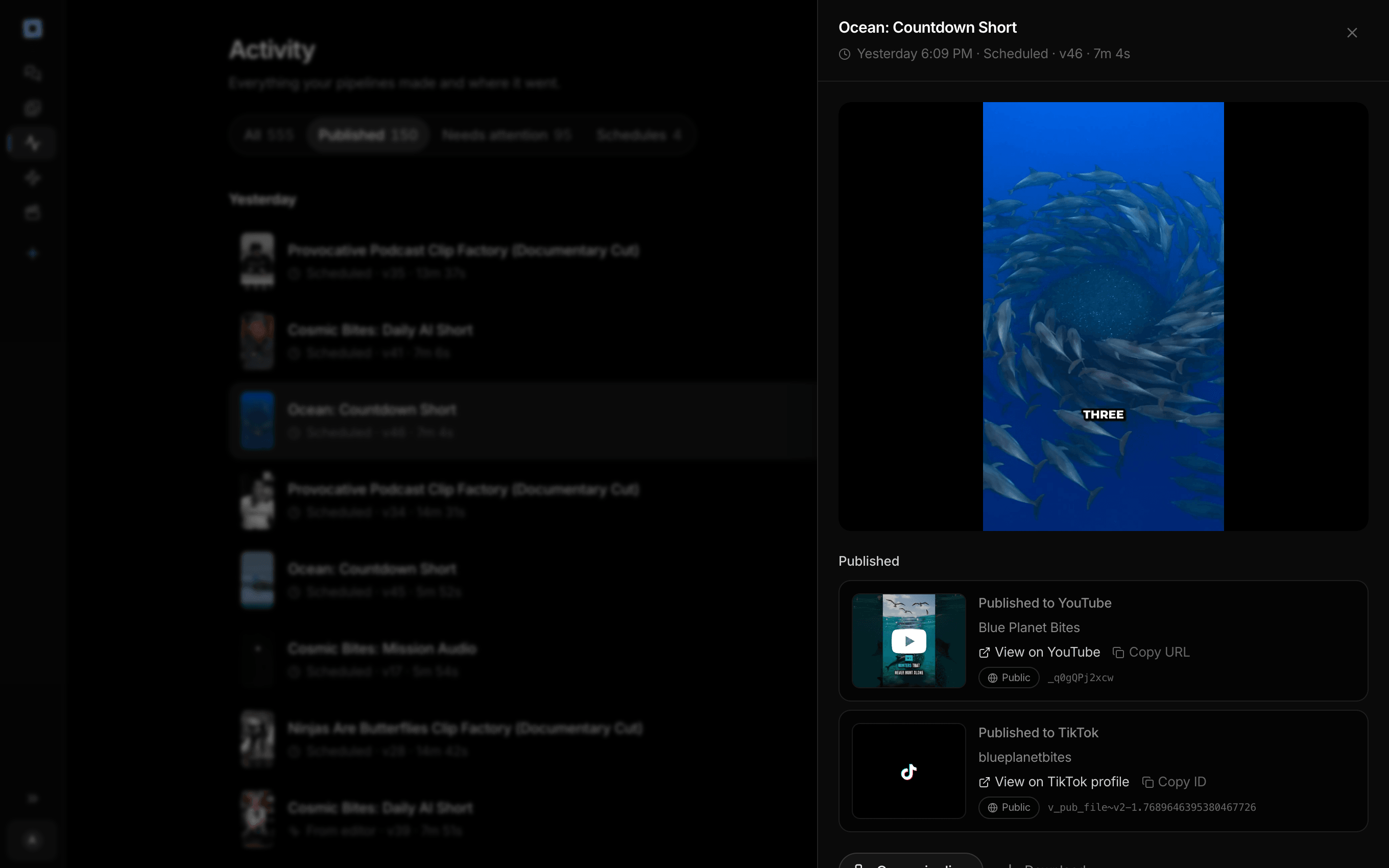
Every run the account has made, and what each one published.
What people build with it
A channel that posts every day
The flagship automation: script, shots, narration, captions, and upload on a daily schedule, with run memory keeping topics fresh.
Weekly clip shows from recordings
Every new episode or webinar runs through the same transcribe, pick, cut, caption, publish chain without anyone opening an editor.
Event-triggered videos
A product launch, a price change, or a trend you spot becomes an API call that starts a render, so the video exists while it still matters.
Batch production through the API
Call the pipeline endpoint once per item from your own script and produce a catalog's worth of videos with your prompt engineering baked in.
Agent-driven production
Over MCP, an agent like Claude can start runs, watch progress, and fetch outputs, turning research or monitoring workflows into finished videos.
Hands-off client deliverables
Automate the recurring deliverable, keep an approval gate for brand safety, and let run history double as the end-of-month report.

Wake up to published videos, not renders.
Hourly, daily, weekly, or any cron expression.
AI video automation, answered
What is AI video automation?
AI video automation is running the full video production chain, scripting, generation, narration, captions, and publishing, from a trigger instead of by hand. On Treza the chain is a pipeline on a node canvas, and the trigger is a schedule, an API call, or an agent over MCP. The result is video production that happens on a cadence or in response to events, with humans reviewing rather than assembling.
Can I automate publishing without losing control of what goes live?
Yes, in layers. Publish nodes default to non-public visibility, so an automated run can stage everything as private or unlisted for review. An approval node goes further and pauses the run until someone signs off. Full autopilot, where runs publish live, is a choice you make per pipeline rather than a default you fight.
How do scheduled videos avoid repeating themselves?
The script node keeps memory of up to 50 previous runs and is instructed to produce something new each time. A daily automation therefore works through fresh angles on your niche rather than converging on one video. You can also feed the pipeline explicit inputs per run through the API when you want full control of topics.
What happens when an automated run fails?
The run records per-node results, so the failure is attributable: which node, which model, what error. Failed generations are not charged, and fallback patterns like a backup model on a second node keep a schedule alive through a provider outage. You fix the weak node and the next scheduled run proceeds.
Can automation run from my own software instead of a schedule?
Yes. Every published pipeline is a versioned HTTP endpoint: the typed /invoke route enqueues a run and returns a run id to poll, and an OpenAI-compatible route works with existing SDKs. There is also a hosted MCP server, so agents can list pipelines, start runs, and fetch outputs without custom integration work.
How much does it cost to make ai video automation with Treza?
Treza runs on prepaid credits with no subscription. Each generation is charged at the model's own rate from your balance, and only successful runs are charged, so a failed generation costs nothing. A typical video generation settles around $1.06, and credit packs start at $5 and never expire.
Can I call this as an API instead of using the canvas?
Yes. Every pipeline can be published as a versioned HTTP endpoint. Call the typed /invoke endpoint with JSON in and JSON out, or point any OpenAI SDK at the OpenAI-compatible endpoint. Swap a model on a node later and the API your product calls does not change.
Do I need to know how to edit video?
No. Start from a template, change the topic, and run it. If you do want frame-level control, the timeline editor is there with multi-track video and audio, per-clip trims, fades, and volume, but nothing about the automated path requires opening it.
Related tools
AI video pipeline
Automated pipelines that end published, on a schedule or via API
Generate videos from Claude
Running your video pipelines from Claude and other MCP clients
x402 video generation API
Agents and apps that pay per video with a wallet, no API key
See every tool, compare the models, read what an AI video pipeline is, or earn 30% sharing these tools.

Your first video is one prompt away.
Generate your first video, image, or draft today. Prepaid credits, no subscription.