

AI video production platform
The AI video production platform that ships the video
Most production platforms stop at an export. Treza runs the whole line on one canvas: a language model breaks the brief into shots, video models render them, narration and captions land on top, and the finished video publishes to YouTube or TikTok on a schedule.
Everything on this page was made on Treza.
From brief to shot list to shots
A language model node turns a brief or script into scenes and shot descriptions, image nodes render frames to react to, and video nodes animate the keepers with first-frame control on the models that support it.
Every frontier model on one canvas
Veo 3.1, Seedance 2.5, Seedance 2.0, Wan 2.7, and Grok Imagine Video sit in one catalog. Run the same shot through two models side by side and swap the winner into the pipeline without rebuilding anything.
Sound is part of the line, not an export
Narration from 82 voices, transcription with word-level timestamps, and burned-in captions run as nodes in the same pipeline, so the video that comes out the end is actually finished.
Every run keeps its full recipe
Run history records what each node generated, with which model, at what cost. When a client asks how a shot was made or what last month's output cost, the answer is on the run, not in someone's memory.
Approval gates before anything goes live
Add an approval step and the pipeline pauses until a human signs off. Publish nodes default to non-public visibility, so nothing reaches an audience before you have seen it.
Distribution is a node, not a handoff
YouTube and TikTok publishing are steps in the pipeline, with titles, descriptions, and tags written from the transcript. Add a schedule trigger and the production line runs without you.
Work that shipped from this platform
Commercial briefs in 16:9, and vertical cuts that went out on our own channels. One account, one platform, different pipelines.

Food commercial
Brief to master with no footage in and no editor open.
Wan 3.0

Architectural film
A walkthrough with nothing built to walk through.
Seedance 2.5

A lore channel
Published on a schedule while the commercials rendered.
Seedance 2.5

An ocean channel
Its own prompt, voice and posting time.
Seedance 2.5

A fiction channel
One chapter per run, continuing the last one.
Seedance 2.5

An archive channel
A recording cut to vertical by its own transcript.
Whisper Large v3
From idea to finished video
- Step 01
Write the brief once
Give the script node your topic, tone, and format. That system prompt is the house style: every future run inherits it.
- Step 02
Render the shots per node
Each scene generates on its own node, so a weak shot gets rerun alone instead of costing you the whole batch. Compare models on the shots where it matters.
- Step 03
Finish it in the same run
Stitch the shots, mix the narration, burn in captions. For frame-level control, the timeline editor adds multi-track trims, fades, and volume.
- Step 04
Publish it, then schedule it
Connect a channel, flip the publish node public, and put the pipeline on a schedule or behind an API endpoint. Production becomes an input change, not a project.
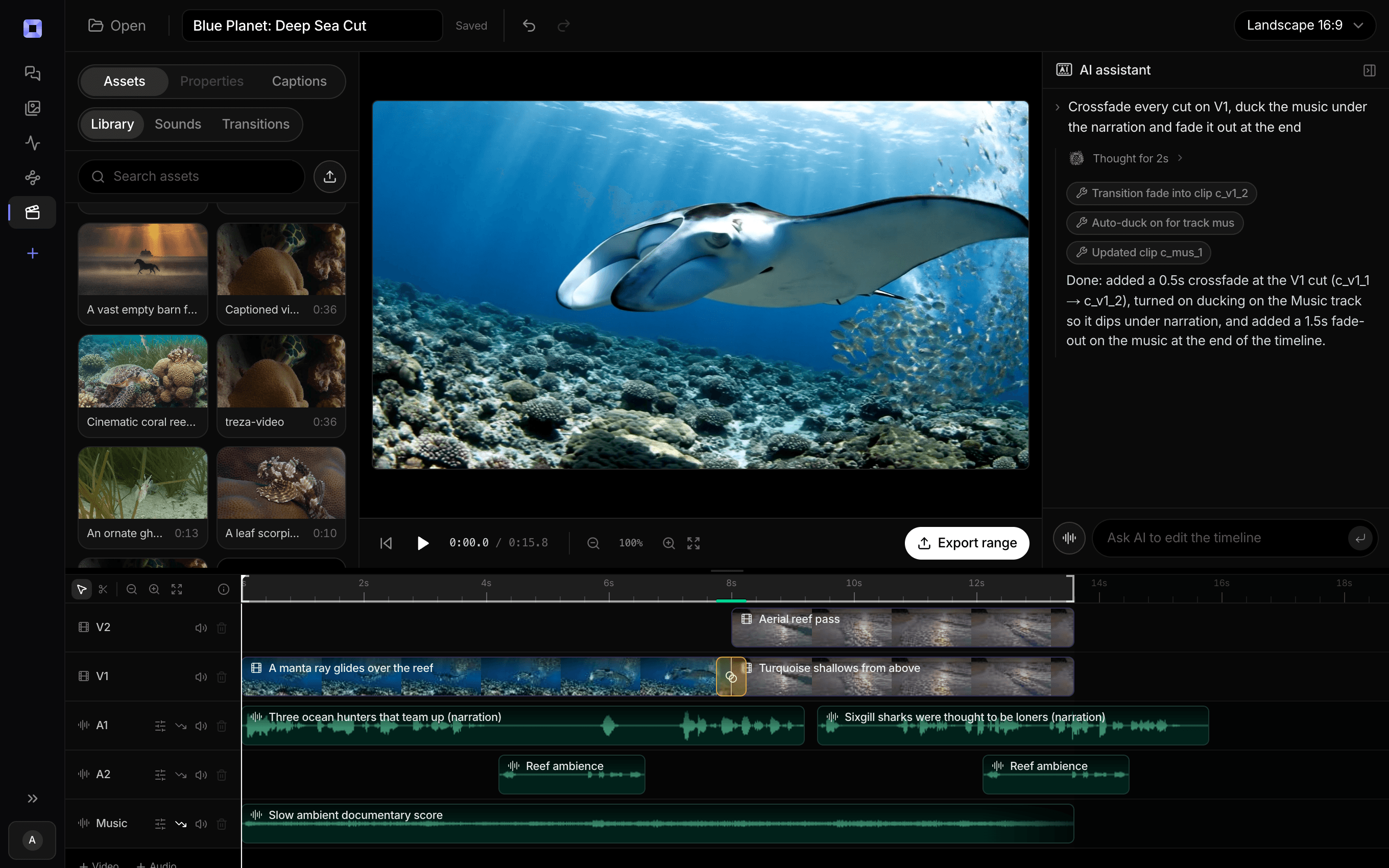
The same video, open in the built-in timeline editor.
What people build with it
Content studios running channels at volume
One pipeline per channel, each with its own prompt, voice, and caption style. Run history shows exactly what every channel produced and what it cost.
Agencies producing for clients
Keep each client's brand rules in their pipeline's system prompt, gate publishing behind an approval step, and answer any question about a deliverable from the run record.
Marketing teams shipping campaign video
Brief in, variants out, captions on, published. The team generates the next batch through a template or an endpoint without learning a new tool.
Concept and pre-viz exploration
Run one script across several models and compare the takes side by side on the canvas before committing budget to the final renders.
Series and franchise formats
Lock the structure once and let the schedule produce the episodes. The script node remembers past runs so a daily series does not repeat itself.
Production inside your own product
Publish the pipeline as a versioned API endpoint and your application generates finished, captioned video on demand, with your prompt engineering baked in.

A production team's output, on one account.
Brief, generate, cut, caption, publish, and report.
AI video production platform, answered
What is an AI video production platform?
An AI video production platform is a system that manages the whole process of making video with AI models: turning a brief into a script and shot list, generating the shots, assembling them with narration and captions, and delivering the result. Platforms differ most at the last step. Some end at a file export for a traditional editor, while Treza treats publishing as part of production, so the pipeline ends with a video live on YouTube or TikTok, on a schedule if you want one.
How is a production platform different from an AI video generator?
A generator returns one clip per prompt and stops. A production platform manages everything around generation: the script, the shot breakdown, model choice per shot, narration, captions, assembly, review, and delivery. On Treza that whole chain is one pipeline you configure once and rerun forever, which is what makes volume production practical.
Can my team review videos before they publish?
Yes. Add an approval node and the run pauses until someone approves or rejects it, and publish nodes default to non-public visibility until you flip them. Review happens on the actual output with its full run history attached, so the reviewer can see which model and prompt produced every shot.
Does it replace my editor?
For scheduled and volume formats, yes: stitching, narration mixing, and captions happen in the pipeline with no manual edit. For hero work, the built-in timeline editor handles multi-track trims, fades, and audio levels, and you can always download the assets and finish in your NLE of choice. The difference from pre-production tools is that finishing here is optional rather than required.
Which models does the platform support?
Video generation covers Veo 3.1 and Veo 3.1 Fast, Seedance 2.5, Seedance 2.0 and Seedance 2.0 Fast, Wan 2.7, and Grok Imagine Video, alongside image models, four text to speech models, and Whisper transcription. Models are added as they ship, and any supported model id can be typed straight into a node.
Is there an API for production at scale?
Yes. Every pipeline publishes as a versioned HTTP endpoint with a typed /invoke route and an OpenAI-compatible route, and there is a hosted MCP server so agents like Claude can list your pipelines, start runs, and fetch outputs. The canvas is the authoring surface; nothing about running production requires it.
How much does it cost to make ai video production platform with Treza?
Treza runs on prepaid credits with no subscription. Each generation is charged at the model's own rate from your balance, and only successful runs are charged, so a failed generation costs nothing. A typical video generation settles around $1.06, and credit packs start at $5 and never expire.
Can I call this as an API instead of using the canvas?
Yes. Every pipeline can be published as a versioned HTTP endpoint. Call the typed /invoke endpoint with JSON in and JSON out, or point any OpenAI SDK at the OpenAI-compatible endpoint. Swap a model on a node later and the API your product calls does not change.
Do I need to know how to edit video?
No. Start from a template, change the topic, and run it. If you do want frame-level control, the timeline editor is there with multi-track video and audio, per-clip trims, fades, and volume, but nothing about the automated path requires opening it.
Related tools
AI video generator
The full video pipeline, from prompt to published
Faceless video generator
Faceless YouTube and TikTok channels that publish on a schedule
AI UGC ad generator
Performance creative and social video ads at volume
See every tool, compare the models, read what an AI video pipeline is, or earn 30% sharing these tools.

Your first video is one prompt away.
Generate your first video, image, or draft today. Prepaid credits, no subscription.