


AI Documentary Video Generator. Mini-documentaries, one episode at a time.
Give Treza a subject and it writes a narrated mini-documentary: a 45 to 55 second episode with five generated scenes, a deep documentary voice, a music bed, and captions. Run it as a daily series, then join the episodes into one longer cut in the editor.
Everything on this page was made on Treza.
Written like a documentary, not a listicle
A writer model turns your subject into one episode with a hook, one surprising and specific detail it builds to, and a line that leads into the next. The script holds only the words the narrator says: no headings, no stage directions.
The documentary narrator
The template's narrator is a deep documentary voice from ElevenLabs, and the writer is told to spell every proper noun the standard way. Swap in any other built-in voice on the narrator node.
Scenes in the subject's own look
Each of the five scenes is a vertical still in a style that suits the subject, archival-looking for an old story or photoreal for nature, carried by a slow push-in so the episode reads as camera rather than a slideshow.
A score under the voice
A music model writes an instrumental bed for each episode's mood. It is ducked 12 dB under the narration, held level so it never drops out, and the cut ends when the narrator does.
Captions checked against the script
A transcription model times the narration and corrects it against the written script, so technical terms and names are captioned as written, three words at a time with the spoken word highlighted.
A series, then a longer cut
On a daily schedule each episode takes a part of the subject the series has not covered, with the writer remembering its last 30. Join finished episodes in the timeline editor, up to 40 clips or 15 minutes in one export.
Documentary-style episodes from our own channels
An ocean channel cut and two space episodes, each written and posted by a scheduled pipeline. Every frame is generated; nothing is clipped from anyone else's documentary.

An ocean channel
Deep sea subjects, written and posted on a schedule.
Seedance 2.5

A space episode
The Faceless Channel Short this page runs, on a space niche.
Faceless Channel Short
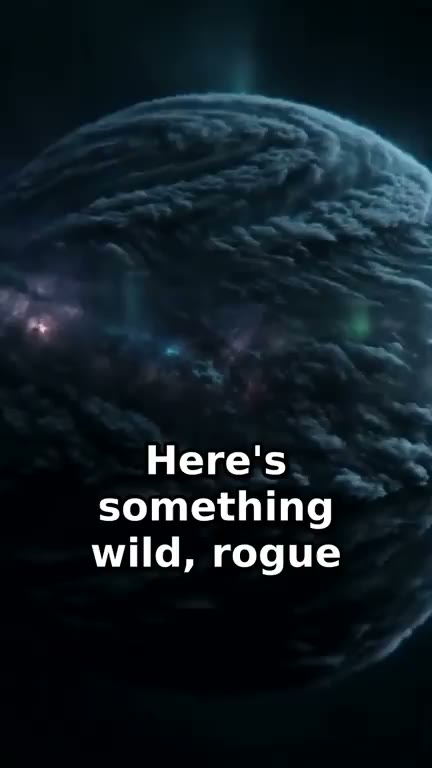
A daily space Short
Rogue planets, written and rendered on the day it went out.
Daily AI Short
The captions are part of the run
The same six seconds of one of our ocean runs, before and after the captions node burned the narration in.


From idea to finished video
- Step 01
Name the subject
Type the subject into chat: a disaster, an engineering project, a company's rise and fall, an animal, a breakthrough. A broad subject gives a series room to run. Run the template untouched and its example deep ocean niche runs instead.
- Step 02
Run the first episode
About $0.78 a run on the Faceless Channel Short template, priced before it starts. The narrated, captioned episode lands in the chat when it finishes.
- Step 03
Fact-check the script
A documentary is only as good as its facts, and these come from a language model. Check every name, date, and figure against a source you trust, then adjust the niche or rerun a scene before anything is published.
- Step 04
Run the series, then cut it long
Connect YouTube and ask for a daily schedule so each episode posts as a Short. When a subject has enough episodes, open them in the timeline editor and join them into one longer video.
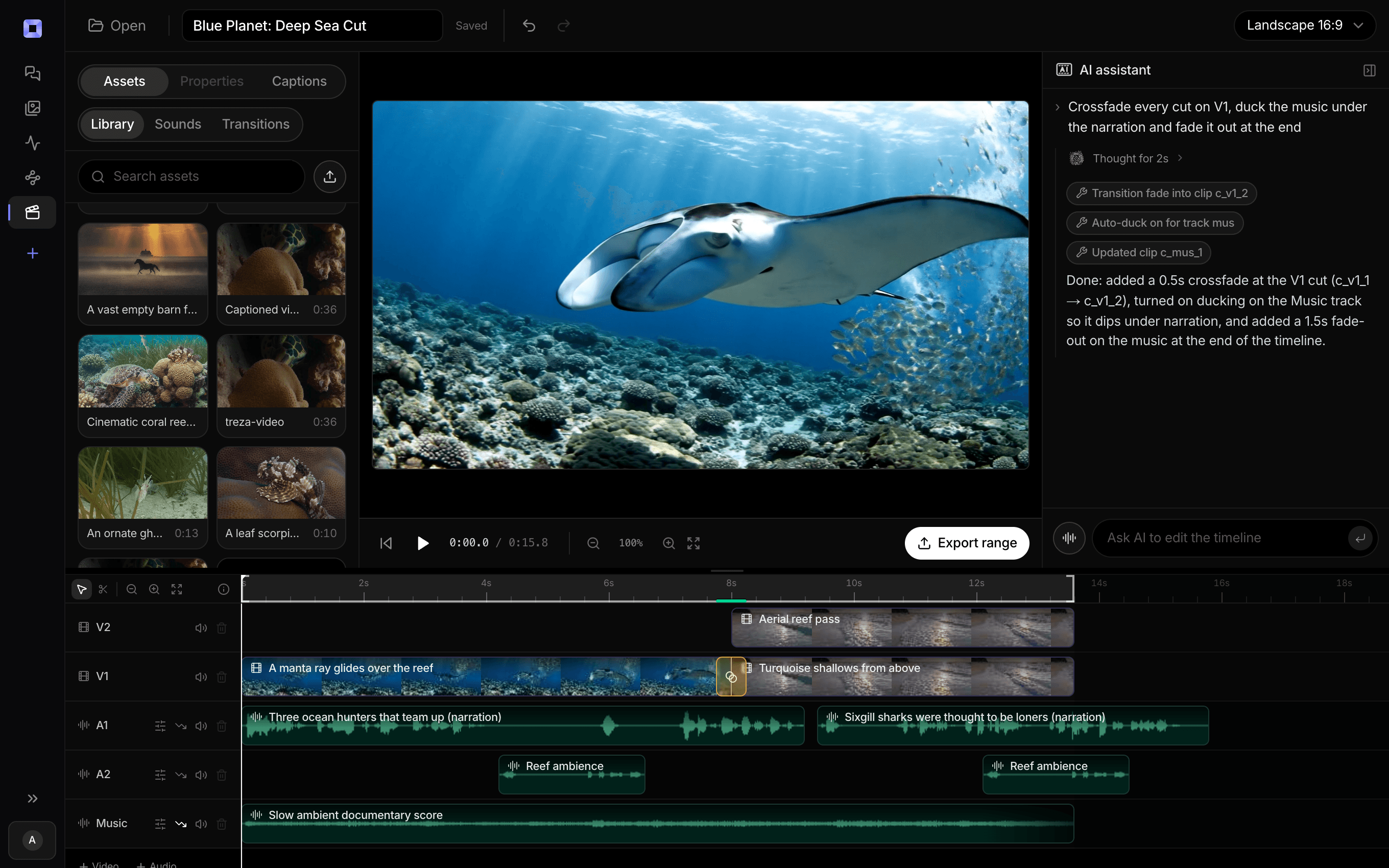
The same video, open in the built-in timeline editor.
What people build with it
Mini-documentary Shorts
One subject told properly in under a minute: how a bridge went up, why a city was abandoned, what happened to a lost ship.
Business and finance stories
A company's rise and collapse, a market crash, a bank that failed overnight. Check every figure before it posts.
Nature and science documentaries
The deep sea, deep space, the inside of a cell. Places no camera of yours can reach, where generated scenes are the only pictures possible.
A narrated mini-series
One subject, one episode a day, each ending on a line that sets up the next, the way a series keeps viewers coming back.
Engineering and history deep dives
Canals, railways, cathedrals, and the people who built them, told through the places and machines rather than invented portraits.
Documentaries in another language
Write the subject in your audience's language and each episode is written, narrated, and captioned in it.

A series a day. A longer cut when it is ready.
Narrated episodes from one subject, joined in the editor.
AI documentary video generator, answered
What is an AI documentary video generator?
An AI documentary video generator turns a subject into a narrated documentary-style video. On Treza, the Faceless Channel Short template writes a 45 to 55 second episode, generates five vertical scenes, narrates it in a deep documentary voice over a music bed, and burns in captions, one new episode a day if you schedule it.
Can it make a full-length documentary?
Not in one run. Each run makes one episode of about 45 to 55 seconds. For a longer documentary, run a series on one subject and join the episodes in the timeline editor, which exports up to 40 clips or 15 minutes, with your own trims and fades.
Is the information accurate?
Not guaranteed. The writer is told to build on true, specific details, but it is a language model and can be confidently wrong. Check names, dates, and figures before you publish, and hold uploads on Unlisted or Private while you review.
Does it use real footage or archive clips?
No. Every scene is generated from the script, so nothing is clipped from someone else's documentary or a stock library. The writer also never depicts real people in a scene; the narration tells their part.
Are the scenes animated?
They are generated stills with a slow push-in and a fade between each, which keeps a run at about $0.78. For animated scenes with labels that point at the subject, the Fact of the Day template makes a 30 second documentary Short, at a higher price per run. AI fact video generator
Can I choose the narrator?
Yes. The template ships with a deep documentary voice, and the narrator node takes any of the 82 built-in voices. Your own recorded narration can go in through the timeline editor instead.
How much does it cost to make a documentary video with Treza?
Treza runs on prepaid credits with no subscription. Each generation is charged at the model's own rate from your balance, and a failed generation costs nothing. A typical video generation settles around $1.06, and credit packs start at $5 and never expire.
Can I call this as an API instead of using the canvas?
Yes. Every pipeline can be published as a versioned HTTP endpoint. Call the typed /invoke endpoint with JSON in and JSON out, or point any OpenAI SDK at the OpenAI-compatible endpoint. Swap a model on a node later and the API your product calls does not change.
Do I need to know how to edit video?
No. Start from a template, change the topic, and run it. If you do want frame-level control, the timeline editor is there with multi-track video and audio, per-clip trims, fades, and volume, but nothing about the automated path requires opening it.
Related tools
Faceless video generator
Faceless YouTube and TikTok channels that publish on a schedule
AI history video generator
Narrated history Shorts, one era or event per episode
AI explainer video maker
Narrated vertical explainers of one idea, with captions
Fact video generator
Daily one-fact documentary Shorts with narration and callout labels
See every tool, compare the models, read what an AI video pipeline is, or earn 30% sharing these tools.
Your first video is one prompt away.
Generate your first video, image, or draft today. Prepaid credits, no subscription.