

AI Video Transcriber. Text, captions, and clips from any video or audio.
Point a pipeline at any video or audio file and get an accurate transcript with timestamps back. Turn it into burned-in captions, an SRT file, social clips, or titles and descriptions, in the same run.
Everything on this page was made on Treza.
Word-level timestamps with Whisper
Whisper transcription returns word-level timing, which is what makes everything downstream possible: captions that land on the beat, clips cut on sentence boundaries, and quotes you can find by timecode.
SRT out of the box
Every timed transcription also produces an SRT file, so you can carry subtitles to YouTube, your editor, or a client deliverable without reformatting anything.
Built for long recordings
Long masters are transcribed in chunks automatically, so a two-hour podcast or webinar recording processes as reliably as a 30-second clip. Uploads support files up to 30GB with resumable multipart upload.
Fast text-only models when timing is not needed
When you just want the words, GPT-4o Transcribe and its mini variant return clean text quickly. Use Whisper when you need timestamps, the text-only models when you need a document.
Captions burned in, not bolted on
Wire the transcript into a captions node and the words are rendered into the video itself, with three styles, five positions, and karaoke-style word grouping tuned for vertical formats.
A transcript a language model can work with
The timestamped transcript feeds straight into a language model node that can find the best 30 to 60 second moments, write titles and descriptions, or summarize the recording, because it knows what was said and when.
Who said what, not just what was said
Turn on Label speakers and a second pass over the same audio tags every word with the voice that said it, ranked by talk time, for up to 6 distinct voices. Set the captions node to color by speaker and a two-host podcast or a panel reads correctly on screen. The pass can only add labels, never change the words.
What the transcript unlocks
Word-level timestamps are what make the rest possible. The clip boundary, the burned-in caption, and the title all read from the same transcript.

It found the moment
A long webcast cut down by what was said in it.
Whisper Large v3

It became the captions
Word timings drive the highlight, rather than a guess.
Captioned AI Short

It wrote the metadata
Title, description, and tags from the same words.
Seedance 2.5
From idea to finished video
- Step 01
Bring in the recording
Upload a file, paste a direct media URL, or wire the output of another node. Video and audio both work, and big masters upload with resumable multipart.
- Step 02
Pick the transcription model
Whisper for timed transcripts, captions, and clipping. GPT-4o Transcribe when you only need the text and want it fast.
- Step 03
Run it
Long recordings chunk automatically and come back as one continuous transcript with segments, timestamps, and an SRT.
- Step 04
Do something with it
Burn in captions, extract clips, generate metadata, or just copy the text. The transcript is a node output, so anything on the canvas can consume it.
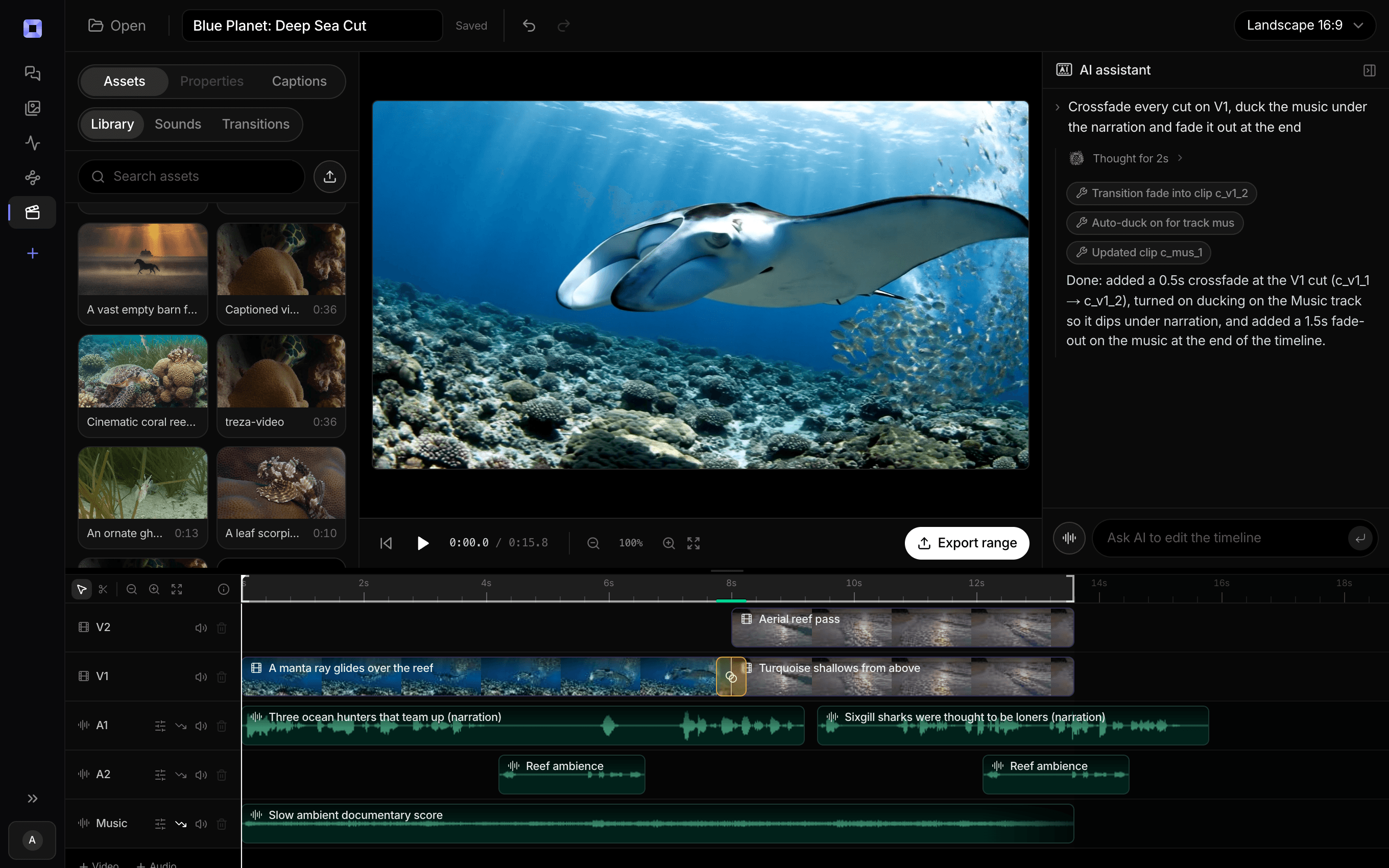
The same video, open in the built-in timeline editor.
What people build with it
Podcasts into clip libraries
Transcribe an episode, let a language model mark the strongest moments, and cut them into captioned vertical clips in the same pipeline.
Captioning shorts and reels
Most short-form video plays muted. Transcribe the audio and burn in word-timed captions so the video still lands with the sound off.
Webinars and meetings into documents
Turn a long recording into a searchable transcript, then have a language model produce the summary, the action items, or the blog post.
SRT subtitle files for delivery
Client work and YouTube uploads often want a subtitle file rather than burned-in text. The timed transcript exports as SRT with no extra step.
Titles, descriptions, and tags from the transcript
Metadata written from what was actually said performs better than metadata guessed from a filename. The transcript feeds the metadata node directly.
Repurposing an archive
Old talks, streams, and tutorials become transcripts, and transcripts become clips, posts, and captions. One pipeline, run per file.

One pass over the audio. Every later step served.
Speaker labels, timestamps, and text you can wire anywhere.
AI video transcriber, answered
How do I transcribe a video with Treza?
Add a transcription node to a pipeline, wire in a video or audio source, and run it. The source can be an uploaded file, a direct media URL, or the output of another node like a Sequence or a text to speech node. Whisper models return text plus timestamped segments and an SRT; GPT-4o Transcribe models return text only.
How accurate is the transcription?
It runs on Whisper and GPT-4o class models, which are the current standard for speech to text, and clean audio transcribes very accurately. Heavy crosstalk, noise, or niche jargon will show up as errors, which is why the transcript stays editable before anything downstream consumes it.
How long can the video or audio be?
Long recordings are handled by design: files are transcribed in chunks and stitched back into one continuous transcript, so multi-hour podcasts and webinar masters work. Uploads support files up to 30GB with resumable multipart upload, so a full-resolution master does not need re-encoding first.
Can it transcribe YouTube videos by URL?
No. The pipeline takes your own uploaded files or direct media URLs, and it does not download from YouTube or other platforms. Point it at your own recordings: the export from your webinar tool, the master from your editor, or a direct MP4 link you host.
Does it produce subtitle files?
Yes. Timed transcriptions produce an SRT alongside the plain text and the segment list. Use the SRT as a deliverable, or skip the file entirely and burn the captions into the video with the captions node.
What languages can it transcribe?
Whisper is a multilingual model and handles major languages well, with English strongest. If you need the output in a different language than the recording, wire the transcript through a language model node to translate it before captions or delivery.
Can it tell speakers apart?
Yes. Turn on Label speakers on the transcription node and a second pass works out who is talking, then tags every word and segment with a speaker ranked by talk time. Set the captions node to color by speaker to see it on screen, or read the labels straight off the transcript. It separates up to 6 voices, and any beyond that share the last color. The pass adds a fraction of a cent per minute of audio and never changes the transcribed words, so a diarizer that fails leaves the transcript untouched.
What can I do with the transcript besides read it?
This is where a pipeline beats a transcription website. The transcript is a node output, so in the same run it can become burned-in captions, an extracted highlight clip, a title and description for the upload, or a summary document. You configure that chain once and every future recording gets the same treatment.
How much does it cost to make a transcript with Treza?
Treza runs on prepaid credits with no subscription. Each generation is charged at the model's own rate from your balance, and a failed generation costs nothing. A typical video generation settles around $1.06, and credit packs start at $5 and never expire.
Can I call this as an API instead of using the canvas?
Yes. Every pipeline can be published as a versioned HTTP endpoint. Call the typed /invoke endpoint with JSON in and JSON out, or point any OpenAI SDK at the OpenAI-compatible endpoint. Swap a model on a node later and the API your product calls does not change.
Do I need to know how to edit video?
No. Start from a template, change the topic, and run it. If you do want frame-level control, the timeline editor is there with multi-track video and audio, per-clip trims, fades, and volume, but nothing about the automated path requires opening it.
Related tools
AI clip generator
Clipping webinars, interviews, and talks into vertical shorts
AI video caption generator
Word-timed captions burned into every video
AI podcast clip generator
Captioned Shorts cut from your podcast feed
See every tool, compare the models, read what an AI video pipeline is, or earn 30% sharing these tools.
Your first video is one prompt away.
Generate your first video, image, or draft today. Prepaid credits, no subscription.