
AI Abandoned House Restoration Video. Derelict to lived-in, from one fixed camera.
Describe the house and where it stands, and Treza draws it restored, works back to broken windows and overgrowth, and animates the repair between each stage. You get a vertical timelapse of a house coming back.
Everything on this page was made on Treza.
An abandoned house is the built-in example
The Restoration Timelapse template ships with a two-storey Victorian house on an overgrown lot, so it runs with the box left empty. Describe your own house to replace it.
Broken windows to new glass
For a house, the planner works through stages like derelict as found, cleared and stripped back, structure and roof repaired, new windows in and walls primed, then painted.
The same house in the same spot
The restored house is drawn first and every earlier stage is an edit of that picture, so the roofline, the porch, and the position in the frame hold from the first stage to the last.
Scaffolding goes up and comes down
From the second stage on the plan dresses the scene as a working site, with ladders, scaffolding, and materials. They are gone again in the finished stage.
The grounds come back last
The stage before finished is the painted house with the grounds still rough, so the planting and the lights are the final reveal.
The repair happens in fast motion
Veo 3.1 animates between each pair of stages from a first and a last frame: people clearing, stripping, repairing, and painting at speed while the light moves across the day.
An abandoned house this template restored
The template's own example: a two-storey Victorian with a wraparound porch. Broken windows and bare grey boards in the first stage, cream paint and a green lawn in the last.
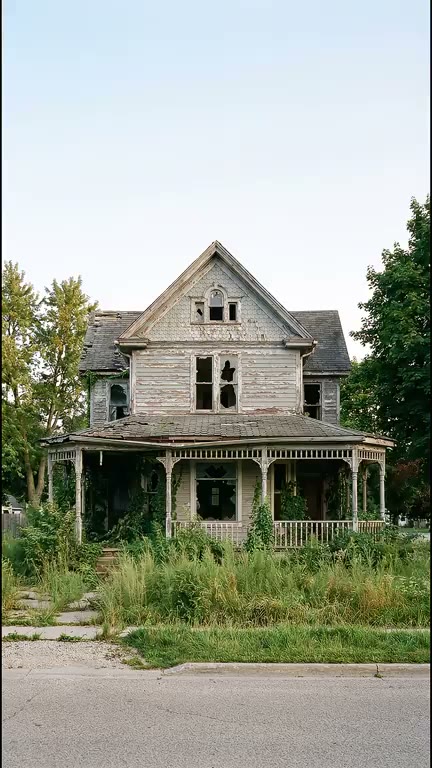
Broken windows and overgrowth
The house as it was found, and the crew arriving.
Restoration Timelapse
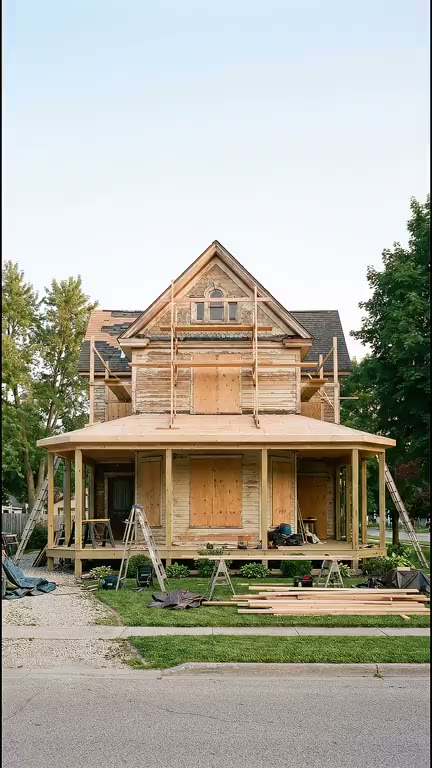
Stripped, scaffolded, rebuilt
The roofline and the porch hold their shape through the work.
Restoration Timelapse
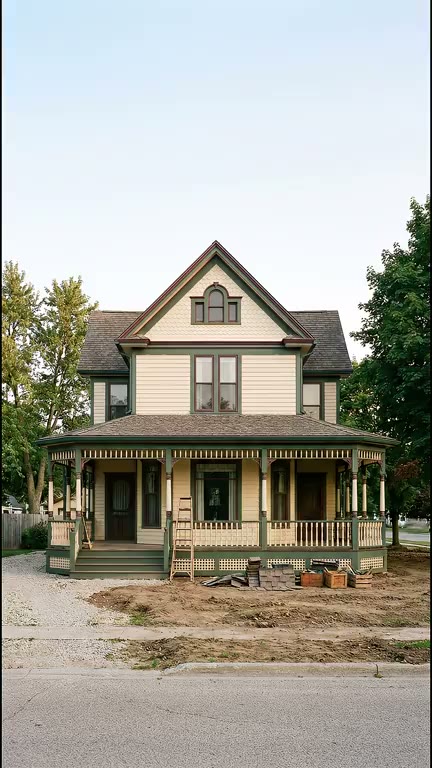
Lived-in again
Paint first, then the grounds.
Restoration Timelapse
From idea to finished video
- Step 01
Describe the house
Open the Restoration Timelapse template and give the style, the number of storeys, the materials, and anything distinctive, like a turret or a wraparound porch.
- Step 02
Say where it stands and what is wrong
An overgrown lot at the edge of town, a hillside, a dirt road. Mention the damage you want to start from: boarded windows, a sagging roof, ivy up one wall.
- Step 03
Run it
Check the version and its price, then run. The plan, the stills, the five clips, and the cut finish in one go.
- Step 04
Tighten it on the canvas
If one stage looks too clean or too wrecked for its place in the order, rerun that stage node and the two clips either side of it.
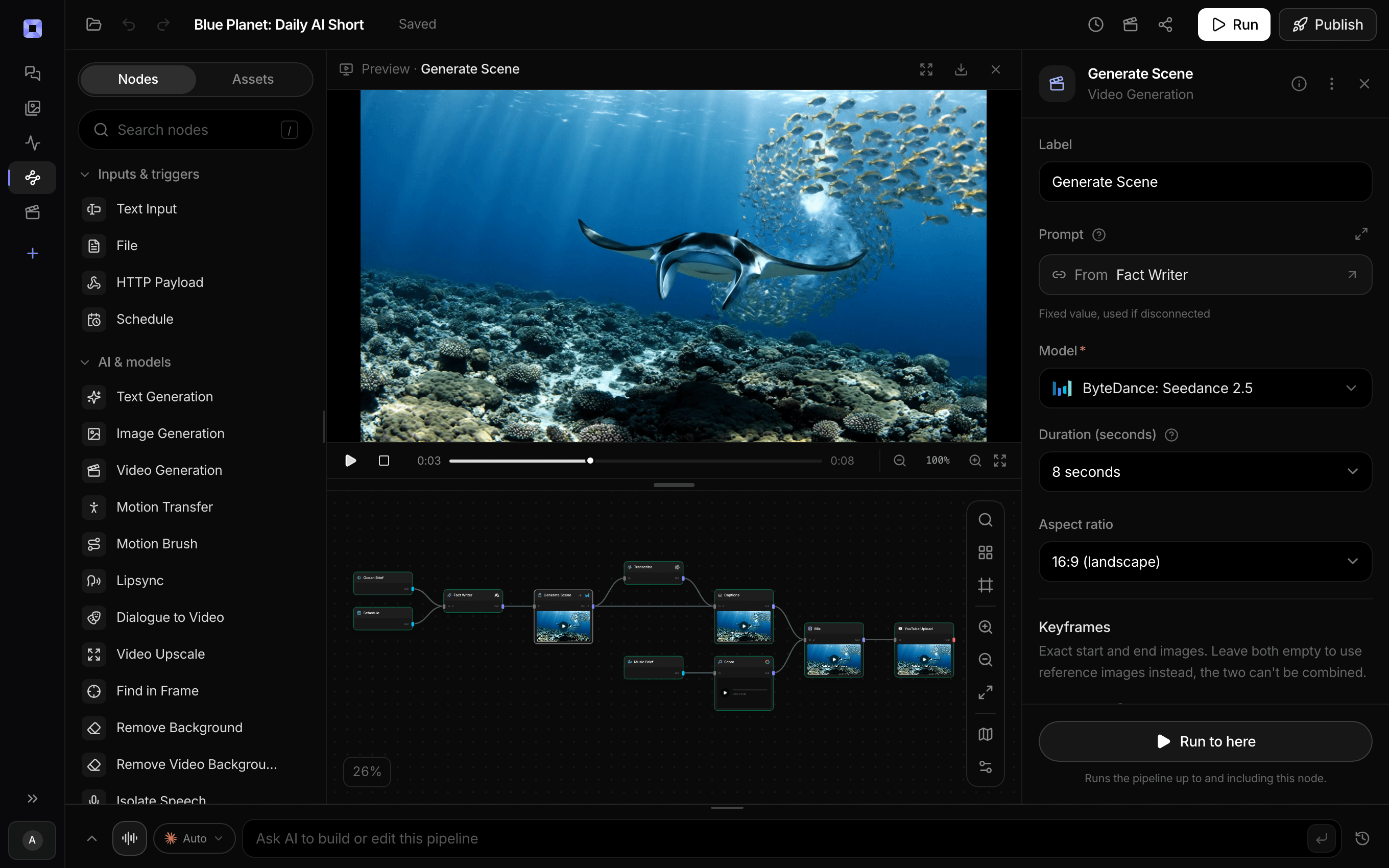
Ask for the pipeline in the composer, or send it from Claude over MCP.
What people build with it
Abandoned mansion restorations
A grand house gone to ruin, restored to its best. Size and ornament give each stage more to show.
Farmhouse and cabin rescues
A tin-roofed farmhouse, a cabin with a fallen chimney. Smaller buildings make shorter, cleaner stories.
Storefronts and small-town buildings
An empty corner shop, a shuttered diner, a chapel with a broken steeple. Describe the frontage and leave signs out: the plan never asks for lettering.
Ruin to finished reveals for Shorts
The first and the last stage of the same run make a clean reveal, and the full timelapse is the long version.
Concept visuals for a renovation idea
Show what bringing a kind of building back could look like. It is an illustration from a description, not a survey of a real property.
AI abandoned house restoration video, answered
How do I make an abandoned house restoration video with AI?
Describe the house, where it stands, and the state it is in. On Treza, the Restoration Timelapse template draws the house restored, edits that picture back through five stages of dereliction, and animates the repair between each pair on Veo 3.1, joined into one vertical timelapse.
What should I describe?
The style and size of the house, its materials, the shape of the roof and porch, the setting, and the damage. The more of the finished house you describe, the less the planner has to decide for you.
Can it restore the inside of the house too?
One run is one fixed camera, so it shows either the outside or one room. Run a room as its own video and join the two in the timeline editor. See the room makeover page
Why does the house keep the same shape in every stage?
Because every stage comes from one picture. Drawing the stages separately is what makes a building change its roof or drift across the frame between shots; editing one still backwards avoids it.
Is the house real?
No. The house and every stage of its repair are generated from your description. Say it is AI-generated when you post it.
How much does it cost to make an abandoned house restoration video with Treza?
Treza runs on prepaid credits with no subscription. Each generation is charged at the model's own rate from your balance, and a failed generation costs nothing. A typical video generation settles around $1.06, and credit packs start at $5 and never expire.
Can I call this as an API instead of using the canvas?
Yes. Every pipeline can be published as a versioned HTTP endpoint. Call the typed /invoke endpoint with JSON in and JSON out, or point any OpenAI SDK at the OpenAI-compatible endpoint. Swap a model on a node later and the API your product calls does not change.
Do I need to know how to edit video?
No. Start from a template, change the topic, and run it. If you do want frame-level control, the timeline editor is there with multi-track video and audio, per-clip trims, fades, and volume, but nothing about the automated path requires opening it.
Related tools
AI restoration video generator
Restoration timelapses from abandoned to restored, from one fixed camera
AI house building video generator
House construction timelapses, from a marked-out lot to lights on
AI room makeover video generator
Room makeover timelapses from a tired room to a finished one
AI timelapse video generator
Construction timelapses from an empty site to finished, from one camera
See every tool, compare the models, read what an AI video pipeline is, or earn 30% sharing these tools.
Your first video is one prompt away.
Generate your first video, image, or draft today. Prepaid credits, no subscription.