


AI video caption generator
Burn accurate, word-timed captions into any video
Wire a video into the Captions node and it transcribes the speech with Whisper and renders the words into the picture, grouped and timed for muted feeds. Styles, fonts, colors, and spoken-word highlight are settings, not editing.
Everything on this page was made on Treza.
Transcribes on its own
Wire in just the video and the node runs Whisper first, then burns the result in. Wire in a Transcribe node when you want the transcript corrected against your script, or paste an SRT or a plain script and it spreads the words across the clip.
Word-level timing
Whisper returns a timestamp per word, so captions can show one to twelve words at a time and each group appears exactly when it is spoken. Set words per caption to zero for full-sentence captions from the segment timings.
Spoken-word highlight
Light up the word being said, either by color or with a filled box behind it, in your choice of highlight color. The karaoke style that keeps Shorts and TikTok viewers reading.
Styles built for vertical video
Bold with a thick outline, clean with a subtle shadow, or boxed on a dark plate. Five positions from top to bottom, three sizes, seven colors including one that rotates per caption, four fonts, uppercase, and a pop animation.
Countdown numbers for list videos
For top-ten style videos the node can place a large number on screen at each item, landing exactly on the cuts the Sequence node reports, with an optional sound effect.
Captions in the same run as everything else
Captions is one node on the canvas, so the video that comes out of it goes straight to the YouTube and TikTok publishers, or back into a Sequence. Every video the pipeline makes is captioned by default.
Captions, burned in
Not an overlay you have to keep track of. These are rendered into the file with libass from Whisper word timings, so they survive every re-upload.

Word by word
The highlight lands on the word being spoken.
Captioned AI Short

Sized to the line
Cues are measured, so a long line never stacks up.
Top 3 Countdown

A quieter style
Three styles and five positions, set per pipeline.
Faceless Channel Short
Captions off, captions on
Not two videos that look alike. One run, one node apart, the same six seconds of it on both sides of the divider.


From idea to finished video
- Step 01
Bring the video
Upload a file, paste a direct MP4 URL, or wire in the output of a video generation or Sequence node.
- Step 02
Choose the transcript source
Do nothing and the node transcribes the speech itself. Or wire a Transcribe node with your script attached for corrected spelling, or paste SRT text.
- Step 03
Set the look
Pick style, position, size, color, font, words per caption, and highlight mode. The defaults are tuned for Shorts and TikTok.
- Step 04
Run and publish
The captioned MP4 comes out as a node output. Preview it, then publish it or hand it to the next node.
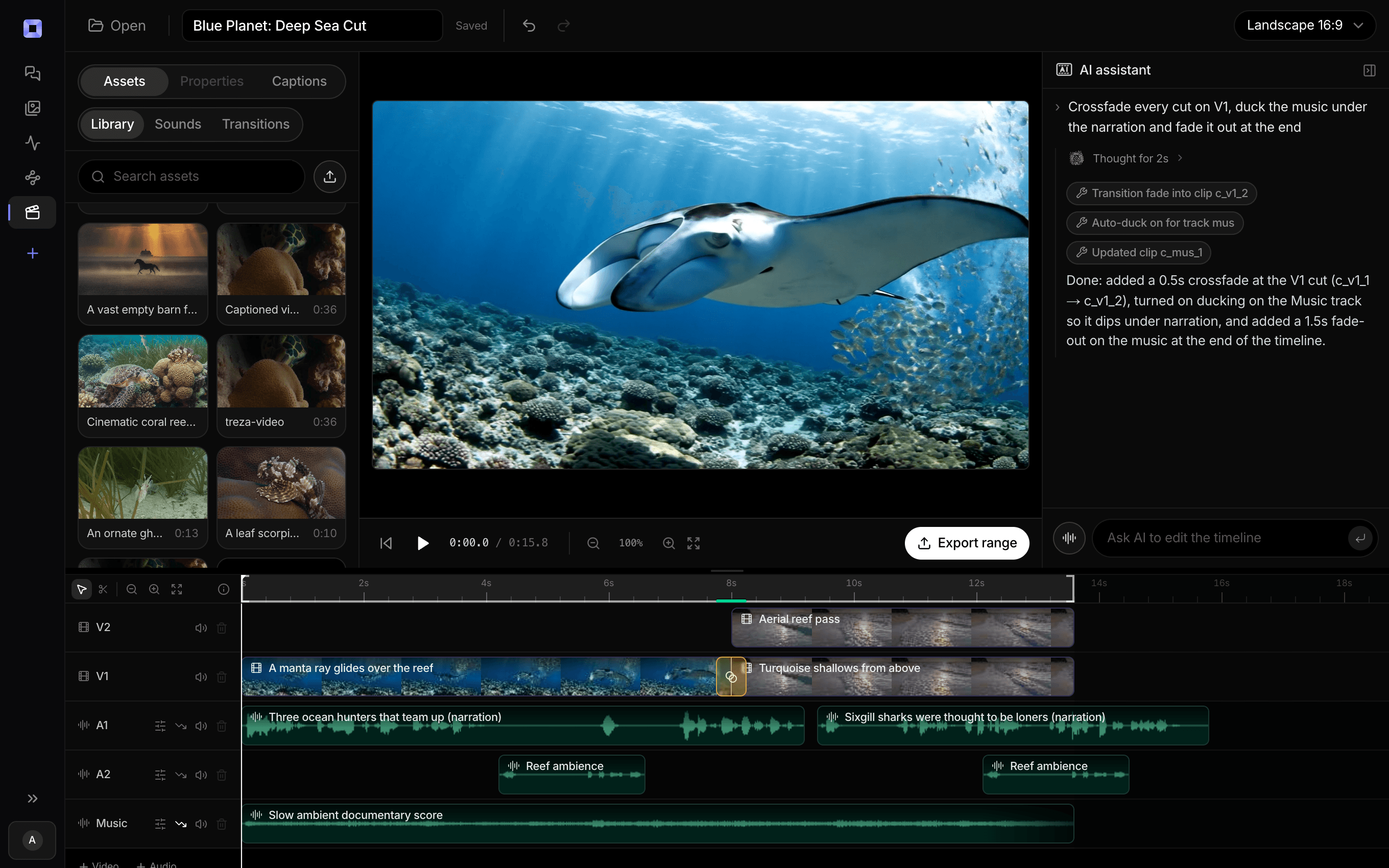
The same video, open in the built-in timeline editor.
What people build with it
Shorts, Reels, and TikToks that play on mute
Most short-form video autoplays silently. Word-timed captions are the difference between a scroll-past and a watch.
Talking-head and interview clips
Caption the speaker as they talk, with the current word highlighted, and the clip reads like the ones that get shared.
AI-generated videos with narration
A text to speech voice reads the script, the video is rendered, and the captions node burns the script in with correct spelling because the Transcribe node checked it against the text.
Listicles and countdowns
Ranked videos get a number on screen at every item, placed on the actual cut rather than guessed from the picture.
Multilingual versions
Translate the transcript with a language model node, voice it, and caption the result. The Video Dubbing template shows the chain.
Captioning at volume
Put the node in a pipeline that runs on a schedule or behind an API, and every video the pipeline produces is captioned without anyone opening an editor.


Most of the feed watches with the sound off.
Captions are the difference between a view and a scroll.
AI video caption generator, answered
How do I add captions to a video automatically?
Add a Captions node to a pipeline and wire your video into it. With nothing else connected, the node transcribes the speech with Whisper and burns word-timed captions into the picture. The captioned MP4 comes out as a node output you can preview, publish, or pass along.
Are the captions accurate?
They come from Whisper, the current standard for speech to text, and clean audio transcribes very accurately. For AI-narrated videos, wire a Transcribe node with the script attached: it restores the script's spelling of names and terms, and it can stop the run if the narration drifted from the text so a wrong caption never gets published.
Can I control how the captions look?
Yes. Style (bold outline, clean shadow, or boxed), position (five options from top to bottom), size, color (seven choices including one that rotates), font (Sans, Anton, Archivo, Montserrat), uppercase, a pop animation, words per caption from one to twelve, and spoken-word highlight by color or fill.
Can I upload my own SRT file or script?
Yes. Paste SRT text and the node uses its timings. Paste a plain script and the words are spread evenly across the clip, which works for short clips with steady narration. For exact timing on longer clips, let the node transcribe or wire a Transcribe node.
Does it produce an SRT file instead of burned-in captions?
The Transcribe node does. It outputs the plain text, the timestamped segments, and an SRT you can deliver to YouTube or a client. The Captions node is for burning the words into the video itself.
What languages are supported?
Whisper is multilingual and handles major languages well, with English strongest. To caption in a different language than the audio, translate the transcript with a language model node first, as the Video Dubbing template does.
How much does it cost to make ai video caption generator with Treza?
Treza runs on prepaid credits with no subscription. Each generation is charged at the model's own rate from your balance, and a failed generation costs nothing. A typical video generation settles around $1.06, and credit packs start at $5 and never expire.
Can I call this as an API instead of using the canvas?
Yes. Every pipeline can be published as a versioned HTTP endpoint. Call the typed /invoke endpoint with JSON in and JSON out, or point any OpenAI SDK at the OpenAI-compatible endpoint. Swap a model on a node later and the API your product calls does not change.
Do I need to know how to edit video?
No. Start from a template, change the topic, and run it. If you do want frame-level control, the timeline editor is there with multi-track video and audio, per-clip trims, fades, and volume, but nothing about the automated path requires opening it.
Related tools
AI video transcriber
Transcripts, SRT files, and captions from your recordings
AI shorts generator
Vertical short-form video for TikTok, Reels, and Shorts
Faceless video generator
Faceless YouTube and TikTok channels that publish on a schedule
See every tool, compare the models, read what an AI video pipeline is, or earn 30% sharing these tools.
Your first video is one prompt away.
Generate your first video, image, or draft today. Prepaid credits, no subscription.