

AI Workout Video Generator. Film it once, and a character demonstrates it.
Record one exercise, describe a trainer character, and Treza's Motion Transfer node makes the character repeat it rep for rep, with your cues kept. Build a session one exercise at a time, with the same character in every clip.
Everything on this page was made on Treza.
Your form, copied
The node reads body movement from your clip and drives the character with it, frame for frame, so the character's squat is your squat: depth, tempo, and pauses included. Film the rep you want people to copy.
Your cues, kept
Kling carries the clip's audio into the result, on by default, so your count and your coaching cues play under the character in time with the reps.
A trainer character you describe
Write the trainer in one line, a robot coach or a bear in a tracksuit, and an image model draws it full body, facing the camera, on a plain studio floor. Or attach your app's own character in chat.
The same trainer in every exercise
Keep one character picture for the whole program. With the picture leading, the trainer stays exactly as pictured while each clip gives it a different exercise.
One exercise per clip, a session per Sequence
Each clip is one continuous shot of one exercise, up to 10 seconds with the picture leading or 30 with the video leading. A Sequence node stitches up to 12 of them into one session.
In the gym you filmed
On the canvas, Wan 2.2 Animate's replace mode keeps your gym footage and swaps you for the trainer character, for coaches who would rather not be on camera.
An exercise library behind an API
Publish the pipeline as an endpoint: your app sends a clip of an exercise and gets back the trainer performing it, the same way for every move in the library.
Made on this platform
Real output, credited under every frame.

Architectural
A dolly through a sunlit room.
Seedance 2.5

Product
A macro turn under a sweeping light.
Kling 3.0 Pro

A channel cut
Written, voiced, captioned, and published on a schedule.
Seedance 2.5
From idea to finished video
- Step 01
Film one exercise
One person, whole body in frame and facing the camera, a steady camera, 5 to 10 seconds at a controlled pace. Your own recording, or one you have the rights to use.
- Step 02
Describe the trainer
Open the Motion Transfer template and type the character. An image model draws it as a full-body still on a plain studio floor, the framing the transfer reads best.
- Step 03
Attach the clip and run
Upload the clip or paste a direct link to it. Kling 3.0 Motion Control takes about 5 minutes for 10 seconds and keeps your cues.
- Step 04
Build the session
Run the next exercise with the same character, then cut the clips into a Sequence, caption them, and download or post the session.
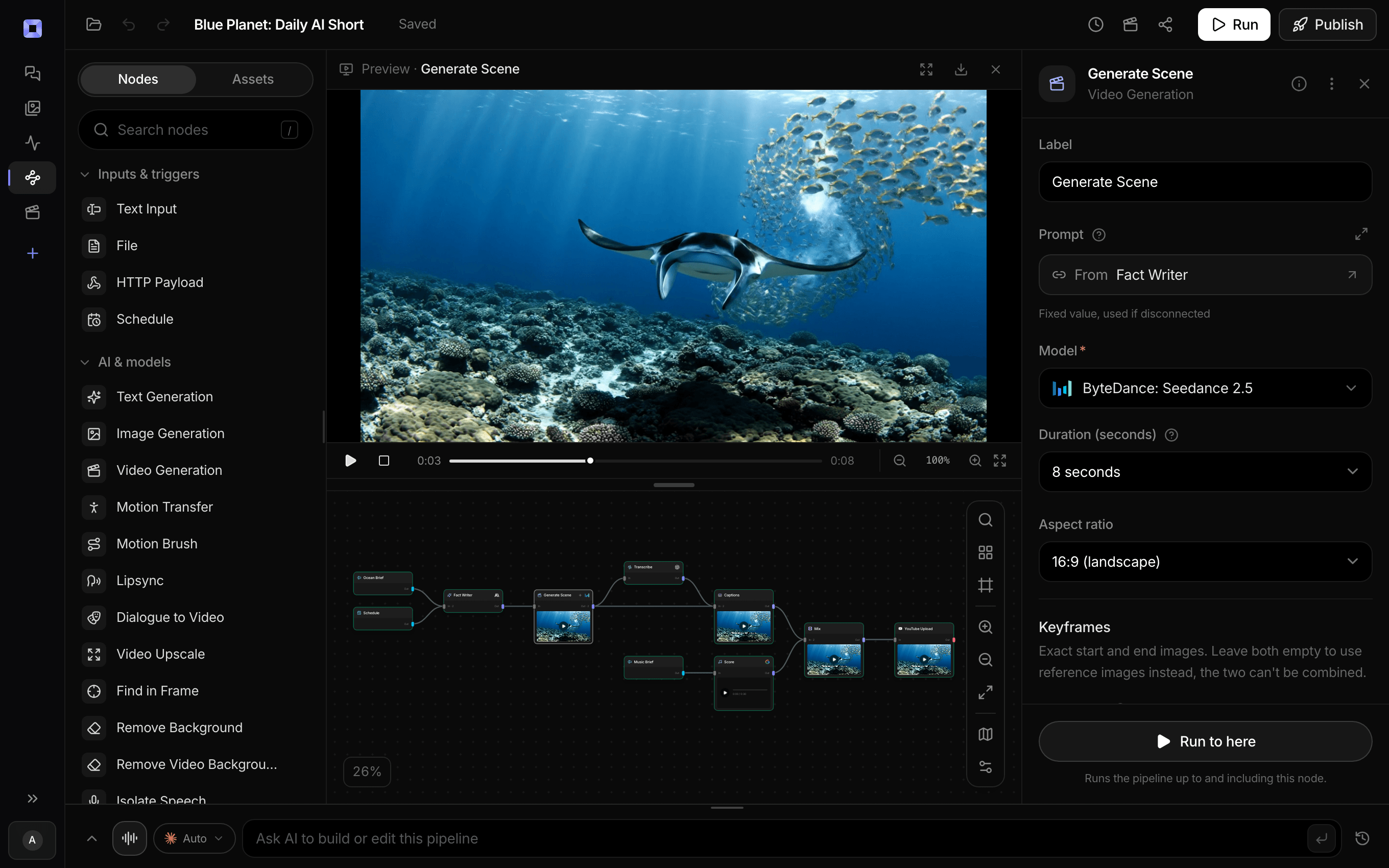
Ask for the pipeline in the composer, or send it from Claude over MCP.
What people build with it
Exercise demos for a fitness app
One trainer character demonstrates every move in the library, filmed once by your coach and the same from clip to clip.
Coaching without being on camera
Film the session yourself and let a character demonstrate it, or keep your gym with replace mode and put the character where you stood.
Stretching and mobility routines
Slow standing moves are the ones the model reads best, so stretches, arm circles, squats, and lunges come back cleanest.
Classroom movement breaks
A teacher films a short stretch once, and a cartoon character leads it on the classroom screen.
A recurring trainer for a channel
The same character fronts every Short, so the channel is recognisable without you on camera.

Generate it, cut it, publish it, in one place.
Prepaid credits, no subscription.
AI workout video generator, answered
How do I make a workout video with AI?
Record yourself doing one exercise, describe a trainer character, and run both through Treza's Motion Transfer node. Kling 3.0 Motion Control copies your movement onto the character, rep for rep, and keeps your spoken cues. Repeat for each exercise and cut the clips into one session with a Sequence.
Which exercises transfer best?
Standing moves done at a controlled pace, facing the camera: squats, lunges, arm raises, standing stretches, marching in place. Jumps, fast reps, and limbs crossing the body are harder for the model to read and can pull the character toward the performer's shape. Try one floor exercise on its own before filming a set of them.
Can I turn a whole workout video into one?
Not in one pass. The model follows one continuous shot, and a clip that cuts between exercises breaks at every cut, so the node refuses it before it is sent. Run each exercise as its own clip, or trim each one out with an Extract Clip node, then stitch them in a Sequence.
Does the character correct my form?
No. It copies what you filmed, movement for movement, including any fault in the rep. Film the version you want people to follow, and watch each clip before you publish it.
Can I keep my voice counting the reps?
Yes, on Kling. Keep original sound is on by default and carries the clip's audio into the result, so your count and cues play in time with the character. Turn it off to add music or narration later in the same pipeline.
Can the character appear in my own gym?
Yes. On the canvas, set the Motion Transfer node to Wan 2.2 Animate (replace character in video). It keeps your footage and puts the character where you were. Wan renders every frame, so one run fits about 22 seconds at 480p or 11 at 720p.
Whose workout footage can I use?
Your own recording, or one you have the rights to use: putting another creator's workout on a character does not make it yours. The trainer is a character you made or own. This is not a face swap or a deepfake tool, so never put a real person into a video they did not agree to, or replace actors in films or shows.
How much does it cost to make a workout video with Treza?
Treza runs on prepaid credits with no subscription. Each generation is charged at the model's own rate from your balance, and a failed generation costs nothing. A typical video generation settles around $1.06, and credit packs start at $5 and never expire.
Can I call this as an API instead of using the canvas?
Yes. Every pipeline can be published as a versioned HTTP endpoint. Call the typed /invoke endpoint with JSON in and JSON out, or point any OpenAI SDK at the OpenAI-compatible endpoint. Swap a model on a node later and the API your product calls does not change.
Do I need to know how to edit video?
No. Start from a template, change the topic, and run it. If you do want frame-level control, the timeline editor is there with multi-track video and audio, per-clip trims, fades, and volume, but nothing about the automated path requires opening it.
Related tools
AI motion transfer
A character that performs your filmed take, or replaces the performer in it
AI dance video generator
A character, or a photo of you, dancing the routine from any clip
AI character replacement
Your own character in place of the person in your footage
AI mascot animation generator
A brand mascot performing a move someone on the team filmed
See every tool, compare the models, read what an AI video pipeline is, or earn 30% sharing these tools.
Your first video is one prompt away.
Generate your first video, image, or draft today. Prepaid credits, no subscription.