

AI music generator
Music for your video, generated and mixed under the voice
Describe a track in one sentence and get an MP3 back: a 30 second bed, a full song, a sound effect, or a score written to a cut you wire in. In a pipeline the music drops under the narration on its own, so the voice always sits on top.
Everything on this page was made on Treza.
A 30 second bed or a full song
Lyria 3 Clip writes a 30 second bed and Lyria 3 Pro writes a full-length song. Describe genre, mood, tempo, and instrumentation in plain words, like mellow lo-fi hip hop, 80 BPM, warm vinyl texture, no vocals.
Scored to your cut
Wire a finished edit into Video to Music and it watches the picture, reading its motion, color, and pacing, then writes music to that edit rather than to a mood you typed. A prompt is optional and only steers it.
Sound effects, not music about them
The sound effects model renders the actual sound: heavy rain on a tin roof, a door slamming shut, hooves on cobblestone. Describe the source and the setting in plain words and it picks the length from the description.
Ducked under the voice automatically
Wire the music into a Sequence node and it becomes the bed under the whole video. While narration speaks the bed drops 12 dB by default, anywhere from 0 to 30 if you want it gentler or harder, and it comes back up between lines.
A steady bed from start to finish
Generated music is arranged, with quiet passages and a real ending. Even out the music bed lifts the quiet stretches so the music never seems to cut out under the voice, and a bed shorter than the video loops with a crossfade at every seam.
A new score for every episode
Put a language model in front and it writes a one-line music brief from each episode's script, so every video gets its own bed. That is how the Fact of the Day and Faceless Channel Short templates score each run.
One channel, a new bed every episode
The writer that scripts each episode also writes a one-line music brief, and a full-song model scores it under the narrator. Three episodes of the same daily format, each with its own bed.

A low, tense ambient drone
The brief this episode's writer wrote, ducked 12 dB under the voice.
Fact of the Day

Written from the script
The same writer, a different fact, a different brief.
Fact of the Day

Under the narrator, not over it
Mixed so the voice always sits on top.
Fact of the Day
From idea to finished video
- Step 01
Describe the track
In chat, ask for the music in one sentence. On the canvas, type the same sentence into an Audio Generation node, or wire a writer into its prompt so every run describes its own.
- Step 02
Pick the model
Lyria 3 Clip for a 30 second bed, Lyria 3 Pro for a full song, the sound effects model for foley and ambience, or Video to Music with your finished cut wired into its Video input.
- Step 03
Mix it under the picture
Wire the audio into a Sequence node with your shots and narration. Set how far it ducks, how loud it sits, and whether to even it out, and give its layer a fade so it falls away at the end.
- Step 04
Keep it or keep going
Download the MP3, or carry on in the same run: transcribe, caption, and publish the finished video. Want to cut it by hand? Lay it on its own track in the timeline editor.
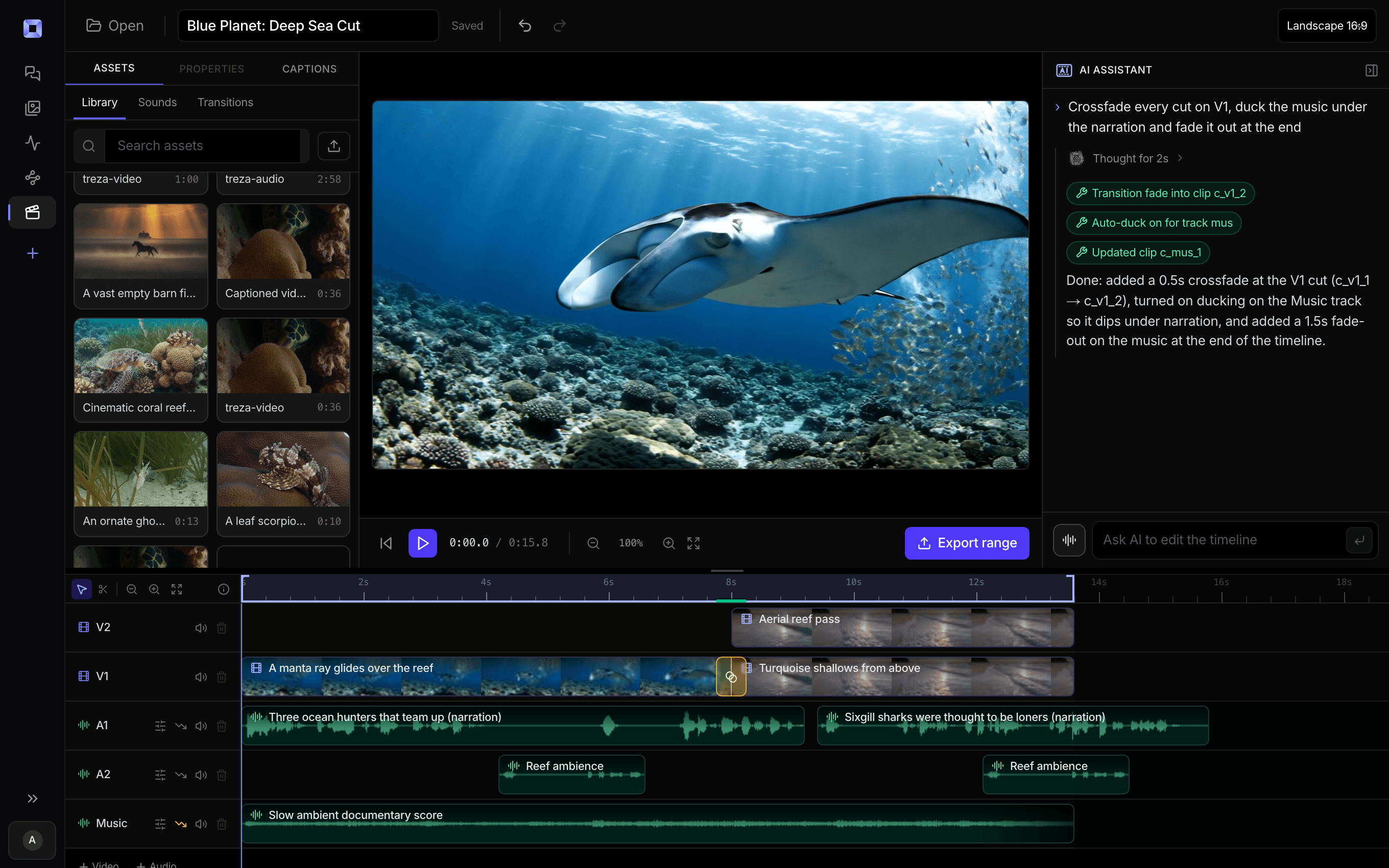
The same video, open in the built-in timeline editor.
What people build with it
Faceless and narrated Shorts
A bed under every episode, written from that episode's script and ducked beneath the narrator, so a daily channel never reuses last week's track.
Ambient and music channels
A generated visual with a full song under it. With no narration to read, the YouTube publisher writes the title and description from the prompt the video was made from.
Scoring a finished edit
Wire the cut into Video to Music and the score follows its pacing, so the music moves when the picture does instead of running under it at one speed.
Sound design for generated scenes
Foley and ambience from a description, for a clip that came back silent or a still that needs a room around it. Lay a sound in at the exact second with the Audio Overlay node.
Hits and stings for clip channels
Generate a few stings from the clip's subject and wire them into the Cutaway node, which rotates them across its cuts, so the hit fits the video it lands on.
Ads and product demos
A bed under the voiceover read. Change the prompt and rerun one node to hear the same spot in a different mood, with the rest of the cut untouched.

Describe the mood. Get the bed under the voice.
Or wire in the finished cut and let it score to the pacing.
AI music generator, answered
How does the AI music generator work?
Text goes into an Audio Generation node, you pick a model, and the node returns an MP3. Lyria 3 Clip and Lyria 3 Pro compose music, the sound effects model renders sounds, and Video to Music scores a cut you wire in. Because it is a node, the audio can flow straight into a Sequence node that mixes it under your shots and narration. In chat, ask for the music you want and it comes back in the conversation.
How long are the tracks?
Lyria 3 Clip returns a 30 second bed and Lyria 3 Pro returns a full-length song. Under a video you rarely need to match the two: the Sequence node loops a shorter bed with a crossfade at each seam and trims a longer one to the length of the video.
Can it score a video I already edited?
Yes. Pick Video to Music and wire the finished cut, not the raw footage, into the node's Video input. It reads the picture and writes to the edit's own pacing. Add a prompt if you want to steer the mood. The node takes files up to 200MB, so export a long cut at a lower bitrate before scoring it.
How does the music sit under a voiceover?
The Sequence node ducks the bed while the narration speaks, 12 dB by default: 6 is gentle, 12 is a typical voiceover, 20 nearly silences it. The bed itself sits 6 dB down by default, and Even out the music bed keeps its quiet passages from dropping out under the duck.
Can it make sound effects instead of music?
Yes. Pick the sound effects model and describe the source and setting plainly, like heavy rain on a tin roof with distant thunder. In chat, say you want a sound effect or ambience and it routes to the same model.
Can I use my own track instead?
Yes. Upload audio into the timeline editor and mix it on its own track with per-clip volume and fades, next to the generated video and narration.
How much does it cost to make ai music generator with Treza?
Treza runs on prepaid credits with no subscription. Each generation is charged at the model's own rate from your balance, and only successful runs are charged, so a failed generation costs nothing. A typical video generation settles around $1.06, and credit packs start at $5 and never expire.
Can I call this as an API instead of using the canvas?
Yes. Every pipeline can be published as a versioned HTTP endpoint. Call the typed /invoke endpoint with JSON in and JSON out, or point any OpenAI SDK at the OpenAI-compatible endpoint. Swap a model on a node later and the API your product calls does not change.
Do I need to know how to edit video?
No. Start from a template, change the topic, and run it. If you do want frame-level control, the timeline editor is there with multi-track video and audio, per-clip trims, fades, and volume, but nothing about the automated path requires opening it.
Related tools
AI voiceover generator
Narration for faceless videos, shorts, demos, and multilingual versions
Faceless video generator
Faceless YouTube and TikTok channels that publish on a schedule
AI shorts generator
Vertical short-form video for TikTok, Reels, and Shorts
See every tool, compare the models, read what an AI video pipeline is, or earn 30% sharing these tools.

Your first video is one prompt away.
Generate your first video, image, or draft today. Prepaid credits, no subscription.