

AI Clip Generator. Turn long videos into short vertical clips.
Drop in a webinar, interview, or talk and get back its most shareable 30 to 60 second moment, cropped to vertical and captioned. The pipeline finds the moment, cuts it, and hands you a clip ready to post.
Everything on this page was made on Treza.
Finds the moment for you
Whisper transcribes the full video with timestamps, then a language model reads the transcript and picks the most shareable 30 to 60 second moment. It is told to skip intros, outros, sponsor reads, and like-and-subscribe plugs, and to land on sentence boundaries.
Cuts a long master in place
The Extract Clip node seeks straight into the source instead of decoding it from the start, so a two-hour recording is read in place and only the clip itself is rendered. Long files never hit the size limits that stop full re-renders.
Vertical crop built in
A landscape frame becomes a Short with one setting: the crop finds the speaker and keeps the 9:16 window on them, following whoever is talking when two people share the shot. Pad letterboxes the full frame onto a vertical canvas when you want nothing trimmed.
Captions cut to the clip
The extracted clip is re-transcribed on its own timeline, so word-grouped captions line up with the audio exactly. Three styles, five positions, and word-by-word grouping tuned for muted feeds.
The title writes itself
The same model that picks the moment answers with a hook title and a caption with hashtags, and a publish node wired to it posts with them. Nothing to write between upload and post.
Posts to Shorts and TikTok
Add a YouTube Upload node to post the clip as a Short, or a TikTok Upload node to post it to TikTok, both through official APIs on OAuth-connected accounts. Set YouTube to unlisted while you test; TikTok has you choose who can view each post.
Long footage, cut to vertical
A transcript finds the moment, the crop follows whoever is speaking, and the captions are the words that were actually said.

A mission webcast, clipped
Cut out of the full stream by its own transcript.
Whisper Large v3

Several moments, one post
Sequenced into a single vertical master.
Top 3 Countdown

Captioned for the feed
Burned in, sized so a long line never stacks up.
Captioned AI Short
From idea to finished video
- Step 01
Drop in the video
Upload the file onto the File node, or paste a direct MP4 URL. Webinars, interviews, panels, and course recordings are the natural inputs.
- Step 02
Let it find the highlight
Whisper produces a timestamped transcript and the highlight picker chooses the strongest 30 to 60 seconds, with a hook title to match.
- Step 03
Cut, crop, caption
Extract Clip cuts exactly that range, crops it to a 9:16 window that follows the speaker, and the captions node burns in the words so the clip works on mute.
- Step 04
Preview, then publish
Check the clip on the canvas, then add a YouTube or TikTok Upload node to post it. Or publish the pipeline as an API endpoint and clip programmatically.
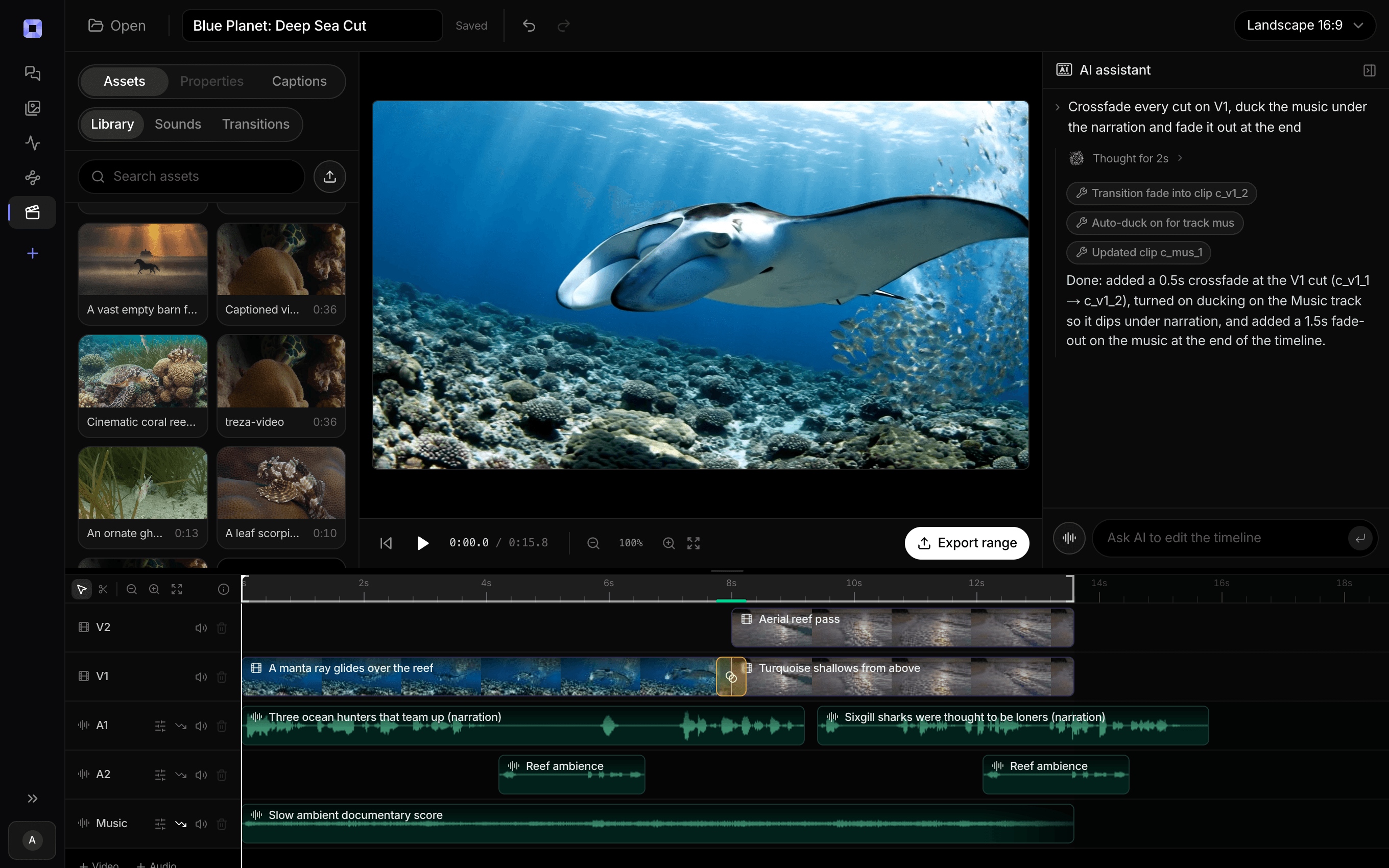
The same video, open in the built-in timeline editor.
What people build with it
Webinars into a clip feed
Every recorded webinar has two or three strong moments. Run the pipeline per recording and post them, instead of letting the replay link die in a follow-up email.
Video podcasts and interview shows
The classic clip show workflow: a long conversation in, a punchy vertical moment out, with the guest's best line as the hook.
Conference talks and panels
Speakers and events both need the highlight, not the hour. Clip the claim that got the room's attention and caption it for the feed.
Course and tutorial marketing
Pull the single most useful minute out of a lesson as a teaser. The transcript-driven picker finds insight, not just noise.
Agencies clipping for clients
Publish the pipeline as an endpoint and clip per client programmatically, with run history showing exactly what was produced and what it cost.
Repurposing a back catalog
Old recordings are free material. Feed them through one at a time and build a short-form presence from content you already own.

AI clip generator, answered
How does the AI decide which moment to clip?
From the transcript. Whisper transcribes the full video with subtitle-level timestamps, and a language model reads that timestamped transcript looking for a bold claim, a funny line, or a standalone insight spanning 30 to 60 seconds on sentence boundaries. It is explicitly instructed to skip intros, outros, sponsor reads, and self-promotion, and a length guard on the cutting node catches a bad answer before it renders.
Does it crop landscape video to vertical automatically?
Yes. The Extract Clip node's reframe setting cuts a 9:16 window around the speaker, so a 16:9 webinar becomes a Short-shaped clip with no separate editing step. A vision model finds who is on screen in each shot, and when two or more people share the frame the window follows whoever is talking. Other reframe options take a centered crop, pad the full frame onto a vertical canvas when trimming the sides would lose something, or keep the original framing.
Can I paste a YouTube link as the source?
No. The pipeline takes an uploaded video file or a direct media URL, and it does not download from YouTube or other platforms. Point it at your own recordings: the export from your webinar tool, the master from your editor, or a direct MP4 link you host.
How long can the source video be?
Hours. The transcription step streams and chunks long files rather than loading them whole, and the cutting step seeks directly into the source, so only the extracted segment is ever rendered. A two-hour recording clips in roughly the time it takes to transcribe it.
Can I get several clips from one video?
One clip per run, by design: each run picks, cuts, and captions a single moment. For more, rerun the pipeline (the picker runs with some temperature, so takes vary), or publish it as an endpoint and call it per clip. For a hand-picked set, the timeline editor cuts a source into up to 40 clips with per-clip trims.
Where can the finished clip go?
YouTube as a Short and TikTok as a direct post: add a YouTube Upload or TikTok Upload node after the captions, and it posts through official APIs on your connected account with the highlight picker's title and hashtags. For Reels or X, download the finished MP4 and upload it by hand.
How much does it cost to make a clip with Treza?
Treza runs on prepaid credits with no subscription. Each generation is charged at the model's own rate from your balance, and a failed generation costs nothing. A typical video generation settles around $1.06, and credit packs start at $5 and never expire.
Can I call this as an API instead of using the canvas?
Yes. Every pipeline can be published as a versioned HTTP endpoint. Call the typed /invoke endpoint with JSON in and JSON out, or point any OpenAI SDK at the OpenAI-compatible endpoint. Swap a model on a node later and the API your product calls does not change.
Do I need to know how to edit video?
No. Start from a template, change the topic, and run it. If you do want frame-level control, the timeline editor is there with multi-track video and audio, per-clip trims, fades, and volume, but nothing about the automated path requires opening it.
Related tools
AI shorts generator
Vertical short-form video for TikTok, Reels, and Shorts
AI podcast clip generator
Captioned Shorts cut from your podcast feed
AI video transcriber
Transcripts, SRT files, and captions from your recordings
See every tool, compare the models, read what an AI video pipeline is, or earn 30% sharing these tools.
Your first video is one prompt away.
Generate your first video, image, or draft today. Prepaid credits, no subscription.