

AI video workflow
An AI video workflow you configure once and rerun forever
Stop rebuilding the same video by hand in four tabs. Wire script, generation, voiceover, captions, and publishing into one workflow on a canvas, then trigger it manually, on a schedule, or from an API call.
Everything on this page was made on Treza.
The workflow is visible
Every step is a node on a canvas with its inputs, outputs, and cost in view. When something looks wrong in the final video, you can see exactly which step produced it and fix that step.
Steps you rearrange, not settings you fight
Want captions before the music, a second aspect ratio, or an extra review step? Move the nodes. The workflow is yours to shape rather than a fixed wizard.
All the models in one place
Video from Veo 3.1, Seedance 2.5, Seedance 2.0, Wan 2.7, and Grok Imagine Video, image models beside them, four text to speech models, and Whisper transcription, all as steps in the same workflow.
Sound and captions in the same pass
Narration from 82 voices, word-level transcription, and burned-in captions run inside the workflow, so the output is watchable with the sound off and finished without a second tool.
Three ways to trigger it
Run it from the canvas while you iterate, put it on a schedule when it is ready, or publish it as an API endpoint and trigger it from your own code, a form, or an agent over MCP.
History on every run
Each run records what every step produced and what it cost. Comparing yesterday's output to today's, or explaining a deliverable to a client, is a lookup rather than an archaeology project.
Workflows that run without you
Each of these is a saved graph. Open it, change the prompt, and it is your workflow.

Script to short
Writer, shots, voice, captions, upload.
Faceless Channel Short

Motion transfer
A filmed performance driving a generated character.
Motion Transfer

Daily social post
One run a day, sized for the feed.
Daily AI Short
From idea to finished video
- Step 01
Pick the workflow shape
Start from a template: a captioned short, a clip factory, a product video. The steps arrive already connected and working.
- Step 02
Set the constants
Your niche and tone in the script prompt, your model choices, your voice, your caption style. These persist across every future run.
- Step 03
Iterate per step
Run it, watch each step's output, and improve the weak link. Rerunning one node costs one node, which is what makes iteration affordable.
- Step 04
Take yourself out of the loop
Schedule it, or hand the trigger to your team, your product, or your agent. The workflow keeps producing while you work on the next one.
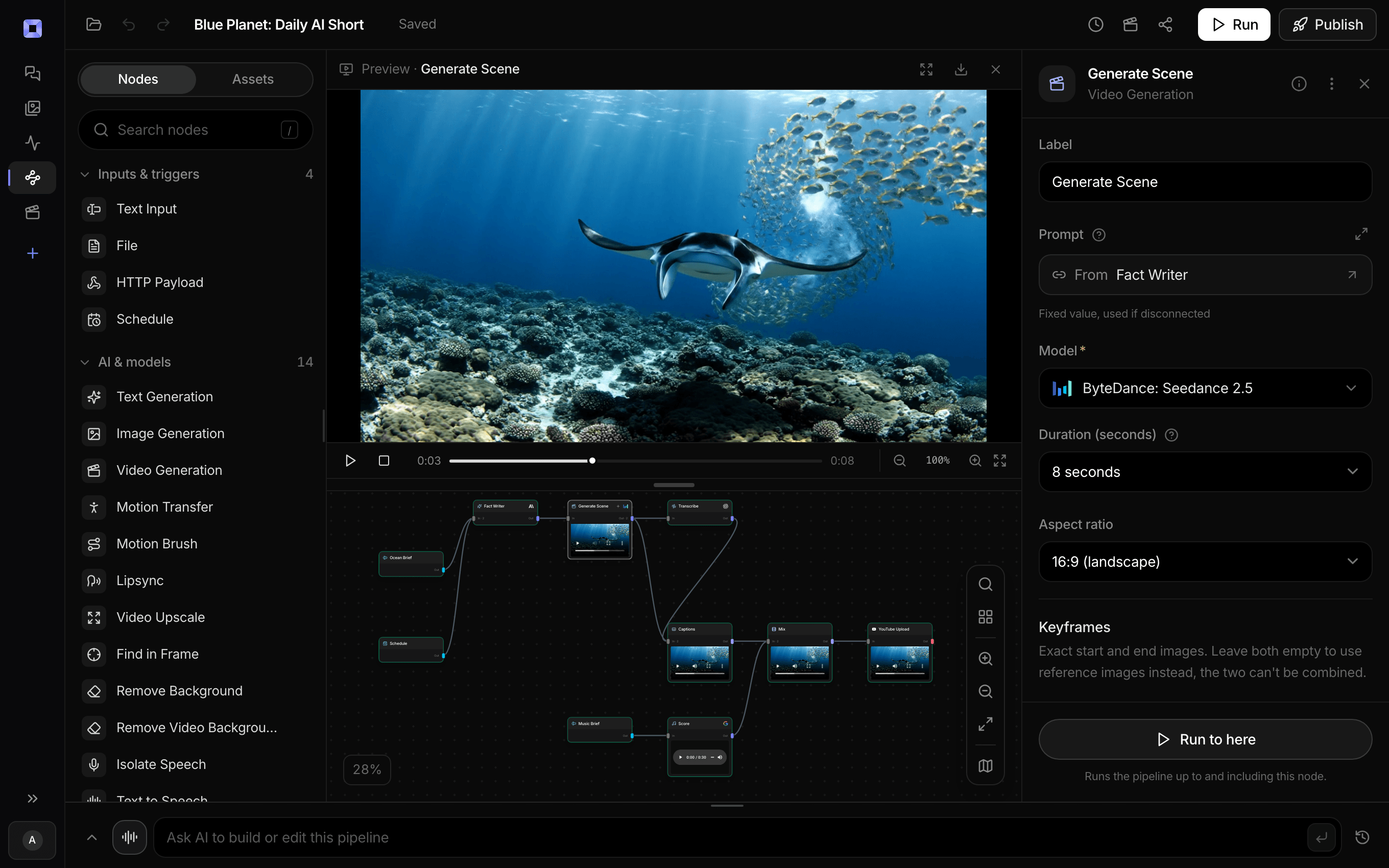
Ask for the pipeline in the composer, or send it from Claude over MCP.
What people build with it
A daily short-form workflow
Topic in, captioned vertical video out, published to YouTube Shorts and TikTok. The schedule keeps the cadence when you are busy.
Podcast to clips, weekly
Each episode runs through the same transcribe, pick, cut, caption, publish steps. The workflow does not forget how you like your clips.
Campaign variants for testing
The brief changes, the workflow does not. Generate hook variants at volume with the brand rules pinned in the system prompt.
Client work with an audit trail
Run history shows every deliverable's steps, models, and cost, which turns end-of-month reporting into a screenshot.
Localizing one video into many
Duplicate the workflow, translate the script step, switch the voice. The multilingual model covers 14 languages.
Workflows other software can call
Published workflows are versioned endpoints, so the same steps that run on the canvas also run from a webhook, a cron job, or Claude over MCP.

Wire it once. Run it for as long as you like.
Nodes, not scripts, and nothing to deploy.
AI video workflow, answered
What is an AI video workflow?
An AI video workflow is the repeatable sequence of steps that turns an idea into a finished video using AI models: scripting, shot generation, narration, captioning, assembly, and publishing. On Treza the workflow is literal rather than a checklist: each step is a node on a canvas, connected in order, so running the workflow means running the graph. Configure it once and every future video follows the same steps with new inputs.
How is a workflow different from just prompting a video generator?
Prompting a generator produces one clip and no process. A workflow captures everything around that clip: how the script gets written, which model renders which kind of shot, how narration and captions are added, and where the finished video goes. That captured process is what lets you produce the tenth video as easily as the first, and what makes quality repeatable instead of lucky.
Can I automate the whole workflow end to end?
Yes. A schedule trigger runs the published workflow hourly, daily, weekly, or on a cron expression, and the publishing steps upload to YouTube or TikTok with generated metadata. If you want a human in the loop, an approval node pauses the run until someone signs off, and publish nodes default to non-public visibility.
Can my team or my software trigger the workflow?
Both. Published workflows become versioned HTTP endpoints with a typed /invoke route and an OpenAI-compatible route, so your own tools can trigger runs and poll results. There is also a hosted MCP server, so agents like Claude can list your workflows, start runs, and fetch the outputs.
What happens when a step fails or looks wrong?
The run shows per-step results, so the failing step is identifiable rather than buried in a black box. Rerun just that node, adjust its prompt or model, and continue. Failed generations are not charged, and the rest of the workflow's completed steps do not need to be paid for again.
How much does it cost to make ai video workflow with Treza?
Treza runs on prepaid credits with no subscription. Each generation is charged at the model's own rate from your balance, and only successful runs are charged, so a failed generation costs nothing. A typical video generation settles around $1.06, and credit packs start at $5 and never expire.
Can I call this as an API instead of using the canvas?
Yes. Every pipeline can be published as a versioned HTTP endpoint. Call the typed /invoke endpoint with JSON in and JSON out, or point any OpenAI SDK at the OpenAI-compatible endpoint. Swap a model on a node later and the API your product calls does not change.
Do I need to know how to edit video?
No. Start from a template, change the topic, and run it. If you do want frame-level control, the timeline editor is there with multi-track video and audio, per-clip trims, fades, and volume, but nothing about the automated path requires opening it.
Related tools
AI video pipeline
Automated pipelines that end published, on a schedule or via API
AI video generator
The full video pipeline, from prompt to published
Faceless video generator
Faceless YouTube and TikTok channels that publish on a schedule
See every tool, compare the models, read what an AI video pipeline is, or earn 30% sharing these tools.

Your first video is one prompt away.
Generate your first video, image, or draft today. Prepaid credits, no subscription.