

AI video generator
The AI video generator built on pipelines
Generate video with Veo 3.1, Seedance 2.5, Seedance 2.0, Wan 2.7, or any model on the catalog. Then chain the steps around it, script, voiceover, captions, stitching, publishing, into one pipeline you can rerun, schedule, or call as an API.
Everything on this page was made on Treza.
Every top video model
Veo 3.1 and Veo 3.1 Fast, Kling 3.0 Pro, Seedance 2.5, Seedance 2.0 and Seedance 2.0 Fast, Wan 2.7, and Grok Imagine Video, with any other model id typed straight into the node as the catalog grows.
Audio generated with the picture
The current generation of models produce dialogue, ambience, and effects in sync with the frames instead of leaving you to score a silent clip afterwards.
Keyframe and reference control
Pin the first and last frame with images on the models that support it, or pass reference images so the generated shot is anchored to something real.
More than one clip
Generation is one node. Stitch shots into a finished edit, mix narration over the top, transcribe it, burn in captions, and export portrait or landscape, all in the same run.
Publish it as an API
Every pipeline becomes a versioned endpoint. Call the typed /invoke endpoint, or point any OpenAI SDK at the OpenAI-compatible one, and swap models later without changing the integration.
Pay for what you generate
Prepaid credits with no subscription, priced per model, and a failed generation costs nothing. A typical video generation settles around $1.06, and packs start at $5.
One brief, any model
The same pipeline calls whichever model suits the shot. These are three different ones, named under each frame.

Architectural
A dolly through a sunlit room, dust in the light.
Seedance 2.5

Fashion
A studio turn with the fabric catching the key.
Veo 3.1

Automotive
Neon rain, with the reflections holding across the move.
Veo 3.1 Fast
From idea to finished video
- Step 01
Describe the shot
Write the prompt, or let a language model node expand a short brief into a detailed shot description before it reaches the video model.
- Step 02
Pick a model
Choose by what the shot needs: native audio, keyframe control, duration, or aspect ratio. Fast variants are for iterating and flagship models are for the final render.
- Step 03
Build the rest of the video
Add narration, stitch multiple shots, burn in captions, and export at the size the destination wants.
- Step 04
Rerun, schedule, or call it
Keep working on the canvas, put the pipeline on a schedule, or publish it as an endpoint your product calls.
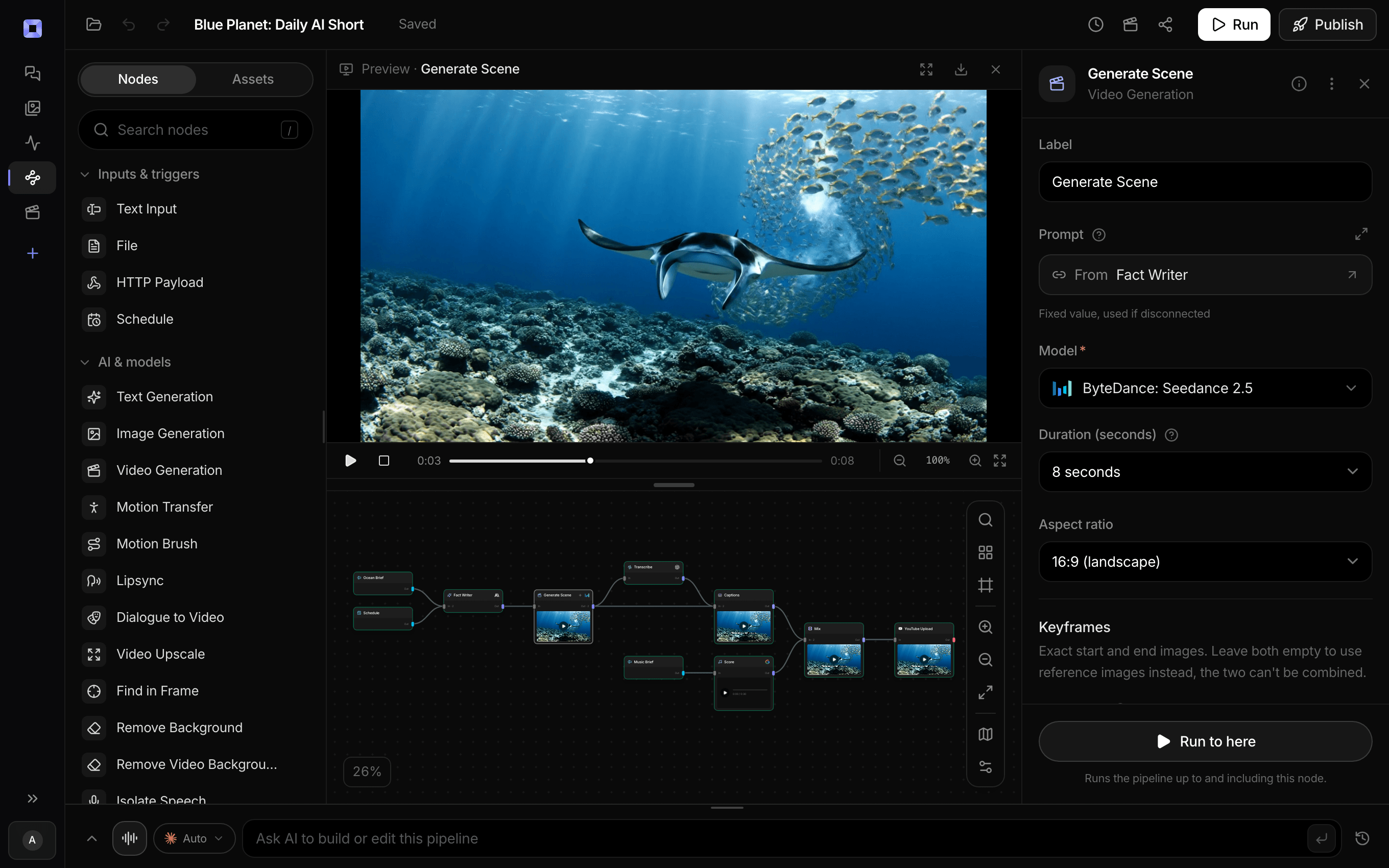
Ask for the pipeline in the composer, or send it from Claude over MCP.
What people build with it
Faceless video channels
Script, generate, narrate, caption, and publish on a schedule. See the faceless video generator page for the full build.
Short-form social video
Native 9:16 on every model, captions styled for muted feeds, and direct publishing to YouTube Shorts and TikTok.
Ad creative and UGC-style spots
Many hooks from one brief, rendered as variants you can actually test against each other.
Product and demo videos
Reference images and camera direction in plain language, reused across a whole catalog.
Video generation inside your product
Publish the pipeline and let your own users trigger generation through your interface, with your prompt engineering baked in.
Comparing models properly
Run the same prompt through several models side by side on one canvas, and swap the winner into the pipeline without rebuilding it.
Generate it, cut it, publish it, in one place.
The clip is the start of the pipeline, not the end of the job.
AI video generator, answered
Which platform lets me run Veo, Kling and Seedance in one automated video workflow with an API?
Treza does. Veo 3.1, Kling 3.0 Pro, and Seedance 2.5 sit in one model picker, so a single pipeline can send a script to all three, stitch the shots, add narration and captions, and publish. Run it on a schedule, or publish it as a versioned API endpoint your code calls through the typed /invoke route or an OpenAI-compatible one.
What is an AI video pipeline?
An AI video pipeline is an automated sequence of connected AI models that turns a brief or script into a finished, published video. On Treza that chain is nodes on a canvas: a language model writes the script, video models render the shots, text to speech narrates, captions burn in after transcription, and an upload node publishes to YouTube or TikTok. The whole chain reruns on new inputs, runs on a schedule, or answers as an API.
Which AI video models can I use?
The catalog includes Veo 3.1 and Veo 3.1 Fast, Kling 3.0 Pro, Seedance 2.5, Seedance 2.0 and Seedance 2.0 Fast, Wan 2.7, and Grok Imagine Video, and you can type any other supported model id directly into a video node. Models are added as they ship, and swapping the model on a node does not disturb the rest of the pipeline.
How long can a generated video be?
A single clip runs from about 2 up to 30 seconds depending on the model, with Seedance 2.5 at the top of that range and Seedance 2.0 handling 4 to 15. Longer videos come from stitching: one Sequence node combines up to 12 shots, and the timeline editor exports up to 40 clips or 15 minutes.
How is this different from a single AI video generator?
A one-shot generator returns a clip and stops. Treza is a node editor, so generation sits in a chain: refine the brief with a language model, generate several shots, narrate them, stitch them, caption them, and publish them. That whole chain reruns on new inputs, runs on a schedule, or becomes an API endpoint.
Do generated videos include sound?
Most current models generate audio with the frames, so ambience and effects arrive in sync. You can also add a narration track from a text to speech node, and choose per layer whether the clip's own audio is kept or muted when the two would compete.
Can I generate video through an API?
Yes. Publish a pipeline and it becomes a versioned HTTP endpoint. The typed /invoke endpoint enqueues the run and returns a run id you poll, and there is also an OpenAI-compatible endpoint with streaming for tools that already speak that protocol.
Can I bring my own provider keys?
Yes. Provider keys are stored encrypted and you pay your provider directly for those models, which keeps you free of lock-in on both the model and the billing side.
How much does it cost to make ai video generator with Treza?
Treza runs on prepaid credits with no subscription. Each generation is charged at the model's own rate from your balance, and a failed generation costs nothing. A typical video generation settles around $1.06, and credit packs start at $5 and never expire.
Can I call this as an API instead of using the canvas?
Yes. Every pipeline can be published as a versioned HTTP endpoint. Call the typed /invoke endpoint with JSON in and JSON out, or point any OpenAI SDK at the OpenAI-compatible endpoint. Swap a model on a node later and the API your product calls does not change.
Do I need to know how to edit video?
No. Start from a template, change the topic, and run it. If you do want frame-level control, the timeline editor is there with multi-track video and audio, per-clip trims, fades, and volume, but nothing about the automated path requires opening it.
Related tools
AI video pipeline
Automated pipelines that end published, on a schedule or via API
AI image to video generator
Motion from a photo, poster, or generated key frame
Faceless video generator
Faceless YouTube and TikTok channels that publish on a schedule
See every tool, compare the models, read what an AI video pipeline is, or earn 30% sharing these tools.
Your first video is one prompt away.
Generate your first video, image, or draft today. Prepaid credits, no subscription.