


AI Voiceover Generator. Turn any script into a finished voiceover.
Type or generate a script, pick one of 82 voices, and get natural narration back in seconds. Keep it as audio, or let the same pipeline mix it over generated video with burned-in captions.
Everything on this page was made on Treza.
82 voices across four models
The text to speech node carries a catalog of 82 voices spanning four speech models, from warm narrator reads to character voices. Preview any voice on the canvas before you spend a run on it.
14 languages on one voice
The multilingual model speaks 14 languages, so the same pipeline can narrate the same script for different audiences by changing one setting instead of finding a new tool per market.
Speed and delivery control
Set speaking speed per node, and use per-voice style options where the model supports them. When a read comes back too fast for your edit, you change a slider and rerun one node, not the whole project.
Voiceover that flows into video
Narration is a node, not a dead end. Wire it into a Sequence node and it gets mixed over your shots, up to 12 generated scenes per sequence, with the audio driving the pacing.
Captions straight from the narration
Whisper transcribes your generated voiceover with word-level timestamps and a captions node burns the words in. The captions always match the audio because they come from the audio.
Scripts written for you
Put a language model node in front of the voiceover and a topic becomes a script becomes narration in one run. Give it your angle once and every future run sounds like you.
Narration, mixed into the cut
Turn the sound on. The voice in each of these was generated in the same run that made the picture, then ducked under the ambience automatically.

A documentary read
Measured, low, and mixed over the bed.
Fact of the Day

Channel narration
The same voice every run, so the channel sounds like one.
Seedance 2.5

A scripted read to camera
Voice and picture from the same script node.
Talking Head Short
From idea to finished video
- Step 01
Write or generate the script
Paste your script into the text to speech node, or wire a language model in front of it with a prompt that describes your voice and audience.
- Step 02
Pick a voice and preview it
Browse the 82-voice catalog by character and gender, preview candidates on the canvas, and set the speaking speed.
- Step 03
Run it and listen per node
The narration renders on its own node, so you can listen, tweak the script or the voice, and rerun just that node until the read is right.
- Step 04
Use it as audio or mix it into video
Download the audio, or keep going on the same canvas: stitch shots under it, burn in captions, and publish the finished video to YouTube or TikTok.
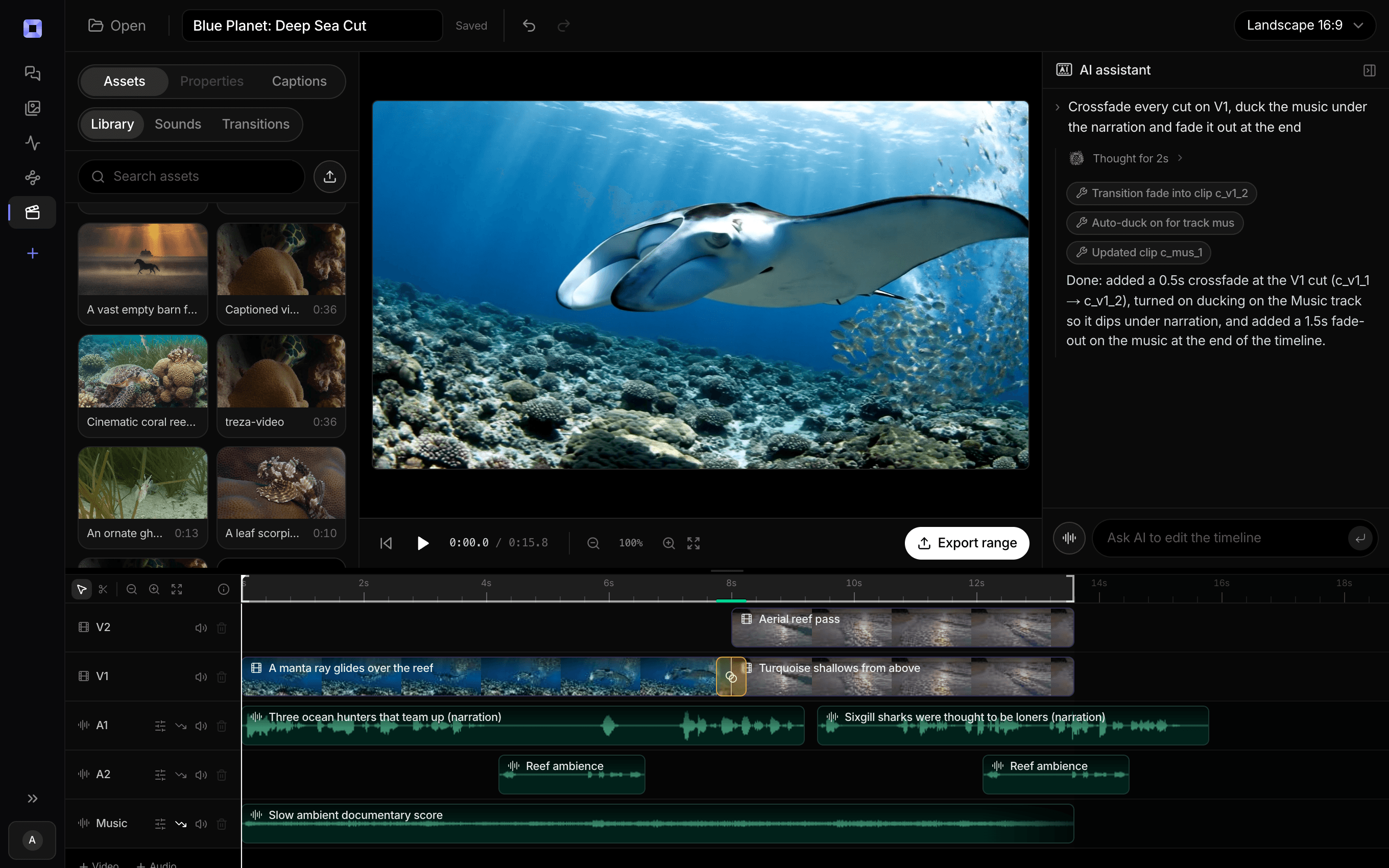
The same video, open in the built-in timeline editor.
What people build with it
Faceless channel narration
The narrator is the product on a faceless channel. Pick a voice once and every video the schedule produces speaks with it, run after run.
Shorts and TikTok voiceovers
Hook lines and 30-second reads over generated footage, with karaoke-style captions that survive muted autoplay.
Product demos and explainers
A clear, steady read over screens and generated b-roll. Update the script when the product changes and rerun, the voice stays identical.
Ads and UGC-style reads
Generate multiple reads of the same offer in different voices and test which one converts, without booking talent for each variant.
Multilingual versions of one video
Fork the pipeline, switch the voice or language on the text to speech node, and ship the same script to a second market. The multilingual model covers 14 languages.
Audio drafts before you record
Hear your script read aloud before you commit to recording it yourself, then keep the AI read if it is good enough to ship.

Write the line. Hear it in the cut.
Preview a voice before you spend a run on it.
AI voiceover generator, answered
How does the AI voiceover generator work?
Text goes into a text to speech node, you choose one of 82 voices across four speech models, and the node returns finished narration audio. Because it is a node on a canvas, the output can flow into whatever comes next: a Sequence node that mixes it over video, a transcription node that times it for captions, or a download.
Can I use the voiceovers commercially and on monetized channels?
Yes. The narration is generated for you and is yours to use in your videos, ads, and client work, including monetized YouTube channels. What matters for monetization review is that your overall video is original content, not who read the script.
Can I clone my own voice?
Not today. Voiceovers come from the built-in catalog of 82 voices with speed control and per-voice style options on some models. If you want your own voice on a video, upload your recorded narration into the timeline editor and mix it there.
What languages are supported?
The multilingual model speaks 14 languages, and the rest of the catalog is strongest in English. Pair the voiceover node with a language model that translates your script first and one pipeline can produce localized narration for each market.
How long can a voiceover be?
A single text to speech run handles scripts on the scale of a narrated video, and longer projects chain runs per section. For video work the practical limit is the edit itself: the timeline editor exports up to 15 minutes, which is far more narration than most shorts-driven formats ever use.
How do captions stay in sync with the voiceover?
The pipeline transcribes the generated narration with Whisper, which returns word-level timestamps, and the captions node burns the words in from those timestamps. Since the captions are derived from the finished audio rather than the script, pauses and pacing line up.
How much does it cost to make a voiceover with Treza?
Treza runs on prepaid credits with no subscription. Each generation is charged at the model's own rate from your balance, and a failed generation costs nothing. A typical video generation settles around $1.06, and credit packs start at $5 and never expire.
Can I call this as an API instead of using the canvas?
Yes. Every pipeline can be published as a versioned HTTP endpoint. Call the typed /invoke endpoint with JSON in and JSON out, or point any OpenAI SDK at the OpenAI-compatible endpoint. Swap a model on a node later and the API your product calls does not change.
Do I need to know how to edit video?
No. Start from a template, change the topic, and run it. If you do want frame-level control, the timeline editor is there with multi-track video and audio, per-clip trims, fades, and volume, but nothing about the automated path requires opening it.
Related tools
Faceless video generator
Faceless YouTube and TikTok channels that publish on a schedule
AI shorts generator
Vertical short-form video for TikTok, Reels, and Shorts
AI video transcriber
Transcripts, SRT files, and captions from your recordings
See every tool, compare the models, read what an AI video pipeline is, or earn 30% sharing these tools.
Your first video is one prompt away.
Generate your first video, image, or draft today. Prepaid credits, no subscription.