

AI video pipeline
Build an AI video pipeline on one canvas
An AI video pipeline is a connected chain of models that turns a brief into a finished, published video. Build one on Treza's node canvas: script, shots, narration, captions, and publishing, wired once and rerun on a schedule or from an API.
Everything on this page was made on Treza.
The whole chain, not one step
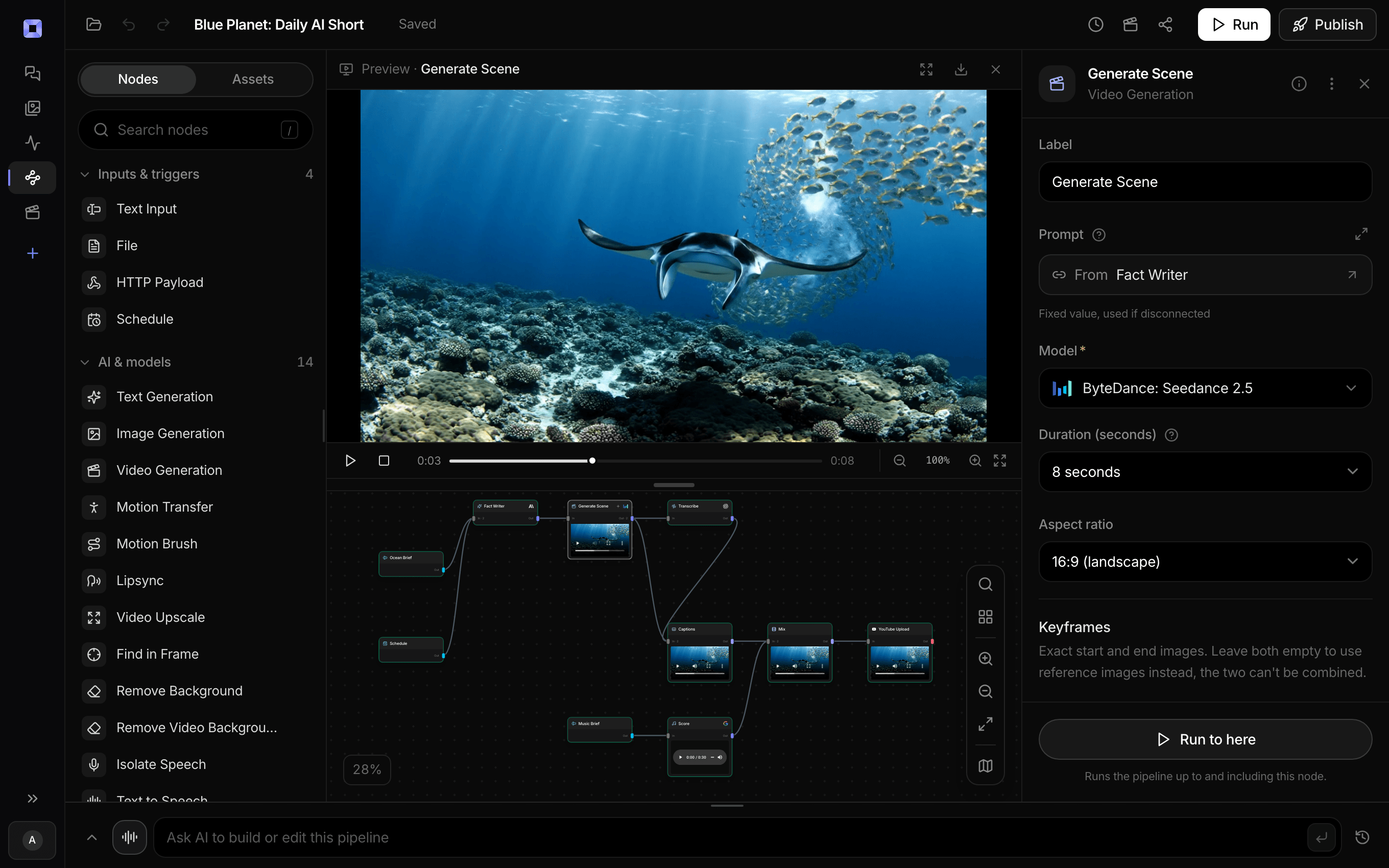
A language model writes the script and shot list, video models render each scene, text to speech narrates, Whisper transcribes, captions burn in, and a publish node uploads. Each stage is a node you can inspect, swap, or rerun alone.
Model flexibility per node
Veo 3.1, Seedance 2.5, Seedance 2.0, Wan 2.7, and Grok Imagine Video share one catalog. Swap the model on a node and the pipeline around it does not change, so upgrades cost a click instead of a rebuild.
Quality gates where they matter
Rerun a single weak shot without paying for the batch, hold the run at an approval node until a human signs off, and let publish nodes default to non-public visibility so nothing ships unseen.
Reusable by design
The pipeline is the asset. Templates cover captioned shorts, clip factories, and product videos, and any pipeline you build reruns forever on new inputs with the structure, voice, and style intact.
Distribution wired in
YouTube and TikTok nodes publish through official APIs with titles, descriptions, and tags written from the transcript. A schedule trigger reruns the pipeline hourly, daily, or on any cron expression.
Every pipeline is an API
Publish a pipeline and it becomes a versioned HTTP endpoint with a typed /invoke route, an OpenAI-compatible route, and MCP tools so Claude and other agents can run it directly.
What a pipeline hands back
A pipeline is not a prompt box. It is a graph you can see, wire yourself, and put on a schedule.

A one-off commercial
The same kind of graph, run once, in 16:9.
Seedance 2.5

Scheduled, vertical, published
Script to YouTube in one graph, every day.
Seedance 2.5

Clipped from a source
A transcript node choosing where to cut.
Whisper Large v3

Captioned in the same run
Transcribed and burned in, with no second tool.
Captioned AI Short
From idea to finished video
- Step 01
Start from a working pipeline
Open a template that already chains script to shots to narration to captions, so you are editing a pipeline that runs rather than wiring one from a blank canvas.
- Step 02
Make it yours
Point the script node's system prompt at your niche, pick the video model per shot, and choose a voice. These three choices are what make the output yours.
- Step 03
Run it and inspect per node
Every node shows its output, cost, and settings. When one shot misses, rerun that node. When a model underperforms, swap it and keep the rest.
- Step 04
Automate it
Publish the pipeline, connect a channel, and add a schedule or call it as an API. From here production is an input change, not a project.
Ask for the pipeline in the composer, or send it from Claude over MCP.
What people build with it
Faceless channels on a schedule
The classic pipeline: script memory, generated scenes, narration, captions, and a daily upload, running while you do something else.
Clip factories for long recordings
Transcribe a webinar or podcast, let a language model pick the strongest moment, cut it in place, caption it, and post it as a Short.
Ad variants at test volume
One brief becomes several hooks, each rendered as its own shot, so creative testing is limited by budget rather than production time.
Product video per SKU
Reference images anchor the shots to the real product, and the same pipeline reruns for every item in the catalog.
The same video in more languages
Fork the pipeline, translate the script with a language model node, switch the voice, and ship the second market from the same structure.
Video generation inside your product
Call the pipeline's endpoint from your own application and your users get finished, captioned video with your prompt engineering baked in.

Every step is a node you can open.
See which shot missed, rerun that one, keep the rest.
AI video pipeline, answered
What is an AI video pipeline?
An AI video pipeline is an automated sequence of connected AI models that turns a brief or script into a finished, published video. Each stage handles one job: a language model writes the script and shot list, video generation models render the scenes, text to speech narrates, transcription and caption steps make it readable with the sound off, and a publishing step uploads the result. Because the stages are connected, the whole chain reruns on new inputs, runs on a schedule, or answers as an API.
What is the difference between a pipeline, a workflow, and a production platform?
The terms overlap, but the useful distinction is what each one automates. A workflow is the repeatable process, the steps in order. A pipeline is that workflow made executable, so a machine runs the steps without you. A production platform is the broader workspace around it, which may include planning and review surfaces. Treza is built pipeline-first: the canvas is where you author the chain, and the chain itself is what runs, schedules, and serves as an API.
Do I need to write code to build one?
No. Pipelines are built by connecting nodes on a canvas and configuring them with prompts and settings. Code shows up only where you want it: a code node exists for custom logic between stages, and the API exists for triggering pipelines from your own software.
How does a pipeline keep quality consistent?
Structure does most of the work. The system prompt on the script node encodes your format and voice once, reference images and first-frame control anchor the visuals, each shot renders on its own node so a miss gets rerun alone, and an approval step can hold the run for human review before the publish node fires.
Can a pipeline publish to YouTube and TikTok by itself?
Yes. Upload nodes post through the official YouTube and TikTok APIs on OAuth-connected accounts, with generated titles, descriptions, and tags from the transcript. Combined with a schedule trigger, the pipeline writes, renders, and publishes on a cadence without you opening the app.
How much does it cost to make ai video pipeline with Treza?
Treza runs on prepaid credits with no subscription. Each generation is charged at the model's own rate from your balance, and only successful runs are charged, so a failed generation costs nothing. A typical video generation settles around $1.06, and credit packs start at $5 and never expire.
Can I call this as an API instead of using the canvas?
Yes. Every pipeline can be published as a versioned HTTP endpoint. Call the typed /invoke endpoint with JSON in and JSON out, or point any OpenAI SDK at the OpenAI-compatible endpoint. Swap a model on a node later and the API your product calls does not change.
Do I need to know how to edit video?
No. Start from a template, change the topic, and run it. If you do want frame-level control, the timeline editor is there with multi-track video and audio, per-clip trims, fades, and volume, but nothing about the automated path requires opening it.
Related tools
AI video workflow
Repeatable video production, from one-off runs to full automation
AI video generator
The full video pipeline, from prompt to published
Faceless video generator
Faceless YouTube and TikTok channels that publish on a schedule
See every tool, compare the models, read what an AI video pipeline is, or earn 30% sharing these tools.

Your first video is one prompt away.
Generate your first video, image, or draft today. Prepaid credits, no subscription.