

AI YouTube thumbnail generator
YouTube thumbnails built from the best frames in your video
The Thumbnail node samples your clip, picks the strongest faces or the sharpest frame, and sets a bold headline over it with one word in an accent color. Wire it into the YouTube publisher and a regular upload goes live with it as the custom thumbnail.
Everything on this page was made on Treza.
Real frames, never generated faces
The node samples the clip, 24 frames by default and up to 40, scores every one, and keeps the best. With people on screen it ranks faces by size, focus, and lighting. Faces are never generated: a generated image can only ever be the backdrop behind them.
Two-up for host and guest
When the clip cuts between two visibly different people, Auto lays them side by side, host on one half and guest on the other, the way podcast clip channels do it. With one usable face it sets a single full frame instead of showing the same person twice.
Headline type that reads at tile size
The headline is set in capitals, wrapped to at most three lines, and sized to fill the width, with one word or phrase painted in the accent color. A small label pill above it carries the guest, the show, or the series name.
Cutout art over a backdrop
Grab the frames with Frame Grab, cut the people out with Remove Background, and wire in a generated backdrop. The Art style stands them in front of the scene and lights them from behind in the accent color.
Faceless footage works too
With nobody on screen, frames are ranked as pictures on detail, contrast, and exposure. Send the best few through an Image Generation node as references to repaint them into one scene, then set the headline over the result.
Published with the upload
Wire the image into the YouTube publisher's Thumbnail port and it is set the moment a regular upload goes live. If YouTube refuses it, the video still publishes and the run note says why, so a picture never costs you the post.
The best frame is already in the video
The Thumbnail node never invents a person. It ranks what is on screen, so the footage decides the layout. Each of these was generated on Treza, and each is a different case the node handles.

Two people at the desk
The case the two-up layout is for.
Veo 3.1 Fast

One subject, lit
A single face, ranked on size, focus, and light.
Seedance 2.5

Nobody on screen
Frames ranked as pictures, ready to repaint.
Veo 3.1
From idea to finished video
- Step 01
Wire in the video, before captions
Connect the clip from a Video Generation, Sequence, or File node. Take it from before the Captions node, or the burned-in words land in the thumbnail too.
- Step 02
Give it a headline
Type one, or wire a language model node that reads the transcript and writes three to five words plus the word to paint in the accent color. Short headlines set bigger.
- Step 03
Pick the look
Choose screen grab or art, the layout, the size, text at the top or bottom, one of five fonts, and the accent color. Raise the frames to consider on a long clip to find a better still.
- Step 04
Publish it with the video
Wire the image into the YouTube publisher's Thumbnail port for a regular upload. For a Short, YouTube takes the thumbnail from Studio or the app, so download the image and set it there.
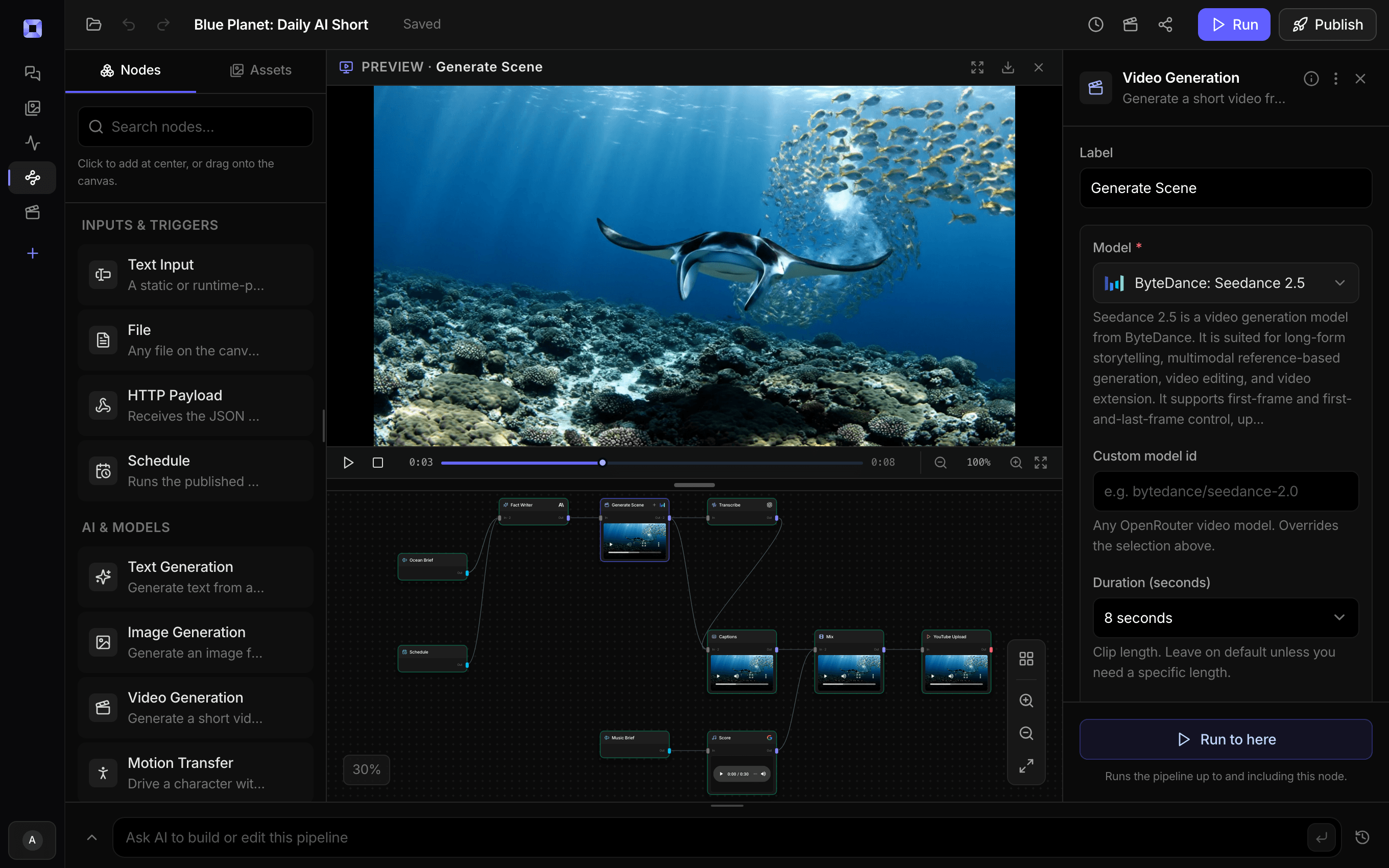
Ask for the pipeline in the composer, or send it from Claude over MCP.
What people build with it
Podcast and interview clips
Host and guest side by side, the guest's name in the label pill, and the line that made the clip as the headline. The layout clip channels use, from the episode's own footage.
Regular uploads on a schedule
Every scheduled upload gets its own thumbnail built from its own footage and set as it publishes, so the channel page fills with designed tiles without a design pass per video.
Faceless and nature channels
No presenter to grab, so the node ranks frames as pictures. Repaint the best ones into a single scene with an image model and set the headline over it.
A series with one look
Fix the font, the accent color, and the label once on the node, and every episode that runs through the pipeline comes out looking like the same show.
Thumbnails for clips you already have
Drop a clip into chat and ask for a thumbnail with your headline. The finished image comes back in the conversation, ready to download.


The first frame anyone sees of your video.
Real faces from the footage, a headline that reads at tile size.
AI YouTube thumbnail generator, answered
How does the AI thumbnail generator work?
Wire a video and a headline into the Thumbnail node. It samples the clip, scores every frame, and picks the strongest faces, or the sharpest, best-exposed frame when nobody is on screen. Then it lays up one or two of them, sets the headline in capitals with an accent word, and returns a JPEG you can publish, download, or pass to the next node.
Does it set the thumbnail on YouTube for me?
Yes, for regular uploads. Wire the image into the YouTube publisher's Thumbnail port and it is set as soon as the video is live. Custom thumbnails need a phone-verified channel; if YouTube refuses one, the video still publishes and the run says why. YouTube only takes a Short's thumbnail from YouTube Studio or the app, so for a Short, download the image and set it there.
Are the people in the thumbnail generated?
No. Faces always come from real frames of your video. A generated image can be the backdrop behind them, and on footage with no people the whole frame can be repainted, but a person on the thumbnail is always a person who was on screen.
What sizes does it make?
Wide 16:9 at 1280 by 720 for regular uploads, vertical 9:16 at 1080 by 1920, and square at 1080 by 1080. The file is a JPEG, re-encoded if needed to stay under YouTube's 2MB limit for custom thumbnails.
Can I use my own images or artwork?
Yes. Wire pictures into the Images input and they are used instead of grabbing frames from the video. Wire any image into the Backdrop input, from an Image Generation node or a File node, and the frames sit on it instead of on a blurred copy of themselves. Feed in cutouts from Remove Background and the Art style stands the people in front of it.
Can I make one without building a pipeline?
Yes. Upload a clip in chat and ask for a thumbnail with the headline you want. Chat runs the Thumbnail node on that clip and posts the finished image back into the conversation.
How much does it cost to make ai youtube thumbnail generator with Treza?
Treza runs on prepaid credits with no subscription. Each generation is charged at the model's own rate from your balance, and only successful runs are charged, so a failed generation costs nothing. A typical video generation settles around $1.06, and credit packs start at $5 and never expire.
Can I call this as an API instead of using the canvas?
Yes. Every pipeline can be published as a versioned HTTP endpoint. Call the typed /invoke endpoint with JSON in and JSON out, or point any OpenAI SDK at the OpenAI-compatible endpoint. Swap a model on a node later and the API your product calls does not change.
Do I need to know how to edit video?
No. Start from a template, change the topic, and run it. If you do want frame-level control, the timeline editor is there with multi-track video and audio, per-clip trims, fades, and volume, but nothing about the automated path requires opening it.
Related tools
AI YouTube title and tag generator
Titles, descriptions, and tags written per upload from the transcript
AI podcast clip generator
Captioned Shorts cut from your podcast feed
Faceless video generator
Faceless YouTube and TikTok channels that publish on a schedule
See every tool, compare the models, read what an AI video pipeline is, or earn 30% sharing these tools.

Your first video is one prompt away.
Generate your first video, image, or draft today. Prepaid credits, no subscription.