


AI TikTok Video Generator. Vertical, captioned, and posted to TikTok.
Describe the video and Treza writes it, renders a 9:16 clip with the narrator's voice and sound in it, and burns in word-by-word captions. Post it to your TikTok from the chat, or put it on a schedule that direct posts to your account.
Everything on this page was made on Treza.
Vertical from the first frame
The clip renders at 9:16 on Veo 3.1 Fast, so nothing is cropped out of a landscape shot. A lighter version runs the same steps on a cheaper video model at its shortest length.
The voice and the sound in the clip
A writer turns your idea into one shot description plus the exact line the narrator says, and the video model generates the speech and the ambient sound together with the picture.
Captions for a muted feed
A transcription model times every word and checks it against the script, then captions burn in bold, four words at a time, in the lower middle of the frame. On the captions node, switch to a heavy display font, all caps, a pop-in, or a highlighted spoken word.
Post from the chat, your choices
Ask to post the finished video to TikTok and a post card appears in the thread. You choose who can view it, whether comments, Duet, and Stitch are on, and any promotional disclosure, then press Post yourself.
Direct post on a schedule
For a daily account, a TikTok Upload node at the end of the pipeline posts each new video through TikTok's Direct Post API with the settings you saved on it, and a schedule trigger runs it hourly, daily, weekly, or on a cron.
Captions written, AI label on
Leave the post caption blank and a language model writes one with hashtags from the transcript, within TikTok's 2,200 characters. Videos Treza made carry TikTok's AI-generated content label.
Checked against your account
Before the post card appears, Treza asks TikTok which privacy levels your account allows and the longest video it can post, so the card never offers a choice TikTok would refuse.
Vertical clips this template made
Runs of the Captioned AI Short from our ocean channel, captions as they were burned in. Each is the kind of vertical file the TikTok post card takes.

Word by word
The narrated line lands as it is spoken, clear of the subject.
Captioned AI Short

The key word lit
Hydrothermal vents, with the keyword of the line highlighted.
Captioned AI Short

From one written idea
One prompt, one vertical clip, captions burned in.
Captioned AI Short
What the captions node does to a clip
The same six seconds of one run with the captions node off and on. A TikTok scrolled past with the sound off still reads.


From idea to finished video
- Step 01
Describe the TikTok
Type the idea into chat, or keep the request the button wrote: the subject, the hook, the tone. The Captioned AI Short turns it into a shot with the narrator's line in it.
- Step 02
Pick the version and run
Run it on the model the template is built with, or on the lighter version with a cheaper video model. Both prices show before anything runs, and the captioned clip lands in the chat.
- Step 03
Connect TikTok
Ask to connect TikTok and the chat gives you a link. TikTok asks your permission to post, and the page tells you when the account is connected.
- Step 04
Post it, or schedule it
Ask to post it and finish the card, or ask for a TikTok a day and the chat adds the upload step, with the visibility you choose, and the schedule. Set a daily spend cap so the schedule pauses itself at your budget.
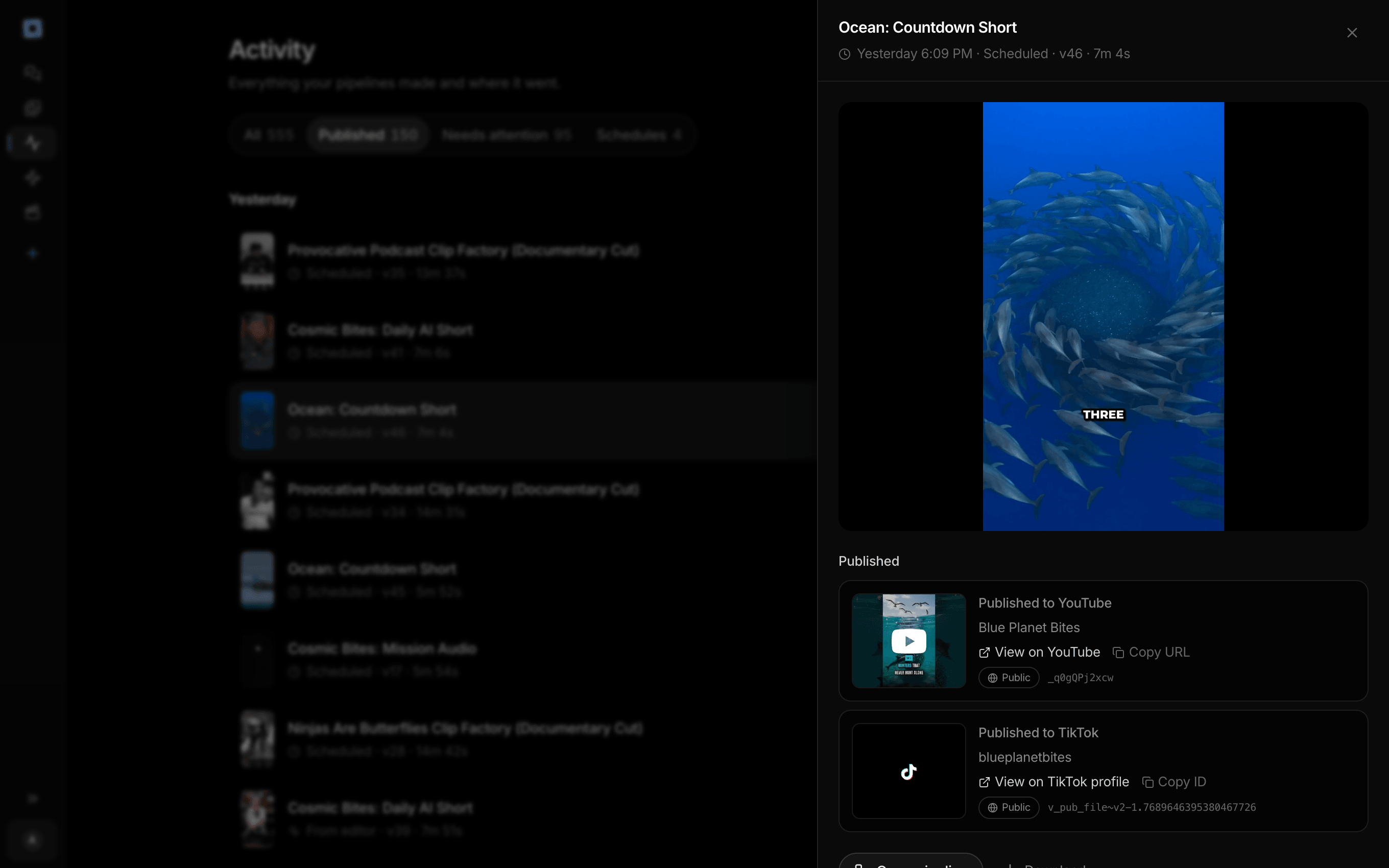
Every run the account has made, and what each one published.
What people build with it
Faceless TikTok accounts
Facts, mysteries, and how-it-works clips with a narrator and captions and no one on camera, one a day.
Did you know TikToks
One surprising line, spoken in the clip and captioned word by word, so it lands with the sound off. Check the fact before it posts.
Space and science TikToks
Black holes, deep sea creatures, how a volcano erupts: subjects you could never shoot yourself, generated for a vertical screen.
TikToks for your own brand
A clip for a product or a shop, posted with TikTok's Your brand disclosure switched on when the post promotes your own business.
One render for TikTok and Shorts
The same vertical file posts to a connected YouTube channel as a Short, so one run feeds both accounts.


Made vertical. Posted to TikTok.
From the chat with your choices, or on a schedule.
AI TikTok video generator, answered
What is an AI TikTok video generator?
An AI TikTok video generator makes vertical videos for TikTok from a written idea. On Treza, the Captioned AI Short template renders a 9:16 clip with a narrator's voice and sound, burns in word-by-word captions, and the finished video posts to your TikTok from the chat or on a schedule.
Does it post to TikTok directly?
Yes, two ways. In the chat, a post card lays out the video with TikTok's own options and you press Post. In a pipeline, the TikTok Upload node posts through TikTok's Direct Post API with the settings you saved on it, so a schedule can post without you.
Why do I have to pick the privacy setting myself?
TikTok requires it. Who can view a post, whether comments, Duet, and Stitch are on, and any promotional disclosure are the creator's choices, so the chat never picks them for you and posts nothing until you press Post.
How long can the TikTok be?
This template makes one short clip. For a longer narrated video, the Faceless Channel Short writes a 45 to 55 second episode over five scenes. Any finished video can post as long as it fits the limit TikTok reports for your account.
Can the same video go to YouTube Shorts?
Yes. The vertical file posts to a connected YouTube channel as a Short, from the chat or from a YouTube Upload node in the same pipeline. Our guide covers sending one render to both. How to make faceless TikTok videos
Is it labelled as AI on TikTok?
Yes. Videos Treza made carry TikTok's AI-generated content label in the chat's post card, and the TikTok Upload node turns the label on by default. Leave it on for anything Treza generated.
How much does it cost to make a TikTok video with Treza?
Treza runs on prepaid credits with no subscription. Each generation is charged at the model's own rate from your balance, and a failed generation costs nothing. A typical video generation settles around $1.06, and credit packs start at $5 and never expire.
Can I call this as an API instead of using the canvas?
Yes. Every pipeline can be published as a versioned HTTP endpoint. Call the typed /invoke endpoint with JSON in and JSON out, or point any OpenAI SDK at the OpenAI-compatible endpoint. Swap a model on a node later and the API your product calls does not change.
Do I need to know how to edit video?
No. Start from a template, change the topic, and run it. If you do want frame-level control, the timeline editor is there with multi-track video and audio, per-clip trims, fades, and volume, but nothing about the automated path requires opening it.
Related tools
AI shorts generator
Vertical short-form video for TikTok, Reels, and Shorts
Faceless video generator
Faceless YouTube and TikTok channels that publish on a schedule
AI YouTube Shorts generator
Daily YouTube Shorts, made and posted on a schedule
AI video caption generator
Word-timed captions burned into every video
See every tool, compare the models, read what an AI video pipeline is, or earn 30% sharing these tools.
Your first video is one prompt away.
Generate your first video, image, or draft today. Prepaid credits, no subscription.