


AI cartoon video generator
An AI cartoon video generator that animates your story
Paste a story in Hindi or English and get it back as a narrated cartoon. Each scene is drawn and animated in the look you describe, one voice reads the story, and the captions are burned in.
Everything on this page was made on Treza.
Your story, split into scenes
Paste the whole story. A language model breaks it into scenes, writes a picture prompt for each one, and keeps the narration in the language you wrote it in, so a Hindi moral story comes back narrated in Hindi.
The cartoon look you ask for
Soft 3D animation, flat 2D, claymation, or storybook watercolor. The style is one line in your brief, and Veo 3.1, Seedance 2.5, and Kling 3.0 Pro all take an animated look from the prompt.
Draw the character once
Generate the main character as a still first, then start each scene from that picture as its first frame or a reference image. It is the most reliable way to keep a character recognisable from one scene to the next.
Narration in Hindi and English
The text to speech catalog has Hindi voices alongside the English ones, and the multilingual narrator reads Hindi as well. Preview a voice before a run commits to it.
Captions in Devanagari
Captions are timed to the narration word by word and drawn in a Devanagari typeface when the story is in Hindi, so they read properly in the frame on a muted phone.
Up to 12 scenes in one cut
The scenes are stitched in order with the narration on top and a music bed underneath. That is a full Short with room to spare, and a longer story splits naturally into episodes.
Vertical for Shorts, wide for YouTube
Render 9:16 for Shorts and Reels or 16:9 for a YouTube channel. When it is done, download it or let the YouTube or TikTok upload node post it.
How a story comes together
Real runs of the pieces a cartoon story is built from: a writer splits the story into scenes, each scene is drawn, one narrator reads it with the captions burned in, and a character you describe can be put through a performance. The look comes from your brief.

A story told in five scenes
Written, drawn scene by scene, narrated, and captioned in one run.
Faceless Channel Short

Captions in the narrator's words
Burned in word by word, for phones playing on mute.
Faceless Channel Short

A character you describe
Drawn by an image model, then moved by a filmed take.
Motion Transfer
From idea to finished video
- Step 01
Paste the story
Write it the way you would tell it, or paste the scene list you already have. Name the characters and say what the moral is.
- Step 02
Describe the look and the hero
Say the style in one line and describe the main character. If the character appears in more than one scene, draw it as a still first and use that picture for every scene.
- Step 03
Every scene renders
Each scene becomes its own animated clip, and the whole set is priced together before the first one starts. A scene that misses can be rerun on its own.
- Step 04
Narrate, caption, publish
One voice reads the story over the scenes, a music bed sits underneath, and the captions are burned in. Download the video or post it to YouTube or TikTok.
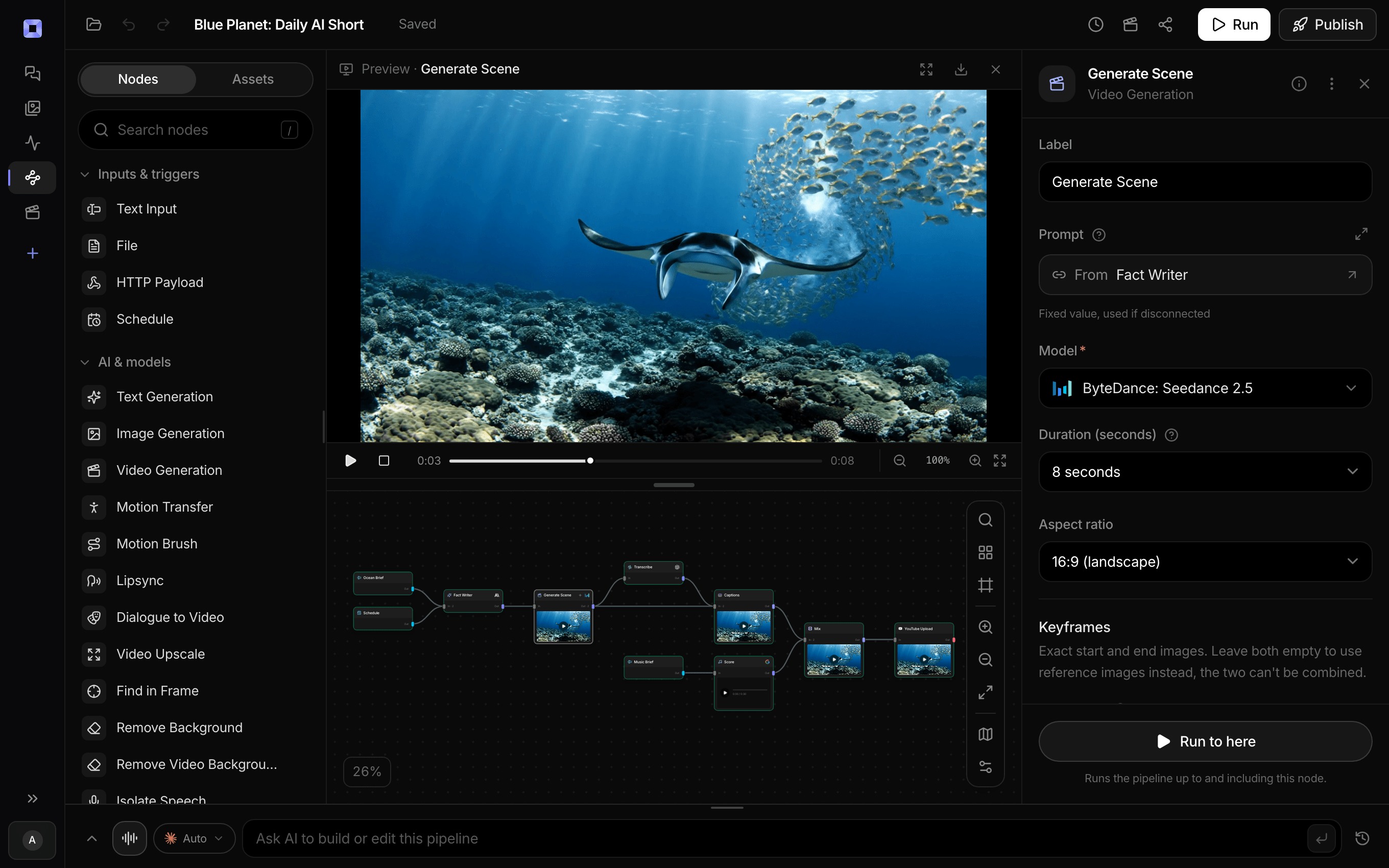
Ask for the pipeline in the composer, or send it from Claude over MCP.
What people build with it
Hindi moral stories
A short tale with a lesson at the end, narrated in Hindi with Devanagari captions, in the format many kids story channels run on.
Bedtime stories
A gentle story in soft colors with a calm narrator, cut to a length that fits before lights out.
A recurring cartoon character
One character, a new small adventure every episode, each scene started from the same character picture.
Talking animals and objects
A rabbit who finds a golden box, vegetables arguing in a kitchen, a curious little robot. Give a character a line and models with native audio can voice it on camera.
Learning cartoons
Days of the week, counting, how a seed becomes a plant: a lesson split into scenes, with a narrator explaining each one.
Animated channel intros
A short cartoon opener with the channel's mascot, rendered once and used at the top of every episode.

Write the story once. Watch it told.
In Hindi or English, scene by scene, with one voice reading it.
AI cartoon video generator, answered
How do I make a cartoon video with AI on Treza?
Open chat and paste your story with a line about the look you want, such as soft 3D animation. Treza splits the story into scenes, renders each one as an animated clip, writes and voices the narration, and cuts it all together with captions and a music bed. The same steps can also be built as a pipeline on the canvas and run again for every new story.
Can it narrate in Hindi?
Yes. Write the story in Hindi and the narration stays in Hindi, with the captions drawn in Devanagari. On the canvas, the text to speech node has Hindi voices to pick from and preview before a run. English works the same way.
Will my character look the same in every scene?
It holds best when every scene starts from the same picture. Generate the character once as a still, then use it as the first frame or a reference image for each clip; Seedance 2.5 takes it as a reference directly. Small details can still drift between shots, so a simple design with a few strong colors carries through best, and a scene that wanders can be rerun on its own.
Can I use famous cartoon characters?
Original characters work best. The image and video models decline recognisable characters from existing films and shows, so describe your own: a shy rabbit named Chintu, a carrot who wants to fly. An original character is also one no other channel has.
How long can a cartoon video be?
One cut holds up to 12 scenes, and each scene is a clip of up to 15 seconds on the default model. That covers anything from a 30 second Short to about three minutes of story. A longer tale works well as a series of episodes with the same character and narrator.
Do the scenes move, or are they still pictures?
Either. Animated scenes render as video clips with motion in them. For a lower cost per episode, scenes can be still illustrations with a slow camera drift under the narration, which is how the Faceless Channel Short template builds its five scenes.
Can the characters talk?
Yes. Veo 3.1 and Seedance 2.5 generate sound with the picture, including a line a character says on camera, so a talking parrot can say its own line. For a story told by a narrator, the voice is generated separately and laid over the scenes, which keeps one voice across the whole video.
How much does it cost to make ai cartoon video generator with Treza?
Treza runs on prepaid credits with no subscription. Each generation is charged at the model's own rate from your balance, and only successful runs are charged, so a failed generation costs nothing. A typical video generation settles around $1.06, and credit packs start at $5 and never expire.
Can I call this as an API instead of using the canvas?
Yes. Every pipeline can be published as a versioned HTTP endpoint. Call the typed /invoke endpoint with JSON in and JSON out, or point any OpenAI SDK at the OpenAI-compatible endpoint. Swap a model on a node later and the API your product calls does not change.
Do I need to know how to edit video?
No. Start from a template, change the topic, and run it. If you do want frame-level control, the timeline editor is there with multi-track video and audio, per-clip trims, fades, and volume, but nothing about the automated path requires opening it.
Related tools
Script to video AI
Scripts, screenplays, and outlines turned into narrated multi-scene video
Faceless video generator
Faceless YouTube and TikTok channels that publish on a schedule
AI image to video generator
Motion from a photo, poster, or generated key frame
See every tool, compare the models, read what an AI video pipeline is, or earn 30% sharing these tools.

Your first video is one prompt away.
Generate your first video, image, or draft today. Prepaid credits, no subscription.