

AI Video Pipeline: What It Is and How to Build One (2026)
An AI video pipeline is an automated sequence of connected AI models that turns a brief, script, or raw footage into a finished, published video. This guide covers the six stages of a production pipeline and walks through building one that writes, renders, narrates, captions, and publishes on its own.


An AI video pipeline is an automated sequence of connected AI models and tools that turns a text brief, a script, or raw footage into a finished, published video. Instead of prompting one model and getting one clip back, a pipeline chains the whole production process: a language model writes the script, video models render the shots, a text to speech model narrates, captions get burned in, and the result uploads itself to YouTube or TikTok. This guide explains each stage and then walks through building one.
What is an AI video pipeline?
A single call to a video model like Veo 3.1 or Seedance 2.5 gives you one shot from one sentence. That is a video generator, not a pipeline. A pipeline is the machinery around the model: the steps before it that decide what to render, and the steps after it that turn a raw clip into something you can actually publish.
The distinction matters because a finished video is never one model call. A 60 second narrated short is a script, eight generated shots, a voiceover, a stitched edit, a caption pass, and an upload. Doing those steps by hand in five different tools works once. A pipeline wires them together so the second video costs you an input change, and the hundredth one runs on a schedule while you sleep.
Pipeline, workflow, or production platform?
Three overlapping terms get used for this category, and the differences are worth pinning down before you evaluate tools:
- An AI video workflow is the repeatable process: the ordered steps that take an idea to a finished video. Every team has one, even if it currently lives in browser tabs and muscle memory. If your steps are the problem, start with the AI video workflow page, which covers making them explicit and repeatable.
- An AI video pipeline is that workflow made executable. The steps become connected stages a machine runs without you, which is what unlocks schedules, APIs, and volume. Building one is what this guide covers, and the AI video pipeline page shows the shape of a finished one.
- An AI video production platform is the workspace around the pipeline, which may add planning surfaces like storyboards and shot lists, review and approval flows, and team features. Some platforms stop at an export for a human editor; a pipeline-first platform ends at a published video.
The category is young and tools draw these lines differently, so the practical test is where the tool stops. We compared two neighbors on exactly that line: Preview.io, a production workspace that ends at a Final Cut export, and Wireflow, an ad-creative canvas with a different center of gravity.
The six stages of an AI video pipeline
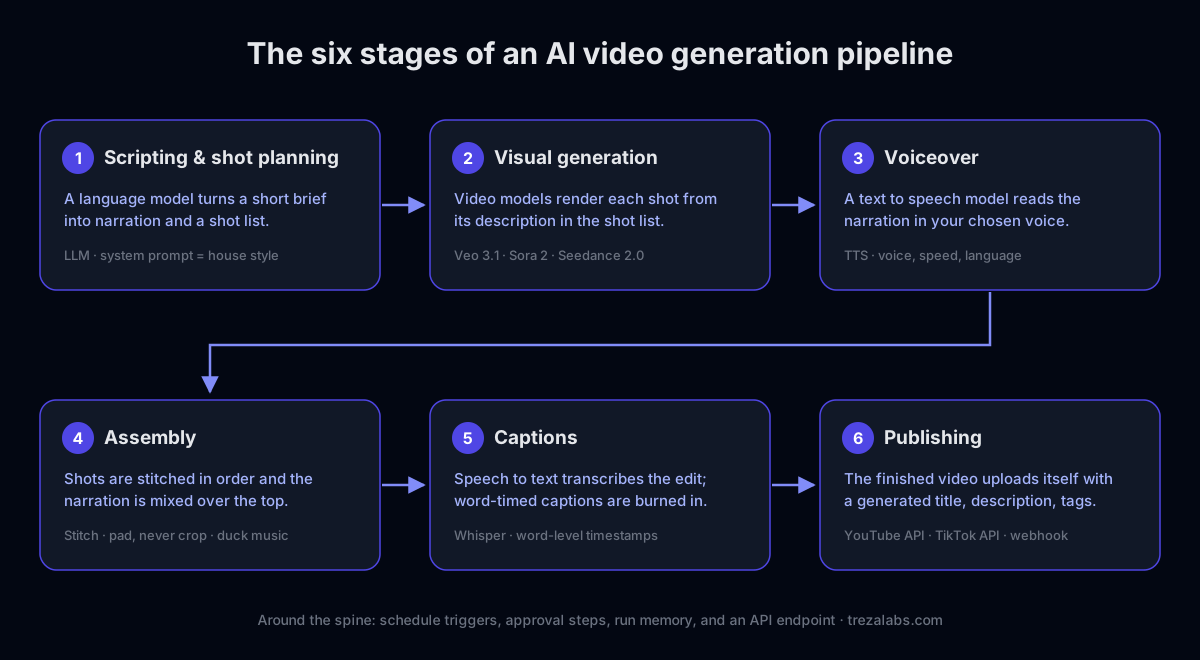
Production pipelines vary, but almost all of them are assembled from the same stages:
- Scripting and shot planning. A language model turns a short brief into narration and a shot list. The system prompt is where your format and voice live, so every video the pipeline produces sounds like your channel rather than like the model's defaults.
- Visual generation. Video models like Veo 3.1, Seedance 2.5, Seedance 2.0, or Wan 2.7 render each shot from its description. Image models can generate stills or keyframes first, and reference images anchor a shot to a real product or a consistent look.
- Voiceover. A text to speech model reads the narration. Voice choice, speed, and language are parameters on a node, so a second language is a fork of the pipeline rather than a second production process.
- Assembly. A stitching step cuts the shots together in order and mixes the narration over the top, padding mismatched aspect ratios instead of cropping them. This is where separate clips become one video.
- Captions. A speech to text model transcribes the finished narration with word-level timestamps, and captions are burned in so the video reads with the sound off. In vertical feeds this stage decides whether the video works at all.
- Publishing. An upload step posts the finished file to YouTube or TikTok through their official APIs, with a language model drafting the title, description, and tags from the transcript when you leave them blank.
Around that spine sit the operational pieces: a schedule trigger that runs the pipeline on a cron expression, an approval step when a human should look before anything goes live, memory of previous runs so a daily pipeline does not repeat itself, and an API endpoint so your own product can trigger runs.
Step 1: Turn the brief into a shot prompt
Use a language model with a system prompt that encodes your house style. Something like:
You are a cinematographer. Rewrite the user's brief into a single detailed shot description. Always specify camera movement, lens, lighting, mood, and frame rate. Keep it under 80 words. Never add dialogue.
Feed it the raw brief ("product demo of a smart water bottle") and you get back the cinematic version. Text-to-video models reward this level of detail. "A product demo of a water bottle" produces something generic. "A cinematic 15 second product demo of a matte-black smart water bottle on a marble counter, soft studio key light, slow dolly-in, shallow depth of field, 24fps" produces something you can ship. Because the style lives in the system prompt, every video your pipeline produces shares the same look without anyone re-typing it.
For multi-shot videos, have the model return a shot list instead of a single description: one entry per beat, each with its own visual direction, plus the narration line that plays over it.
Step 2: Render with the right video model
Different models suit different jobs:
- Veo 3.1, strong for photoreal product and lifestyle shots with controllable duration and aspect ratio.
- Veo 3.1 Fast, lower latency and cost for drafts and iteration.
- Seedance 2.5, the longest clips in the lineup, exact durations from 4 to 30 seconds, six aspect ratios.
- Seedance 2.0 and Wan 2.7, fast vertical-native options for social formats.
The advantage of a pipeline is that the model is just one node. You can start on a fast model while iterating on structure, then swap to a flagship model for the final render without touching the rest of your flow. Set duration and aspect ratio per node so a vertical 9:16 social cut and a 16:9 hero video come from the same pipeline with one parameter changed. Most current models also generate audio in sync with the frames, so ambience and effects arrive with the shot instead of getting layered on afterwards.
Step 3: Narrate, stitch, and caption
This is the stage most one-shot tools skip, and it is where a clip becomes a video:
- Narration. Wire the script into a text to speech node and pick a voice. On Treza's AI video generator that is a catalog of 82 voices across four models, with 14 languages on the multilingual one.
- Stitching. A Sequence node combines up to 12 shots into one video and mixes the narration over the top. For frame-level control, a timeline editor takes over from there with multi-track video and audio, per-clip trims, fades, and volume.
- Captions. Whisper transcribes the narration with word-level timestamps, and a captions node burns the words in a few at a time, karaoke style, tuned for muted autoplay in Shorts and TikTok feeds.
Step 4: Add guardrails and fallbacks
Two nodes make the difference between a demo and production:
- A brand guardrail that checks the expanded prompt against your rules (no competitor names, no restricted claims) before it reaches the render step.
- A fallback model so that if the primary video model is rate-limited or errors, the pipeline retries on an alternate instead of failing the request.
If a human should sign off before anything goes public, add an approval step between the render and the upload. The pipeline pauses, someone reviews the video, and it continues or stops on their decision.
Step 5: Publish it, schedule it, or call it as an API
Once the pipeline works on the canvas, there are three ways to run it:
- Publish the video directly. Finish the pipeline with a YouTube or TikTok node. Uploads go through the official APIs on OAuth-connected accounts, as Shorts, standard videos, or TikTok direct posts.
- Put it on a schedule. A schedule trigger runs the pipeline hourly, daily, weekly, or on any cron expression, in your timezone. This is how a faceless channel publishes every day without anyone opening the app.
- Publish it as an endpoint. With Treza, every pipeline becomes a versioned API you can call two ways: a typed
/invokeendpoint, or an OpenAI-compatible/chat/completionsendpoint that any OpenAI SDK can hit, streaming included. Your app sends a brief, the pipeline runs the whole chain, and returns the video URL. Swapping a model later never changes your integration.
Putting it together
A production AI video pipeline is not one model call. It is a chain: write the script, render the shots, narrate them, stitch them, caption them, and publish the result, with guardrails and a schedule around the whole thing. Build it once on a canvas, version it, and every video your product or channel generates is consistent, on-brand, and swappable to whatever model is best next month.
Ready to build one? Start free and open a template to see a full script → render → narrate → caption → publish pipeline wired up and ready to run.
Frequently Asked Questions
What is an AI video pipeline?
An AI video pipeline is an automated sequence of connected AI models and tools that turns a text brief, script, or raw footage into a finished, published video. A typical pipeline chains a language model for scripting, video models for rendering shots, text to speech for narration, transcription and caption burning, and an upload step that posts the result to YouTube or TikTok.
What is the difference between an AI video pipeline and an AI video workflow?
A workflow is the repeatable process, the steps in order from idea to finished video. A pipeline is that workflow made executable, so the steps run as connected stages without a person driving each one. In practice you design the workflow once, then build it as a pipeline so it can rerun on new inputs, run on a schedule, or be called as an API.
How is an AI video pipeline different from an AI video generator?
A video generator is one model that returns one clip per prompt. A pipeline is the full production chain around it: script writing before the render, and narration, stitching, captions, and publishing after it. Generators are a component; the pipeline is the system that turns their output into a finished video repeatedly.
What models does an AI video pipeline use?
Usually several at once. A language model (for scripts and metadata), one or more video models such as Veo 3.1, Seedance 2.5, Seedance 2.0, or Wan 2.7 (for the shots), a text to speech model (for narration), and a speech to text model like Whisper (for captions). Because each model is one step in the chain, individual models can be swapped without rebuilding the pipeline.
Can an AI video pipeline publish videos automatically?
Yes. A pipeline can end with an upload step that posts to YouTube or TikTok through their official APIs, and a schedule trigger can run the whole chain hourly, daily, weekly, or on a cron expression. That combination is how automated channels publish new videos with no one at the keyboard, with an optional approval step when a human should review first.
Do I need to write code to build an AI video pipeline?
No. On a node-based canvas like Treza's, a pipeline is nodes and connections: script node into video nodes into narration, captions, and an upload node. Code enters the picture only if you want it to, either as a sandboxed code step inside the pipeline or by calling the published pipeline from your own application as an API.
How much does an AI video pipeline cost to run?
It depends on the models in the chain, since each generation is charged at the model's own rate. On Treza a typical video generation settles around $1.06 on prepaid credits, packs start at $5, and only successful runs are charged. The structural work of the pipeline itself costs nothing to rerun.